32
SAFE 10/30 SMART - 35 SMART PLUS
SAFE_10_30_35_SMART_IM_20190517
1 Beep
1 Beep
1 Beep
Opening
Permanent code
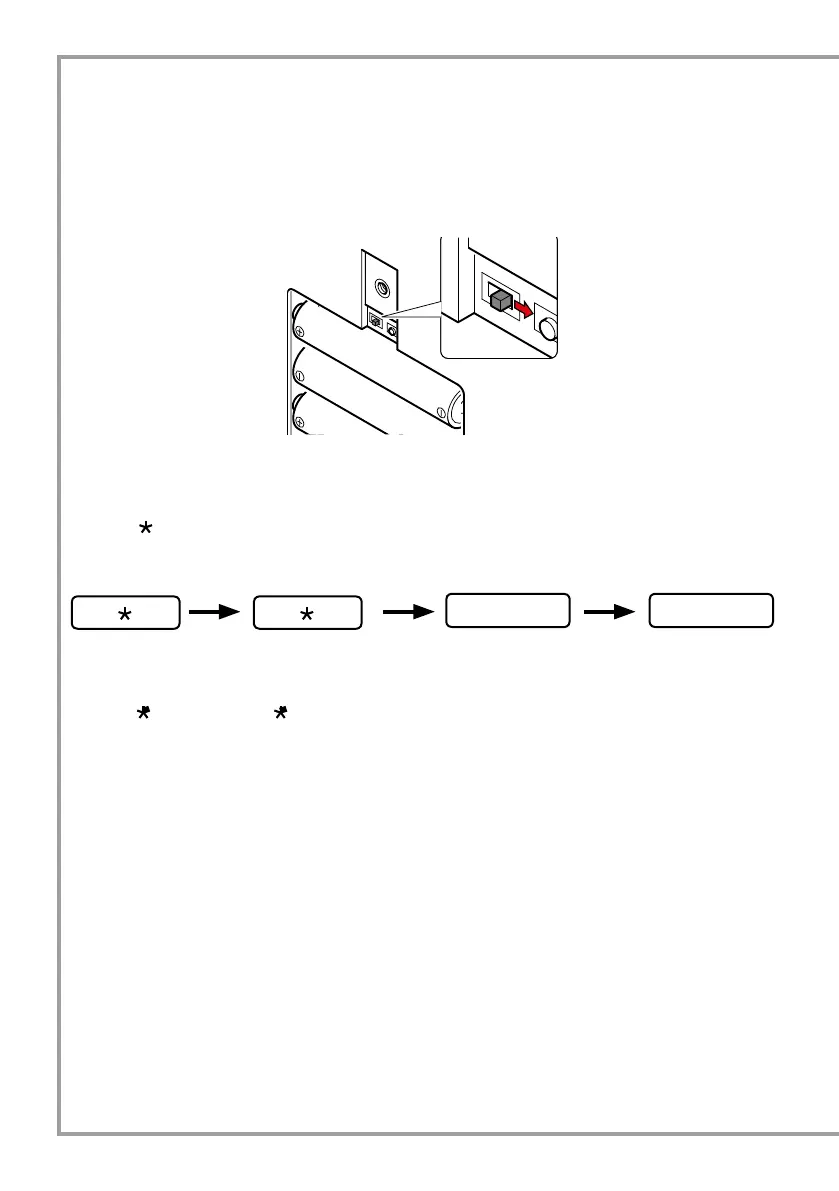
PERMANENT CODE PLACE THE SLIDING SWITCH TO THE RIGHT
DOOR LOCK SIDE BATTERY COMPARTMENT
PERMANENT CODE SETTING
Press the button, place the Owner Key on the receiver, after one beep, insert a code with 4 to 9 digits,
followed by #. After two beeps the Safe will pop up on display “CLOSE” and the inserted code will become
the Permanent Code. For each Safe only one Permament Code will be assigned.
SAFE OPENING
Press the
button, press the button again, insert the Permanent Code followed by #, place the Owner
Key or the Master Key on the receiver and the Safe will open.
SAFE CLOSURE
Press the # button, after two beeps the Safe will close.



 To Next Page