40
SAFE 10/30 SMART - 35 SMART PLUS
SAFE_10_30_35_SMART_IM_20190517
IOPERATOR INTERFACE
INITIAL SETTINGS
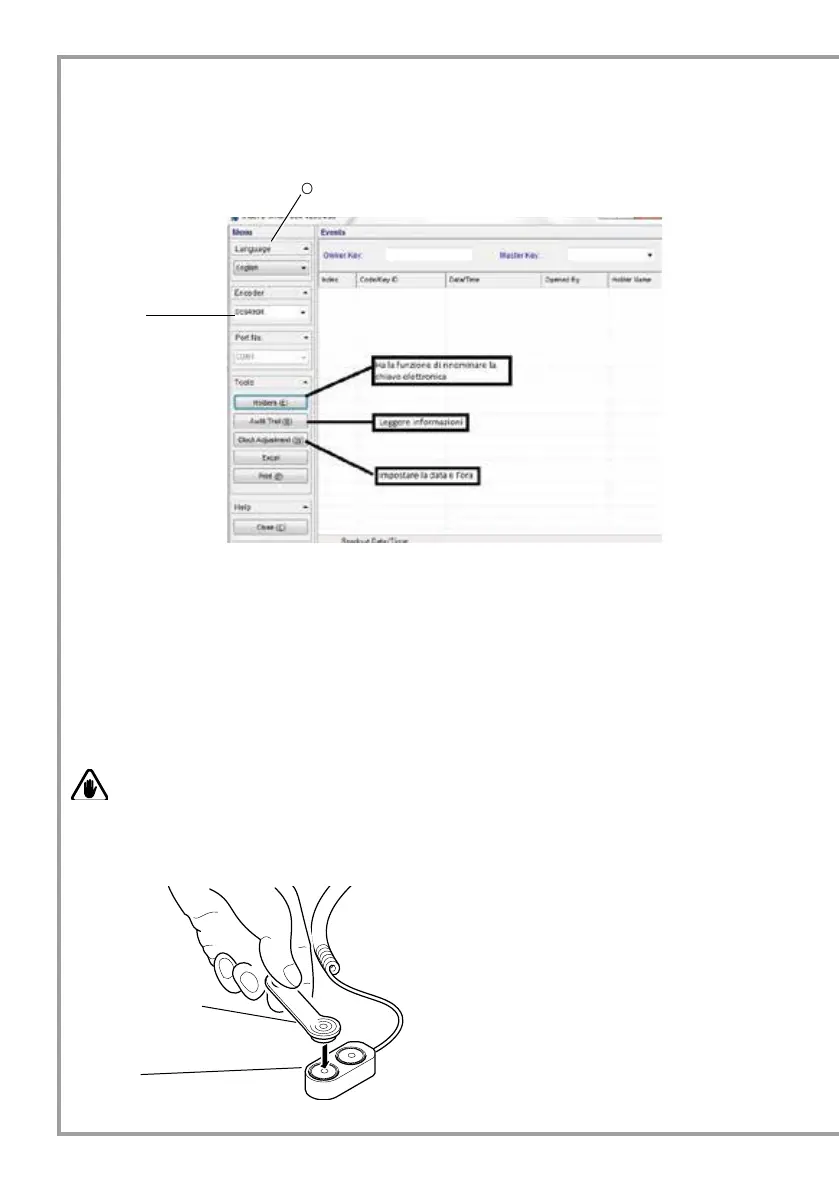
After launching the program, select in the operator panel the type of interface used.
The keys called Holders, Audit Trail, Clock Adjustment, Excel, Print, Close, serve respectively to rename
the electronic key (Holders), read information (audit trail), set date and time (Clock Adjustment), save data
downloaded in Excel format (Excel), to print the stored data (Print), and close the program (Close).
SAFE DATE AND TIME SETTING
Before using the program, it is necessary to set correct date and time in the Safe. The date that will be stored by
the time card is the date and time set in the computer. For this operation it is necessary to proceed as follows.
WARNING
The non-synchronisation between the date set on the Safe and the date set on the computer is due to the
time elapsed between the storage of the date in the time card and the storage of the date in the Safe.
OPERATOR PANEL
Connect the time card (green) to one of the two
encoder ports and click on the Write button in the
operator panel.
Time card (green)
Encoder
DS9490R
is the default setting



 To Next Page