18
GB
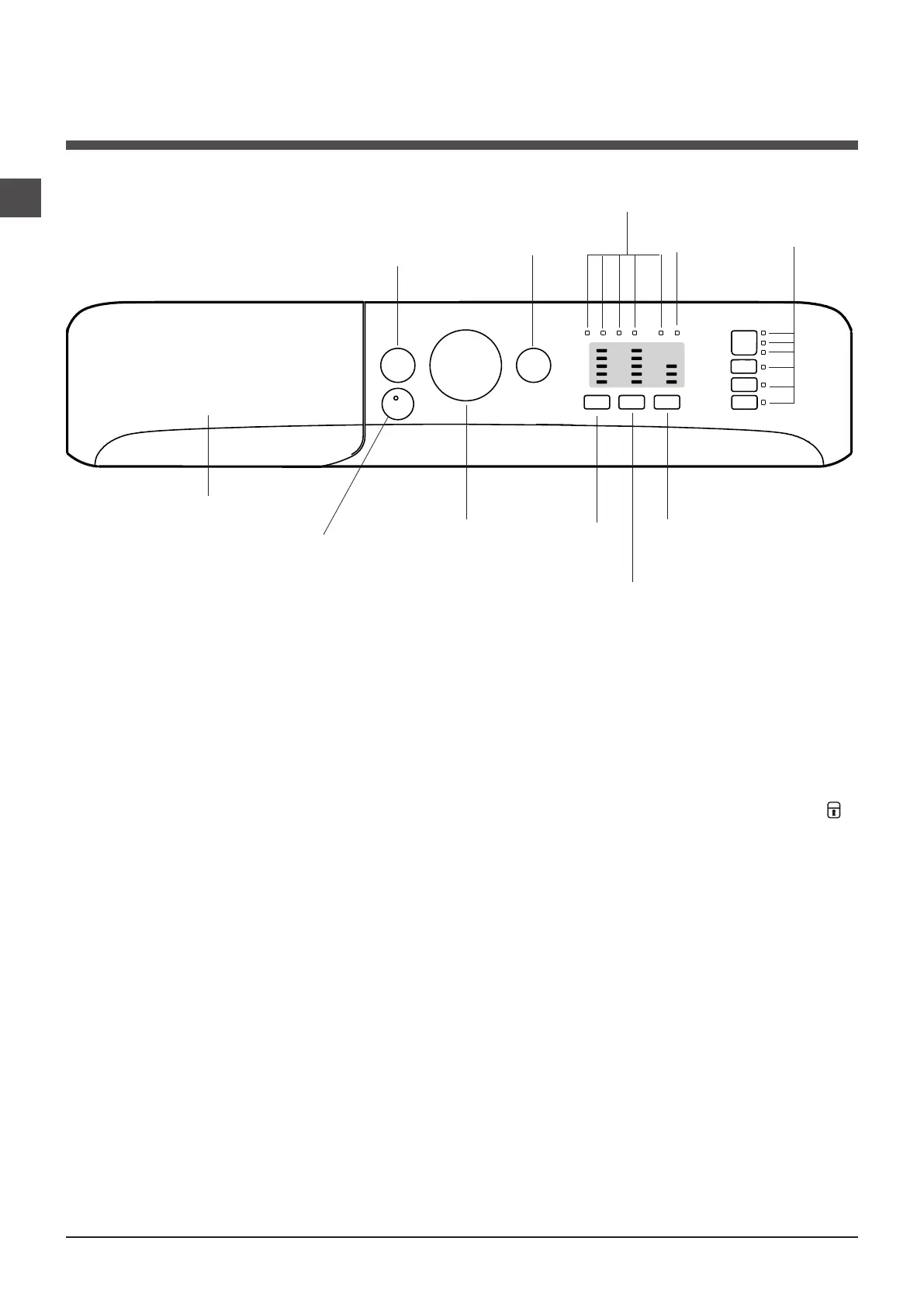
Detergent dispenser drawer: used to dispense
detergents and washing additives (see “Detergents and
laundry”).
ON/OFF button: switches the Washer-dryer on and off.
PUSH&WASH+DRY button: (see “Wash cycles”).
WASH CYCLE knob: programmes the wash cycles. Du-
ring the wash cycle, the knob does not move.
OPTION buttons with indicator light: used to select the
available functions. The indicator light corresponding to the
selected function will remain lit.
TEMPERATURE button: sets the temperature or the cold
wash cycle (see “Personalisation”).
TIME-BASED DRYING button: press to select the desi-
red drying time. The selected drying time is shown bythe
indicator lights above.
LEVEL-BASED DRYING button: press to select the
desired drying level. The selected drying level is shown by
the indicator lights above.
WASH CYCLE PROGRESS indicator lights: used to
monitor the progress of the wash cycle.
The illuminated indicator light shows which phase is in
progress.
DOOR LOCKED indicator light: indicates whether the
door may be opened or not (see next page).
START/PAUSE button with indicator light: starts or tem-
porarily interrupts the wash cycles.
N.B. To pause the wash cycle in progress, press this
button; the corresponding indicator light will flash orange,
while the indicator light for the current wash cycle phase
will remain lit in a fixed manner. If the DOOR LOCKED
indicator light is switched off, the door may be opened
(wait approximately 3 minutes).
To start the wash cycle from the point at which it was
interrupted, press this button again.
Standby mode
This Washer-dryer, in compliance with new energy saving
regulations, is fitted with an automatic standby system
which is enabled after about 30 minutes if no activity is
detected. Press the ON-OFF button briefly and wait for the
machine to start up again.
Consumption in off-mode: 0,5 W
Consumption in Left-on: 8 W
Description of the Washer-dryer
and starting a wash cycle
Control panel
WASH CYCLE PROGRESS
indicator lights
DOOR
LOCKED
indicator light
START/PAUSE
button with indicator
light
Detergent dispenser drawer
ON/OFF
button
WASH CYCLE
knob
TEMPERATURE
button
OPTION
buttons with
indicator lights
PUSH&WASH+DRY
button
TIME-BASED
DRYING
button
LEVEL-BASED
DRYING
button



 To Next Page