37 inniton.es
English
How to use
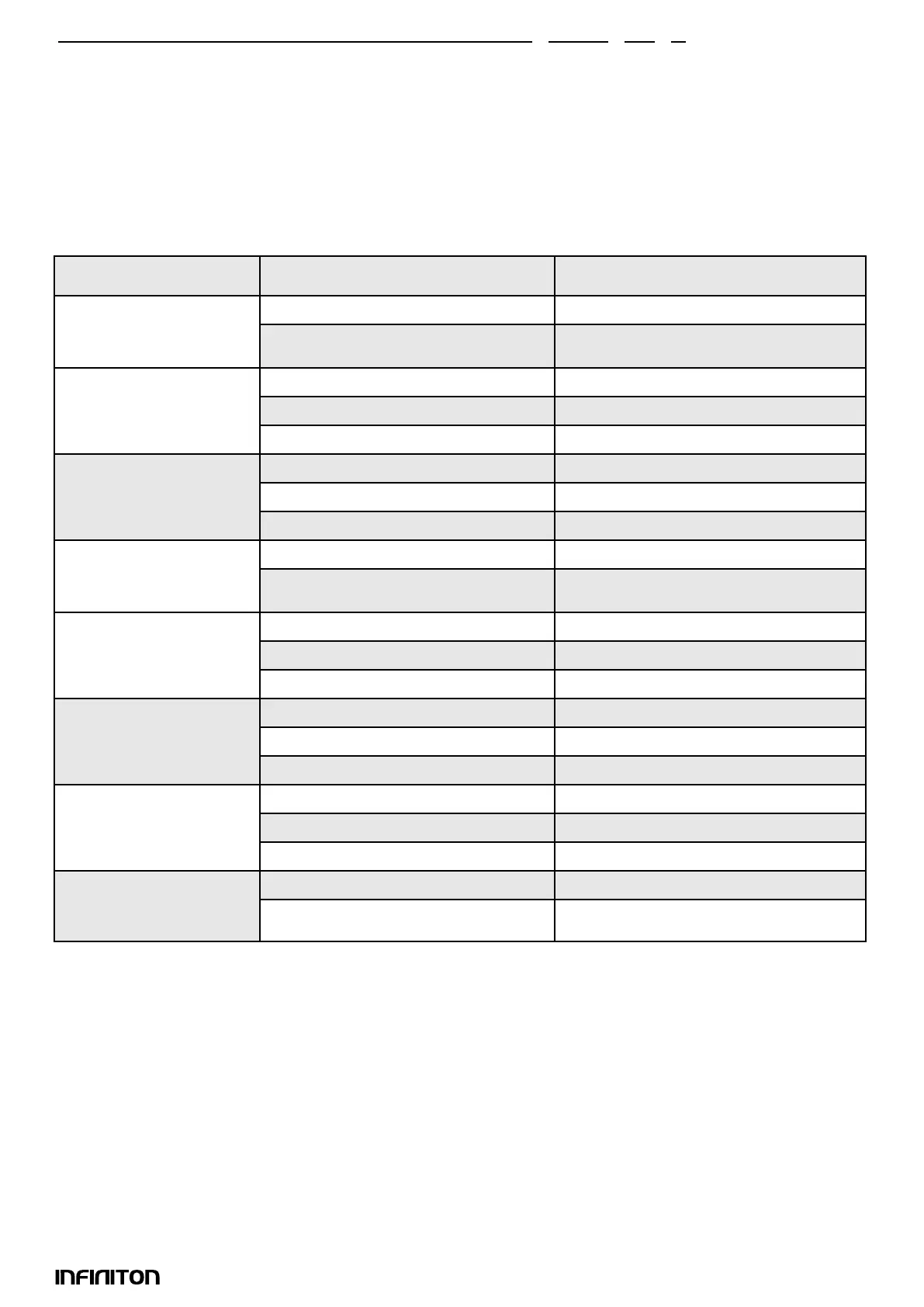
Menu Weight Display
A-1
Pizza - Cakes
200gr 200
400gr 400
A-2
Meat
250gr 250
350gr 350
450gr 450
A-3
Vegetables
200gr 200
300gr 300
400gr 400
A-4
Pasta
50gr (con 450ml cold water) 50
100gr (con 800ml cold water) 100
A-5
Potatoes
200gr 200
400gr 400
600gr 600
A-6
Fish
250gr 250
350gr 350
450gr 450
A-7
Hot drinks
1 cups (120ml) 1
2 cups (240ml) 2
3 cups (360ml) 3
A-8
Popcorn
50gr 50
100gr 100
8. AUTO Modes
1) In standby, press “+” to select the menu from “A1” to “A8”.
2) Press “START” to conrm the selected menu.
3) Press “+/-” to choose the weight of the food.
4) Press “START” to start cooking.
5) When the cooking is nished, the microwave will beep 5 times..
Table of automatic menus



 To Next Page