EasyManua.ls Logo

Infinity INF-BC4 - User Manual

Infinity INF-BC4
2 pages
Print Icon
To Next Page IconTo Next Page
Loading...
INF-BC4 OPERATION
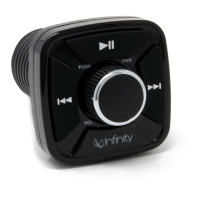
1. POWER ON/OFF button
- Press the knob to power the controller on or off.
- Turn right and left to adjust volume level.
(Remark: A beep tone indicates volume has reached maximum or minimum level.)
To establish Bluetooth connection
- Once the controller has been powered on, it will blink red and blue until a
Bluetooth connection has been made.
- Go to your digital media to turn Bluetooth on and then search for the INFBC4
address. Once paired, the controller will turn to a constant blue.
2. Track DN button
- Press it to select the previous track.
3. Track UP button
- Press it to select the next track.
4. Play/Pause button
- Simply press it to pause the playback.
- Simply press it again to resume playback.
To Disconnect Bluetooth device
- Press and hold the PAUSE button for 3 seconds to disconnect from Bluetooth.
The controller will flash red and blue when disconnected.
-
After Bluetooth has been disconnected, press PAUSE button to reconnect the
last paired device.
Cables configuration:
1. Red: +12V power supply with 2A fuse.
2. Black: GND.
3. Blue: REM OUT with constant 12V power supply.
4. White/Blue: REM IN for external remote control. With external remote control
connected to REM IN, the BT Controller can also be powered on/off by that
external remote control.)
5. Black: RCA Output.
, VOL knob
3
4
1
2
PUSH
PWR
VOL
Question and Answer IconNeed help?

Do you have a question about the Infinity INF-BC4 and is the answer not in the manual?

Infinity INF-BC4 Specifications

General IconGeneral
Connectivity TechnologyBluetooth
BatteryLithium-ion
Charging Time2 hours
Operating Range10 meters
PlatformAndroid, iOS

Summary

INF-BC4 Operation

Power and Volume Control

Controls power on/off and adjusts volume level via the knob. Beep indicates max/min.

Track Navigation

Buttons to select the previous track (DN) or the next track (UP).

Playback Control

Button to pause and resume audio playback.

Bluetooth Connectivity

Establishes, disconnects, and reconnects the device via Bluetooth.

Cables Configuration

Details the wiring and function of each cable connection for power and output.

FCC Compliance and Warnings

FCC Statement

Equipment tested for Class B digital device limits, designed to provide protection against harmful interference.

FCCRFW Warning

Device complies with Part 15 of FCC Rules; operation subject to conditions to avoid interference.