The Infinity IoT Smart Watch is a versatile, all-in-one IoT device designed for multiple purposes, functioning as a stand-alone mobile phone equipped with GPS, Bluetooth, Wi-Fi, and running on the Android 4.4.4 operating system (API Level 19) with root access. It is suitable for use as an emergency SOS button, a medical Bluetooth gateway, an asset tracking device, a VoIP calls device, and an open-source platform for learning Android and Java language. The device comes with a global SIM card already installed, eliminating the need for users to insert or change it, and is open for use in 120 countries worldwide.
Function Description:
The Infinity Watch offers a wide range of functionalities:
- Emergency SOS Device: It features a dedicated SOS/Operation button. A short press on this button will turn on an LED indicator for a moment, confirming the device is on. Pressing and holding the SOS button for 3 seconds will trigger an alarm to a medical center, accompanied by a signal tone and device vibration. The tracking system, which uses GPS/Wi-Fi location, will locate the person in danger. Clicking the SOS button initiates an alarm in the mobile app and starts dialing pre-set numbers. The mobile app allows users to view multiple Infinity devices on a map, locate them, view location history, make phone calls, change settings, set safe zones for alarms, and navigate to the device in an emergency.
- Medical Gateway Device: The device can act as a medical gateway, transferring data from nearby medical devices to a doctor for remote monitoring. It supports various medical tests, including blood pressure, heart rate, ECG, blood oxygen, glucose, HRV, temperature, and fall detection. Supported external medical devices include Contour ONE (glucose measurement), FORA TN'G BP (blood pressure), VitalPatch from Vital-Connect (ECG, heart rate, heart rate variability, respiratory rate, body temperature, pedometer), HeartBook by ECG (ECG, heart rate, heart rate variability, respiratory rate), and Cosinuss ONE (temperature, heart rate & heart rate variability).
- Asset Tracking Device: Using a special app and Bluetooth function, users can track assets. This involves mapping assets on the Infinity IoT platform, attaching Bluetooth stickers (beacons) to important items, turning on the beacons, and running a scan from the platform to show all beacons in range.
- VoIP Calls Device: The VoIP system enables receiving and initiating phone calls over the internet using the SIM card. Making a call involves setting up to 3 contacts for speed dialing via the mobile app or online platform. Clicking the middle button for three seconds will initiate a call to the first contact, then the second, and finally the third if previous attempts fail. Clicking the middle button again ends the call. Incoming calls will cause the Infinity Watch to ring, and pressing the screen answers the call.
- Open Source and Build Your Own: The device is open source, allowing users to build their own apps in Java or Kotlin using the Infinity SDK available on the Infinity IoT platform. With root access, users can control various features like GPS, Wi-Fi, BLE, TTS, Linux, Sockets, Music, VoIP, Button, Heart Rate, Vibration, Green LED, Drop Detection, and SensorHUB. Apps can be installed using ADB tools or third-party software like "Vysor," which allows screen viewing and control via a keyboard.
Important Technical Specifications:
- Chip: SC9820E by Unisoc
- CPU: 1.3GHz quad-core 64-bit ARM Cortex-A53
- Modules: FPS GPS/Galileo/GLONASS with AGPS, Wi-Fi 802.11 b/g/n 2.4GHz, BLE 4.0
- Memory & Storage: ROM: 4 GB, RAM: 512 MB, Storage: 2.56 GB
- Cellular Bands:
- 2G: 850/900/1800/1900 MHz
- 3G: 900/1900/2100 MHz
- 4G(LTE): B1/B2/B3/B4/B7/B17/B20
- Battery: 670mAh Lithium Ion 3.7V
- Size & Weight: 3.3" X 4.9", Weight: 1.58 Ounce
- Charging: 5V DC
- Sensors: G-Sensor, Drop, Gyroscope, Accelerometer, Vibration, SensorHUB, Heart Rate
- Sound: Speaker and Microphone included
- Screen: TFT LCD 1.54", Resolution: 240X240
- Water Protection: IP67 waterproof (though contact with water should be avoided)
- SAR Information:
- Next-to-mouth SAR: 0.32 W/Kg
- Wrist SAR: 1.99 W/Kg
- Simultaneous SAR: 2.77W/Kg
Usage Features:
- Powering On: Connect to the charger (auto boot) or press the power button for a few seconds.
- Powering Off: Press and hold the power button for a few seconds.
- Charging: Press the watch into the charging tray until it clicks, ensuring metal bars are touching.
- User Interface: The device features a speaker, microphone, power button, and SOS/Operation button. The main screen of the mobile app allows for language selection, username/password input, and redirection to the main interface with options for phone calls, settings, history, safe zone, SOS, medical, and navigation.
- LED Indicators for SOS Device:
- On for 3 seconds, then off for 3 seconds: 2G/3G/4G/Wi-Fi network not found, device is searching.
- On for 1 second, then off for 3 seconds: Network found, but server connection is off, device trying to connect.
- Indicator is off: Device operates normally.
- One short click on the middle SOS button: LED turns on momentarily, indicating the device is on.
- On and off fast for 6 seconds: Location found and sent to the server.
Maintenance Features:
- Initial Charge: Charge the battery for at least 2 hours before initial use; the device will turn on automatically.
- Cleaning: Use only a dry cloth; do not use detergents.
- Temperature: Do not expose the device or charger to high temperatures.
- USB Connection: The USB plug should only be connected to the wall charger supplied or a PC/Mac.
- Wire Damage: If exposed wires are noticed, do not attempt to replace them; contact customer service immediately to avoid electrocution.
- SIM Card: The device has a built-in SIM card and does not require insertion or changing.
- Data and Call Limits: Users should contact their local provider to check remaining internet usage for the SIM card and available minutes for the VoIP package, as these are limited.
- App Operation: The specific mobile app required to operate the Infinity device depends on the local provider and is not named in the user manual.

 Need help?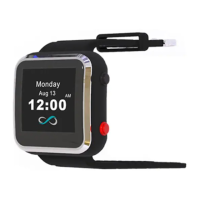

 To Next Page
 General