About charging
How to use
If you stop or press the power button during operation
and the four mode indicator ash at the same time, the
remaining battery power is low and needs to be charged.
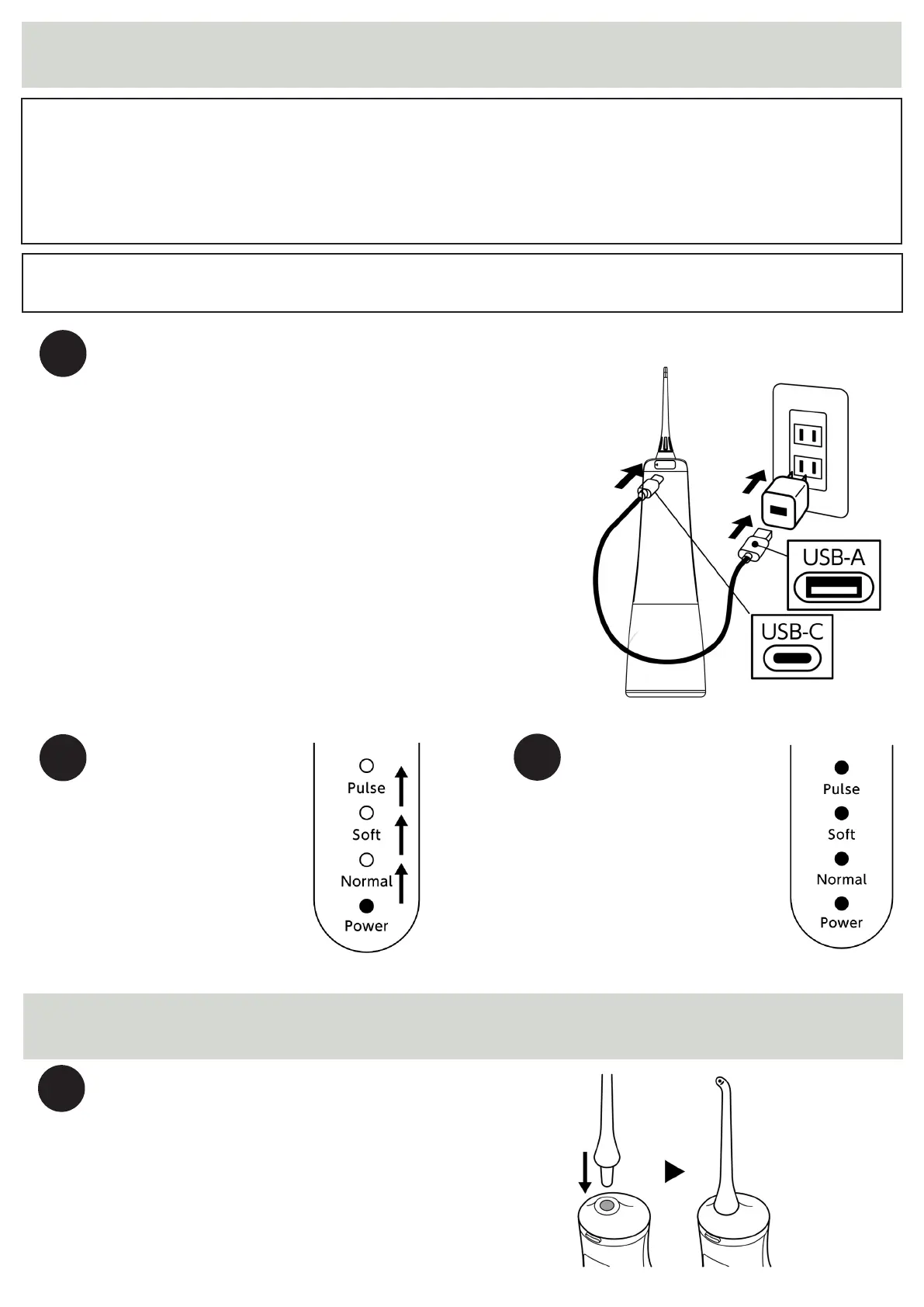
How to charge
1
Connect the USB-C port of the supplied
charging cable. Please remove the cap of the
charging port of the main unit and connect it
to the charging port. Connect the other end
(USB-A) connector of the charging cable to
your USB output charging adapter.
* If the charging port of the main unit gets
wet with water, please wipe it with a dry cloth
before connecting the charging cable and start
charging after drying.
2
1
3
When you start
charging, the four
mode indicator lamps
light up one after
another to indicate
that charging is in
progress.
When charging is
completed, the four
mode display lamps
will light up at the
same time.
Charging Fully charged
Nozzle mounting
Insert the nozzle into the nozzle holder on
the top of the main unit until it clicks.


 To Next Page
 Loading...