Black plate (15,1)
Model "INFINITI_NAVI" EDITED: 2006/ 3/ 20
INI0116
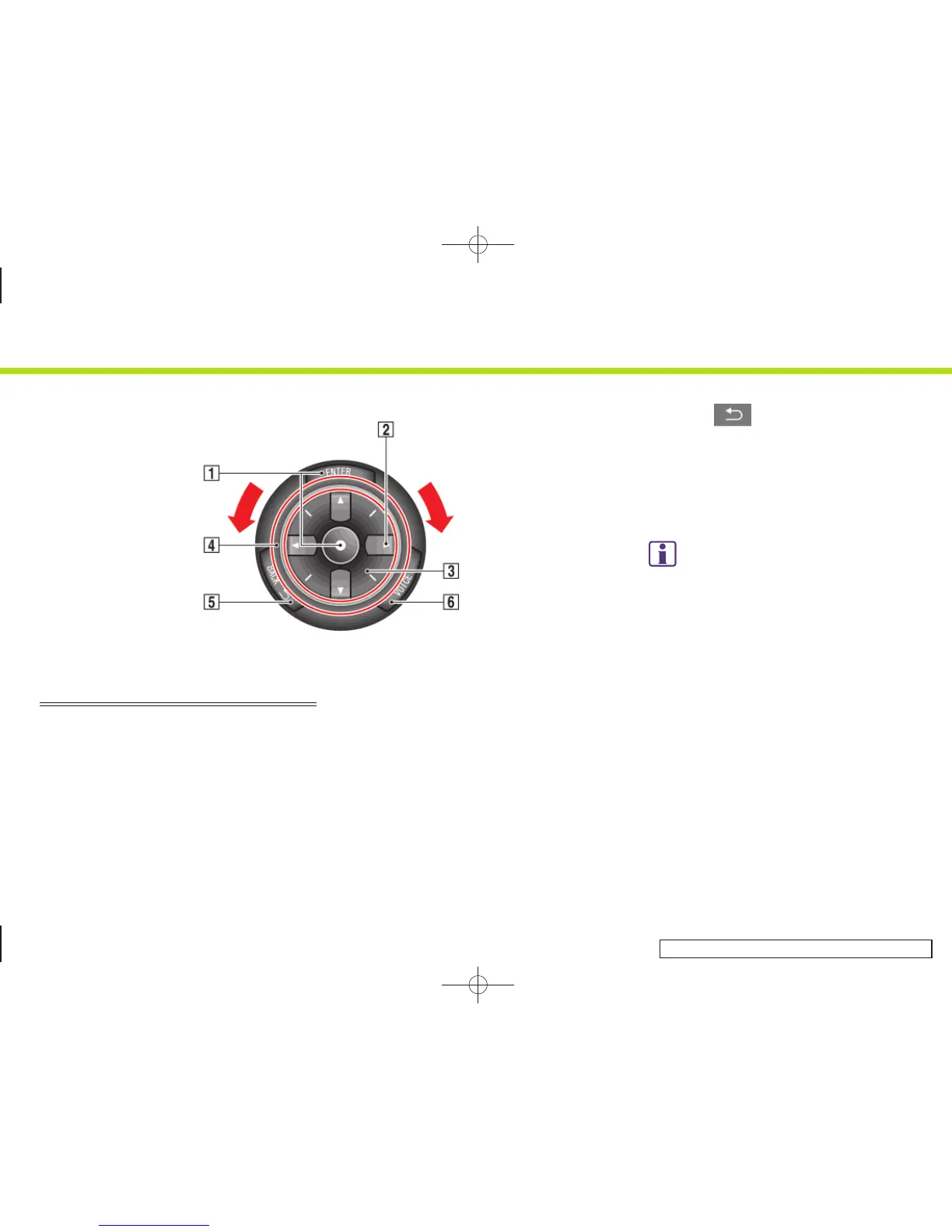
INFINITI CONTROLLER (M45/M35,
FX45/35 and G35 Coupe)
&
1
<ENTER>:
Push to select the highlighted item on
the screen.
&
2
Main directional buttons:
Use to move across the map, highlight
an item on the screen or adjust a
setting (volume, brightness, etc.).
&
3
Additional directional buttons:
Use to move across the map or high-
light an item on the character input
screen.
&
4
Center dial:
Turn to highlight an item on the screen
or adjust a setting.
&
5
<BACK> :
Push to return to the previous screen.
In a settings screen, this button can
also be used to apply the setting.
&
6
<VOICE>:
Push to repeat voice guidance for a
guide point.
INFO:
If <BACK> needs to be pushed to apply the
setting in a settings screen, this manual will
explicitly include a step for this procedure.
Otherwise, pushing <BACK> returns you to the
previous screen.
2. Getting started
2-7


 To Next Page
 Loading...