Black plate (16,1)
Model "INFINITI_NAVI" EDITED: 2006/ 3/ 20
INI0117
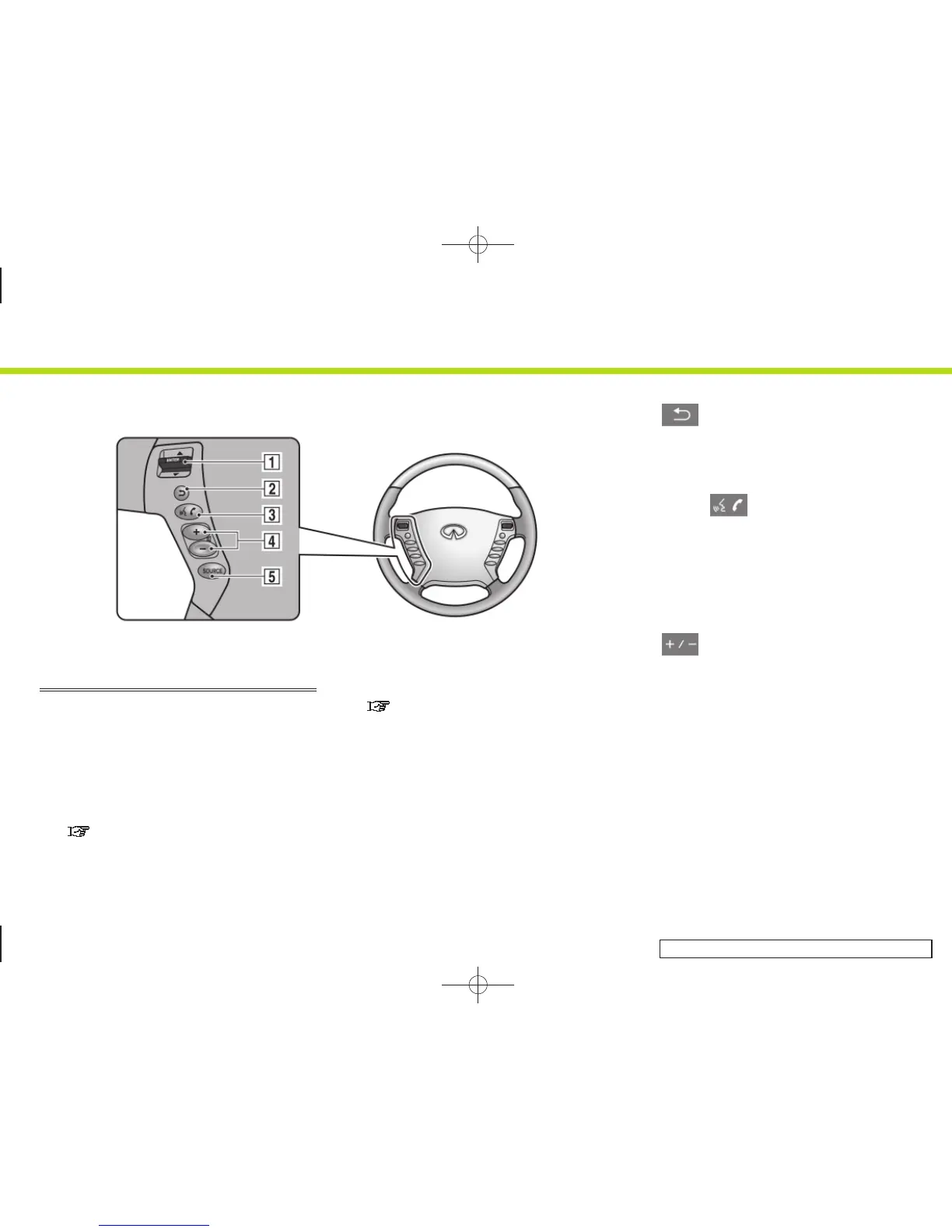
STEERING SWITCH (M45/M35)
&
1
<ENTER>:
Tilt to highlight an item on the screen
or adjust a setting. Push to select the
highlighted item.
If this button is pushed while a map is
displayed, the map menu screen is
displayed.
“MAP MENU SCREEN” (page 2-19)
Push and hold to display the start
menu.
“START MENU (M45/M35 only)”
(page 2-22)
If this button is tilted up while the
audio function is activated and the map
or status screen is displayed, the audio
system can be operated.
&
2
:
Push this button during a setting
operation to return to the previous
screen. In a settings screen, this button
can also be used to apply the setting.
&
3
<TALK> :
Push to start the voice recognition
mode. Push and hold for 1 second to
cancel voice commands when in the
voice recognition mode.
Push and hold when not in the voice
recognition mode to display the phone
screen.
&
4
:
Use to adjust the volume. These but-
tons have the same function as that of
the volume knob. Refer to the Owner’s
Manual of your vehicle.
&
5
<SOURCE>:
Use to switch the audio mode (source).
Refer to the Owner’s Manual of your
vehicle.
2. Getting started
2-8


 To Next Page
 Loading...