Black plate (230,1)
Model "INFINITI_NAVI" EDITED: 2006/ 3/ 20
VIEWING INFORMATION ABOUT CUR-
RENT VEHICLE LOCATION
This allows you to display the information
about the vehicle location on the route
when driving according to route guidance.
BASIC OPERATION
FX45/35, QX56:
1. Push <ROUTE>.
2. Highlight [Route Information] and push
<ENTER>.
3. Highlight [Whe re a m I?] and push
<ENTER>.
4. Push <BACK> to return to the previous
screen.
Push <MAP> to return to the current
location map screen.
G35 Coupe, M45/M35:
1. Push <INFO>.
2. Highlight [Whe re a m I?] and push
<ENTER>.
3. Push <BACK> to return to the previous
screen.
Push <MAP> to return to the current
location map screen.
INV2704
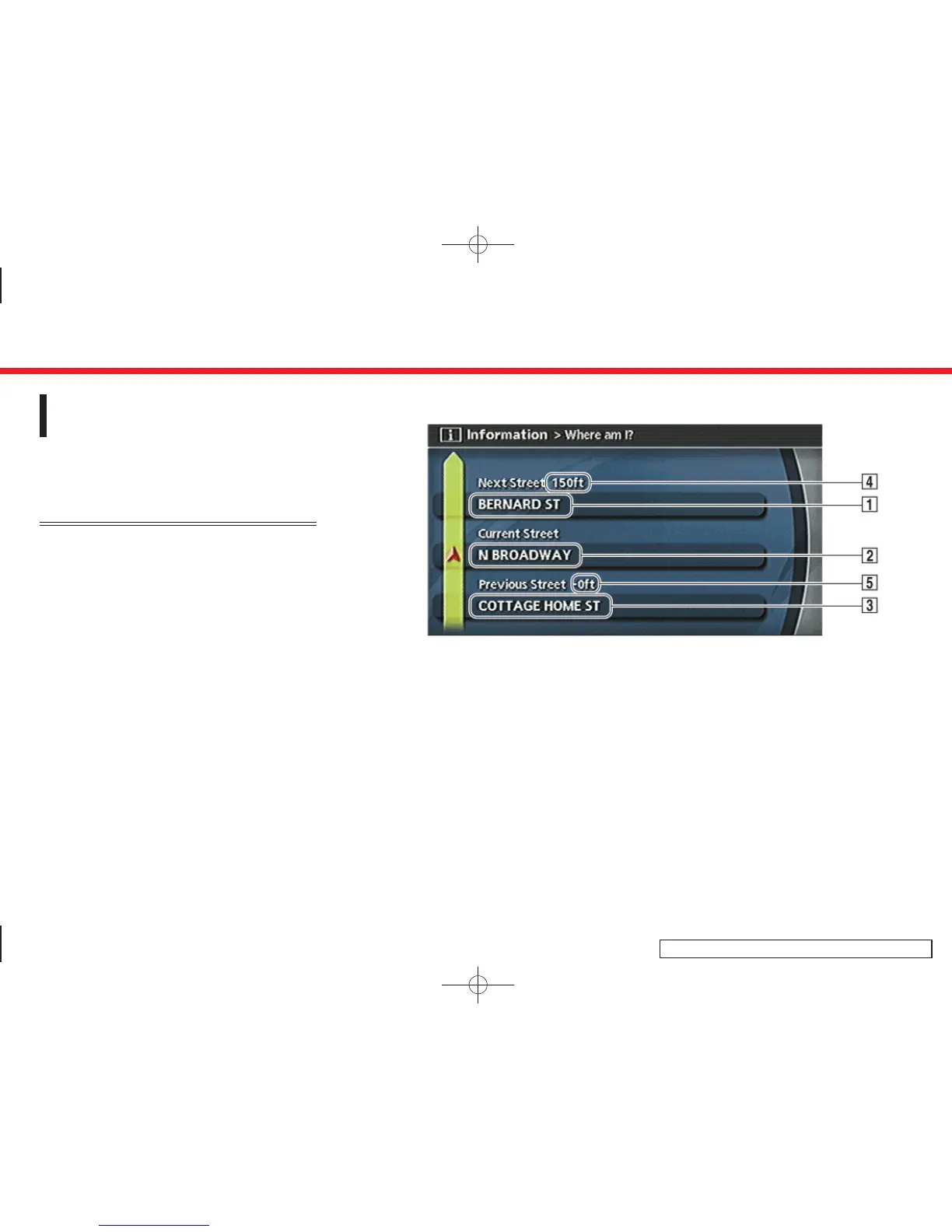
Contents of vehicle location infor-
mation
&
1
Next Street:
Displays the next street on the route.
&
2
Current Street:
Displays the current street on the route.
&
3
Previous Street:
Displays the previous street on the
route.
&
4
Displays the distance to the next
intersection on the route.
&
5
Displays the distance traveled from the
previous intersection on the route.
7. Viewing technical information
7-4


 To Next Page
 Loading...