6 TOLL FREE: 1-888-668-9600
1
Carpets
Bare Floors / Tools
4
Off
Indicator Light
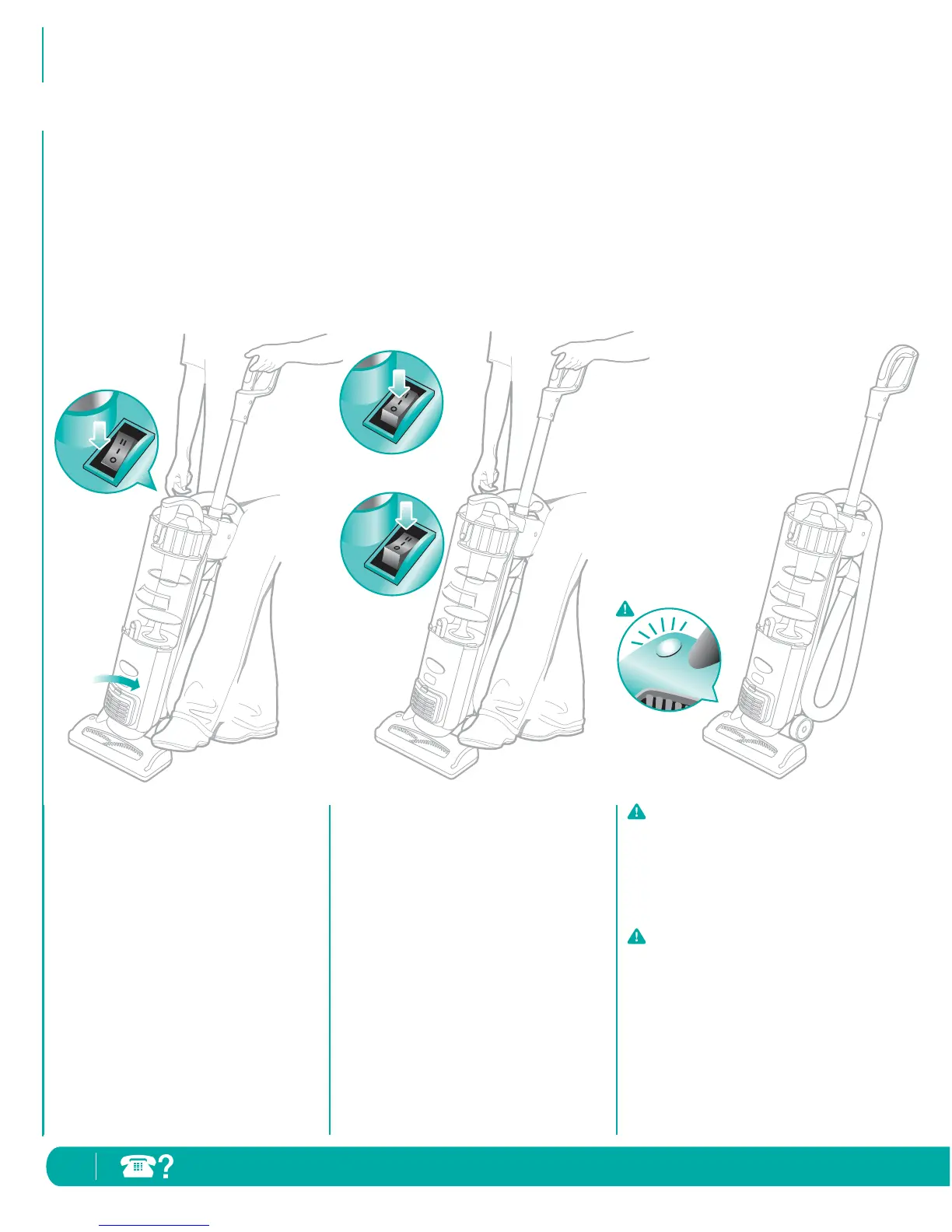
Using the Vacuum
1 Start with the Power Switch in the
“O Off” position.
2 Place your foot on the Floor Power
Nozzle and pull handle towards you.
3 Set the Power Switch to desired
cleaning setting.
Your Infinity Upright Vacuum is a versatile
tool that can be used to clean bare floor
surfaces or carpets – with the click of
a switch.
Stand the vacuum into the upright position.
Plug in the vacuum.
4 When cleaning bare floors:
Select the “IOn” position for
suction only cleaning to avoid
scattering dirt while cleaning.
When cleaning carpets:
Ensure you have pulled the handle
towards you and select the
“II Brush Roll On” position to
agitate the carpet fibers for
deeper cleaning performance.
IMPORTANT: To protect your
carpets, the Brush Roll will only turn
on when you have pulled the handle
towards you and released the Floor
Power Nozzle.
IMPORTANT: Your Brush Roll
Indicator Light will illuminate solid
green when brush roll is on,
or solid red if there is a
blockage. This feature is designed
to protect your Lifetime Belt that
powers your Brush Roll. See
Checking for Blockages
on page 13.



 To Next Page