[ Edit: 2016/ 8/ 1 Model: 2017MY INFINITI Q70(Y51) OM17E00Y51U0 ]
SAA2473
Example
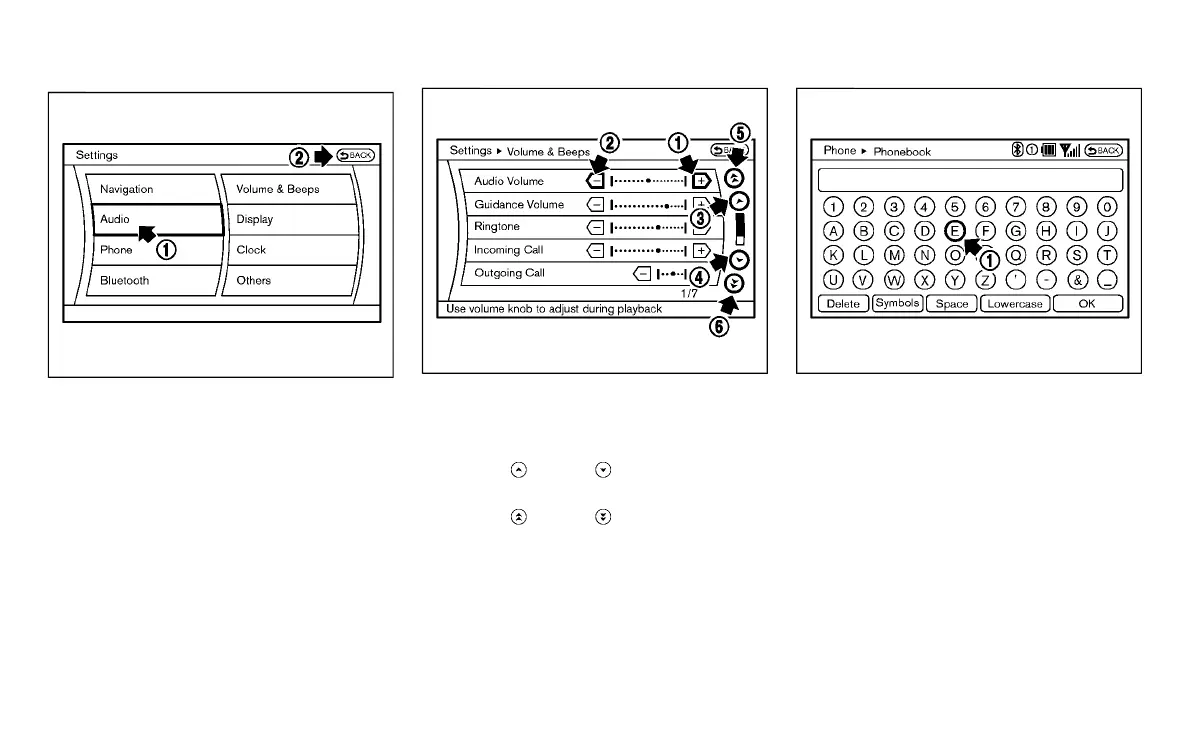
Touch screen operation
Y51D-V-E01-D5BFD989-15E2-4755-808B-2A4D6CCC519C
With this system, the same operations as
those for the INFINITI controller are possi-
ble using the touch screen operation.
Selecting the item:
Y51D-V-E01-F9A55D52-A865-40FD-AED7-896003BE1B82
Touch an item to select it. To select the
“Audio” settings, touch the “Audio” area
*
1
on the screen.
Touch the “BACK”
*
2
key to return to the
previous screen.
SAA2474
Adjusting an item:
Y51D-V-E01-B0E982C5-7659-4B68-A908-739AF21C0BAB
Touch the +
*
1
or −
*
2
key to adjust the
settings.
Touch the
*
3
or
*
4
key to move to
the previous or next item.
Touch the
*
5
or
*
6
key to move to
the previous or next page.
SAA2475
Inputting characters:
Y51D-V-E01-CC6E36F7-E424-44E2-99BF-143B325077EB
Touch the letter or number
*
1
.
There are some options available when
inputting characters.
. Uppercase:
Shows uppercase characters.
. Lowercase:
Shows lowercase characters.
. Symbols:
Shows symbols such as the question
mark (?).
. Space:
Inserts a space.
Monitor, climate, audio, phone and voice recognition systems 4-7
Condition:



 To Next Page