[ Edit: 2016/ 8/ 1 Model: 2017MY INFINITI Q70(Y51) OM17E00Y51U0 ]
4-8 Monitor, climate, audio, phone and voice recognition systems
. Delete:
Deletes the last character that has been
input with one touch. Push and hold to
delete all of the characters.
. OK:
Completes character inputs.
Touch screen maintenance
Y51D-V-E01-491B2ECA-8F9C-463C-B82A-4020E68B17B2
If you clean the display screen, use a dry,
soft cloth. If additional cleaning is neces-
sary, use a small amount of neutral
detergent with a soft cloth. Never spray
the screen with water or detergent. Dam-
pen the cloth first, and then wipe the
screen.
SAA3011
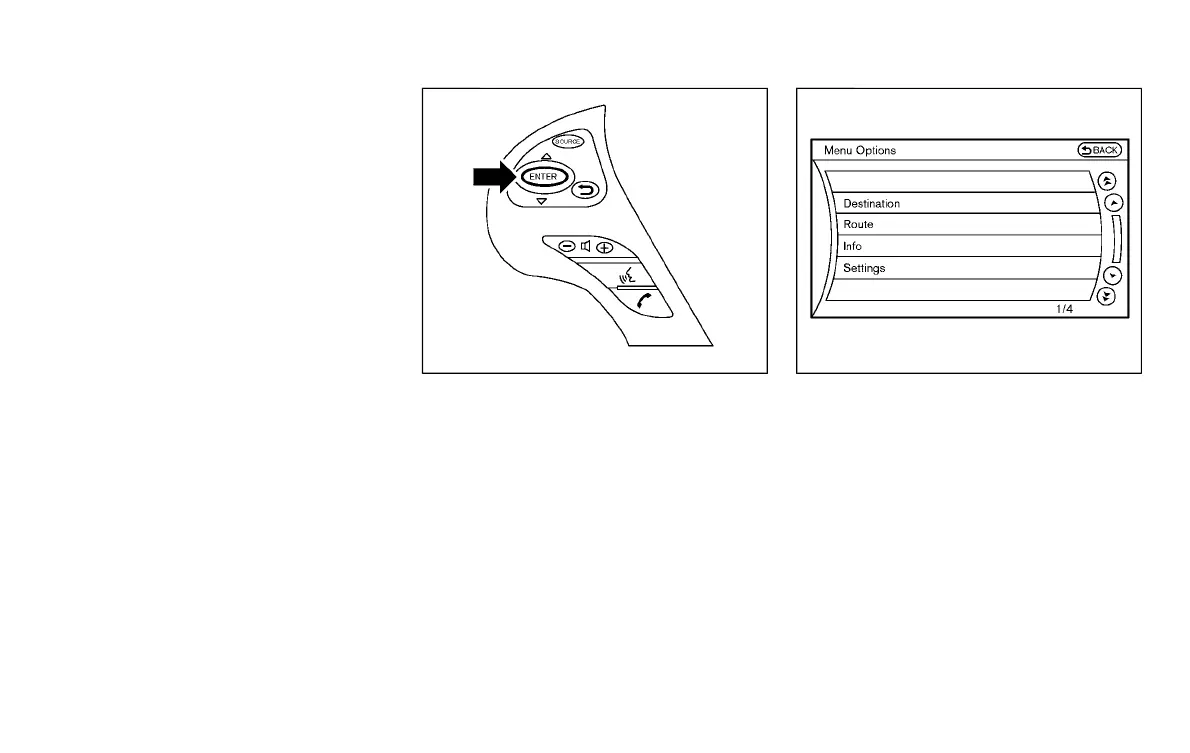
MENU OPTIONS (models with navi-
gation system)
Y51D-V-E01-47D7B56A-1A5D-45EE-8622-D8477605952F
The start menu can be displayed using the
menu control switch on the steering-wheel-
mounted controls.
1. While the MAP or STATUS screen is
displayed, push and hold the menu
control switch until the “Menu Options”
screen appears.
2. Highlight the preferred item by tilting
the menu control switch up or down,
and then push the menu control switch
to select it.
SAA2476
Available items
Y51D-V-E01-6B0A1332-273A-422F-BC78-A5B175DC042E
Destination/Route:
Y51D-V-E01-F2AD7B2D-2746-40F0-AA6F-5F5113D46615
These items are for the navigation system.
See the separate Navigation System Own-
er’s Manual for details.
Info:
Y51D-V-E01-595FABEF-AA4B-4CCE-983F-6ECCAD2877D7
Displays the information screen. It is the
same screen that appears when you push
the INFO button.
Settings:
Y51D-V-E01-DD84EF59-48DA-48EF-92F9-4341C1EEE310
Displays the settings screen. It is the same
screen that appears when you push the
SETTING button.
Condition:



 To Next Page