[ Edit: 2016/ 8/ 1 Model: 2017MY INFINITI Q70(Y51) OM17E00Y51U0 ]
SAA2477
Models with navigation system
SAA3149
Models without navigation system
HOW TO SELECT MENUS ON THE
SCREEN
Y51D-V-E01-86BB56D9-4948-444F-8C73-EF7EB1C3A5A7
Vehicle functions are viewed on the display
screen in menus. To select each key item,
highlight the preferred item using the
INFINITI controller and push the ENTER
button.
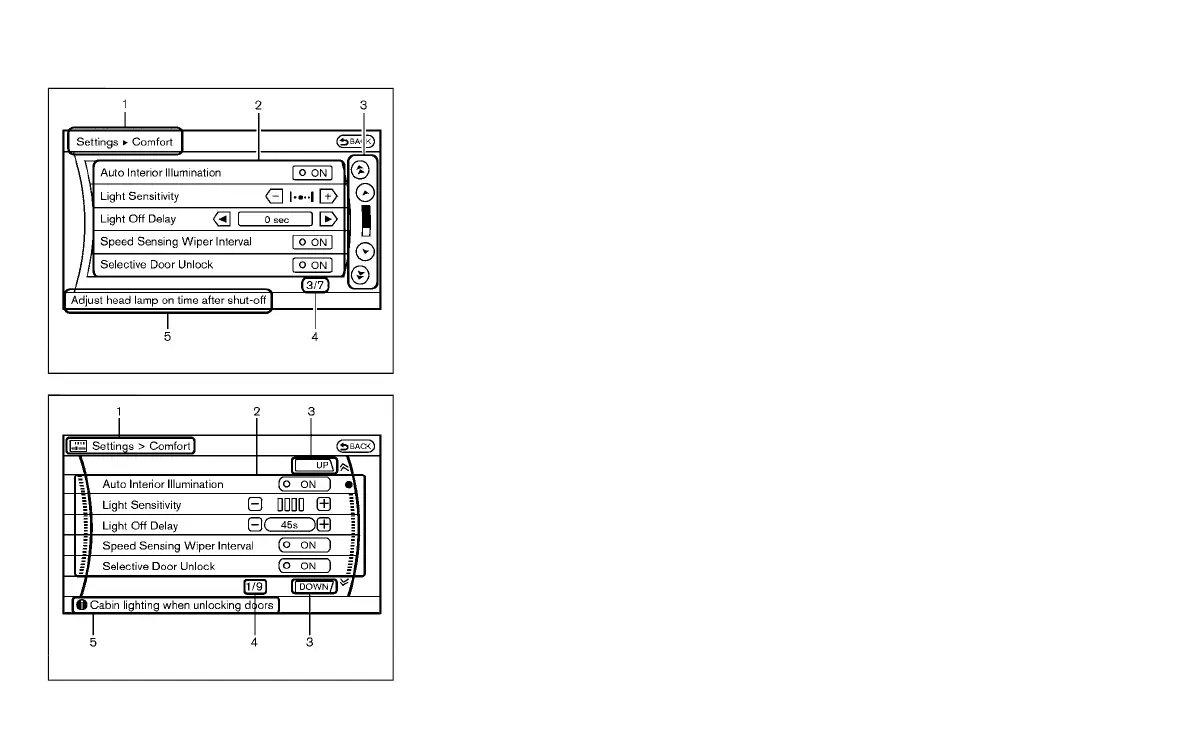
Whenever a menu selection is made or
menu item is highlighted, different areas
on the screen provide you with important
information. See the following for details.
1. Header:
Shows the path used to get to the
current screen.
2. Menu Selections:
Shows the options to choose within
that menu screen.
3. UP/DOWN Movement indicator:
Shows that the INFINITI controller may
be used to move UP/DOWN on the
screen and select more options.
4. Menu Items Counter:
Shows the total number of items listed
across all pages for the current menu.
5. Footer/Information Line:
Provides more information (if available)
about the menu selection currently
highlighted.
Monitor, climate, audio, phone and voice recognition systems 4-9
Condition:



 To Next Page