[ Edit: 2016/ 8/ 1 Model: 2017MY INFINITI Q70(Y51) OM17E00Y51U0 ]
4-10 Monitor, climate, audio, phone and voice recognition systems
Y51D-V-E01-12ABF638-7C1C-4AFD-AD0F-F79EF0C30835
HOW TO USE STATUS BUTTON
Y51D-V-E01-1F7FDD9D-55DB-4CD2-B7BC-36AA83A45621
You can check information related to the
audio, climate control system, fuel con-
sumption and navigation system (if so
equipped) by pressing the STATUS button
repeatedly.
HOW TO USE BRIGHTNESS CON-
TROL AND DISPLAY ON/OFF BUTTON
Y51D-V-E01-47C1A803-CD64-42B5-B4F4-5B5BF1BC8805
Push the “ OFF” button to switch the
display brightness to the daytime mode or
the nighttime mode, and to adjust the
display brightness using the INFINITI con-
troller while the indicator is displayed at
the bottom of the screen.
Push and hold the “
OFF” button for
more than 2 seconds to turn the display
off. Push the button again to turn the
display on.
Models without navigation system:
The display brightness can also be ad-
justed using the “
” button or “ ”
button.
HOW TO USE CAMERA BUTTON
(models with navigation system)
GUID-C69CA08B-BE59-4C1F-B1F1-BB2B3145ED63
Push the CAMERA button to display Around
View
®
Monitor. (See “Around View
®
Moni-
tor” (P.4-32).)
HOW TO USE DISP BUTTON (models
without navigation system)
Y51D-V-E01-66FB10D2-2840-4A84-8CC2-E3C4679E3AC5
Push the DISP button to show the display
setting screen. (See “Display settings
(models without navigation system)” (P.4-
20).)
HOW TO USE ECON BUTTON (mod-
els without navigation system)
Y51D-V-E01-F33D4B2C-B3A2-4597-A2BB-B37393E4DF60
Push the “ ECON” button to show fuel
economy information. (See “Fuel Economy
information” (P.4-12).)
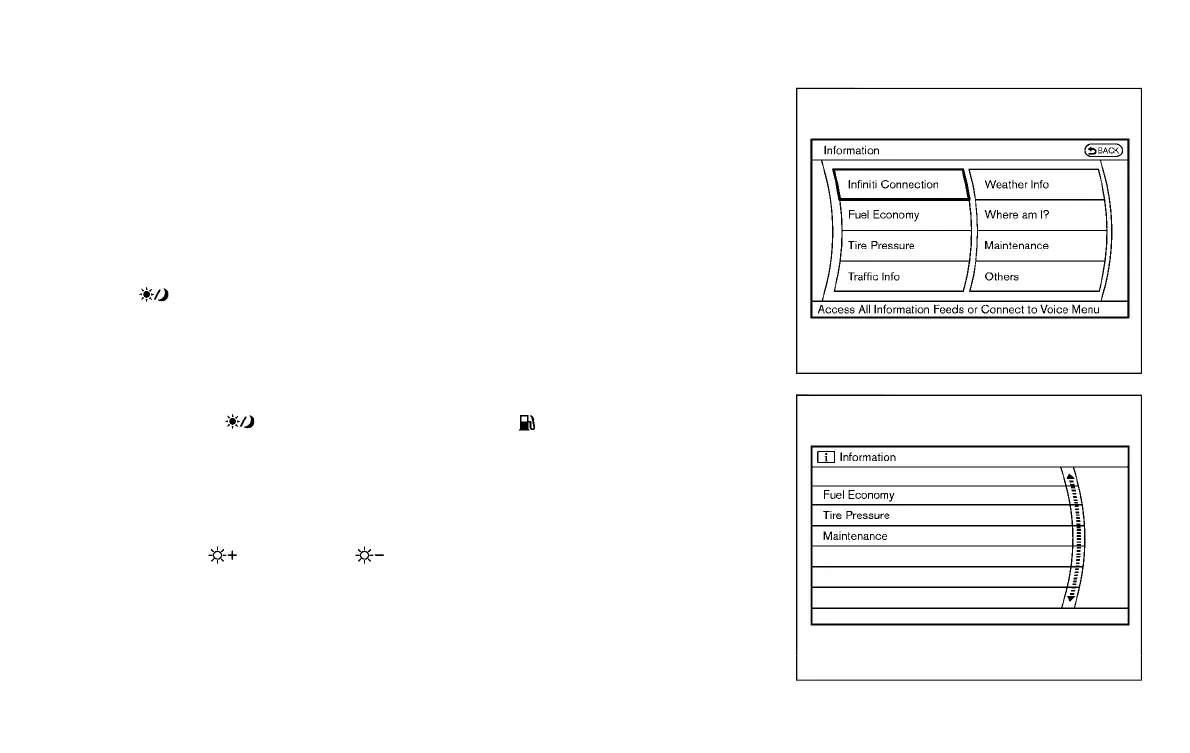
HOW TO USE INFO BUTTON
Y51D-V-E01-99586B1F-168B-4156-B513-0080B5E3B7E5
The display screen shows vehicle and
navigation (if so equipped) information
for your convenience.
The information shown on the screen
should be a guide to determine the
condition of the vehicle. See the following
for details.
JVH0256M
Models with navigation system
SAA2145
Models without navigation system
VEHICLE INFORMATION AND SETTINGS
Condition:


 To Next Page
 Loading...
