[ Edit: 2016/ 8/ 1 Model: 2017MY INFINITI Q70(Y51) OM17E00Y51U0 ]
JVH1144X
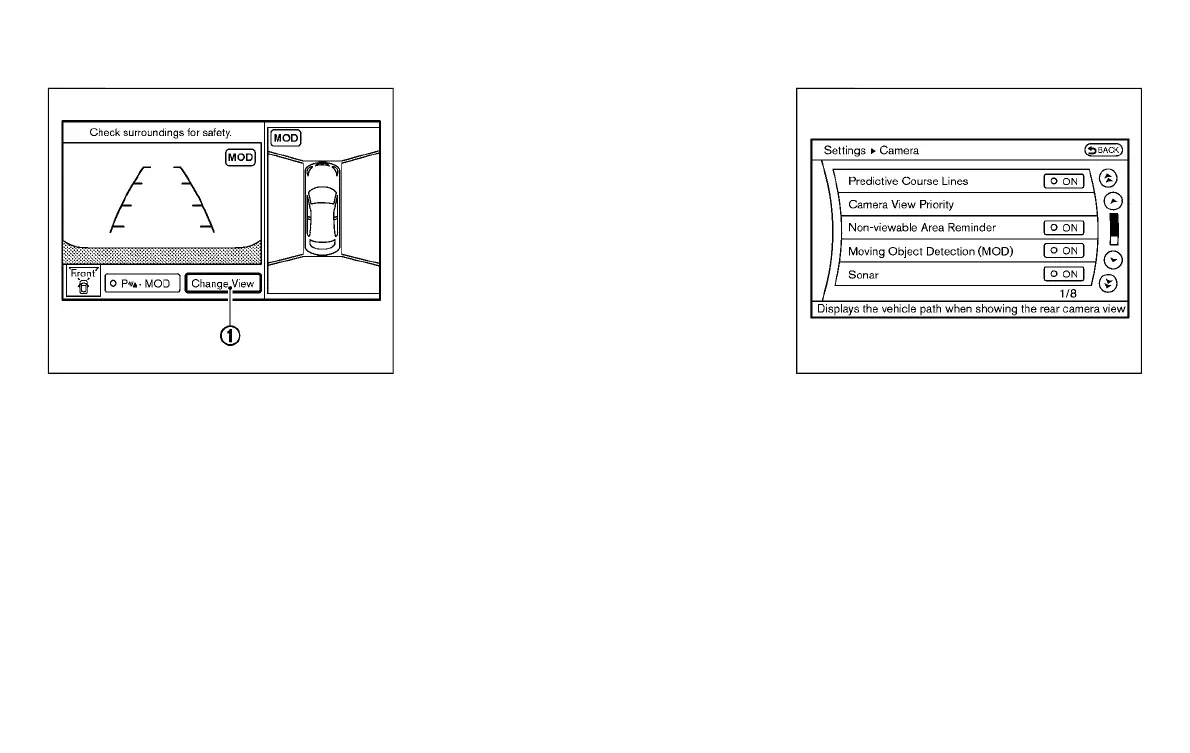
How to switch the display
GUID-DF12B0AB-43A6-4A7B-B9E6-81F0D0DFACA9
The Around View
®
Monitor can display two
split views as well as a single view of the
front-wide view or rear-wide view. Push the
CAMERA button, change the shift lever
position, or select the “Change View” key
*
1
to switch between the available views.
HOW TO ADJUST THE SCREEN VIEW
GUID-14BBAB63-488B-4654-96B5-1204A8B79C27
The display settings such as Display ON/
OFF, Brightness, Tint, Color, Contrast and
Black Level of the Around View
®
Monitor
can be adjusted.
1. Push the SETTING button with the
Around View
®
Monitor turned on.
2. Select an item you wish to adjust.
3. Adjust the level of the setting item
using the INFINITI controller.
NOTE:
Do not adjust any of the display settings of
the Around View
®
Monitor while the
vehicle is moving. Make sure the parking
brake is firmly applied.
JVH1303X
AROUND VIEW
®
MONITOR SET-
TINGS
GUID-584B47FA-5C96-4F62-A8EC-A00BC278BB74
To set up the Around View
®
Monitor to your
preferred settings, push the SETTING
button, select the “Others” key and then
select the “Camera” key.
Designs and items displayed on the screen
may vary depending on the models.
Predictive Course Lines:
When this item is turned to ON, the
predictive course line is displayed in the
front and the rearview and bird’s-eye view.
Monitor, climate, audio, phone and voice recognition systems 4-41
Condition:



 To Next Page