[ Edit: 2016/ 8/ 1 Model: 2017MY INFINITI Q70(Y51) OM17E00Y51U0 ]
5-48 Starting and driving
TURNING THE BSI SYSTEM ON/OFF
GUID-02F8EEC3-AA33-4F7E-AC99-3F8D37069371
To turn on the BSI system, push the
dynamic driver assistance switch
*
3
on
the steering wheel after starting the
engine. The BSI ON indicator light (green)
*
1
on the instrumental panel will illumi-
nate.
Push the dynamic driver assistance switch
*
3
again to turn off the BSI system. The
BSI ON indicator light (green)
*
1
will turn
off.
The dynamic driver assistance switch
*
3
is
used for the BSI, Lane Departure Preven-
tion (LDP) and Distance Control Assist
(DCA) systems. When the dynamic driver
assistance switch
*
3
is pushed, the LDP
and DCA systems will also turn on or off
simultaneously. The BSI system can be
individually set to on or off on the center
display
*
2
.
If the system is set to off, the system will
not turn on even if the dynamic driver
assistance switch
*
3
is pushed to on. To
set the system to on or off on the center
display, see “How to enable/disable the
BSI system” (P.5-48).
SSD0939
SSD1001
HOW TO ENABLE/DISABLE THE BSI
SYSTEM
Y51D-V-E01-7FAF8BCB-7D1B-4C60-8E45-9C397B4F24BF
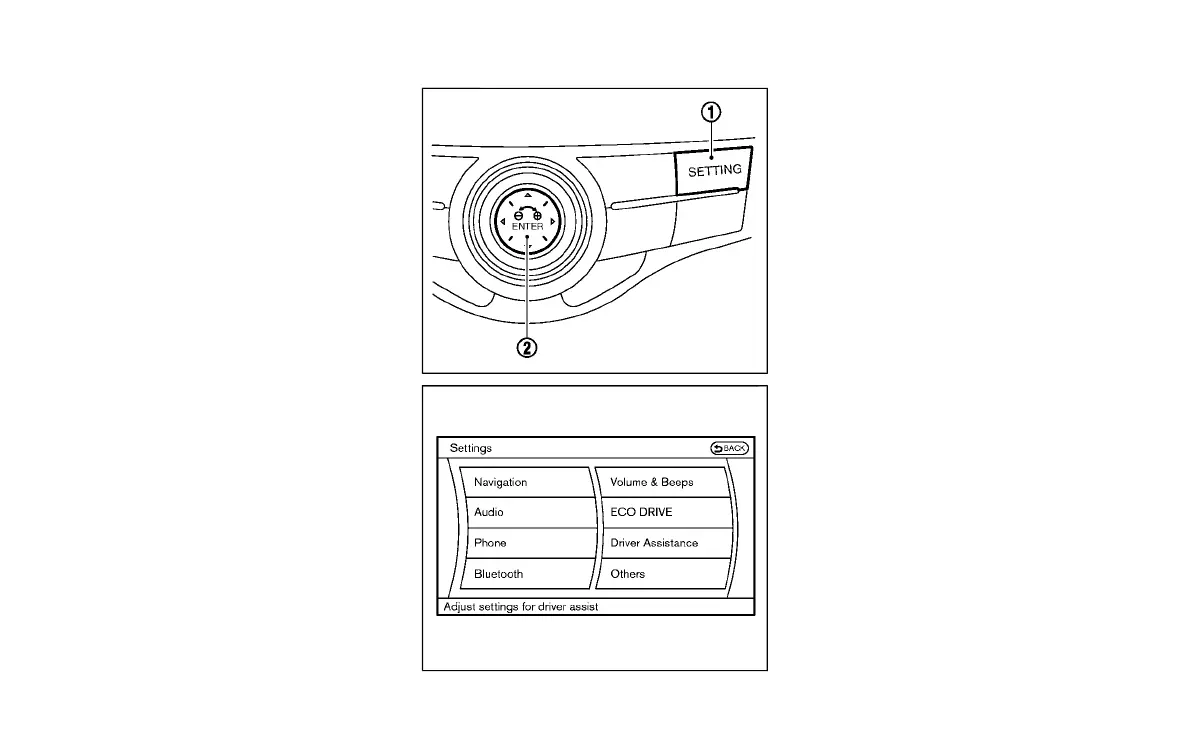
Perform the following steps to enable or
disable the BSI system.
1. Push the SETTING button
*
1
and high-
light the “Driver Assistance” key on the
display using the INFINITI controller.
Then push the ENTER button
*
2
.
2. Highlight the “Dynamic Assistance Set-
tings” key, and push the ENTER button
*
2
.
Condition:



 To Next Page