j
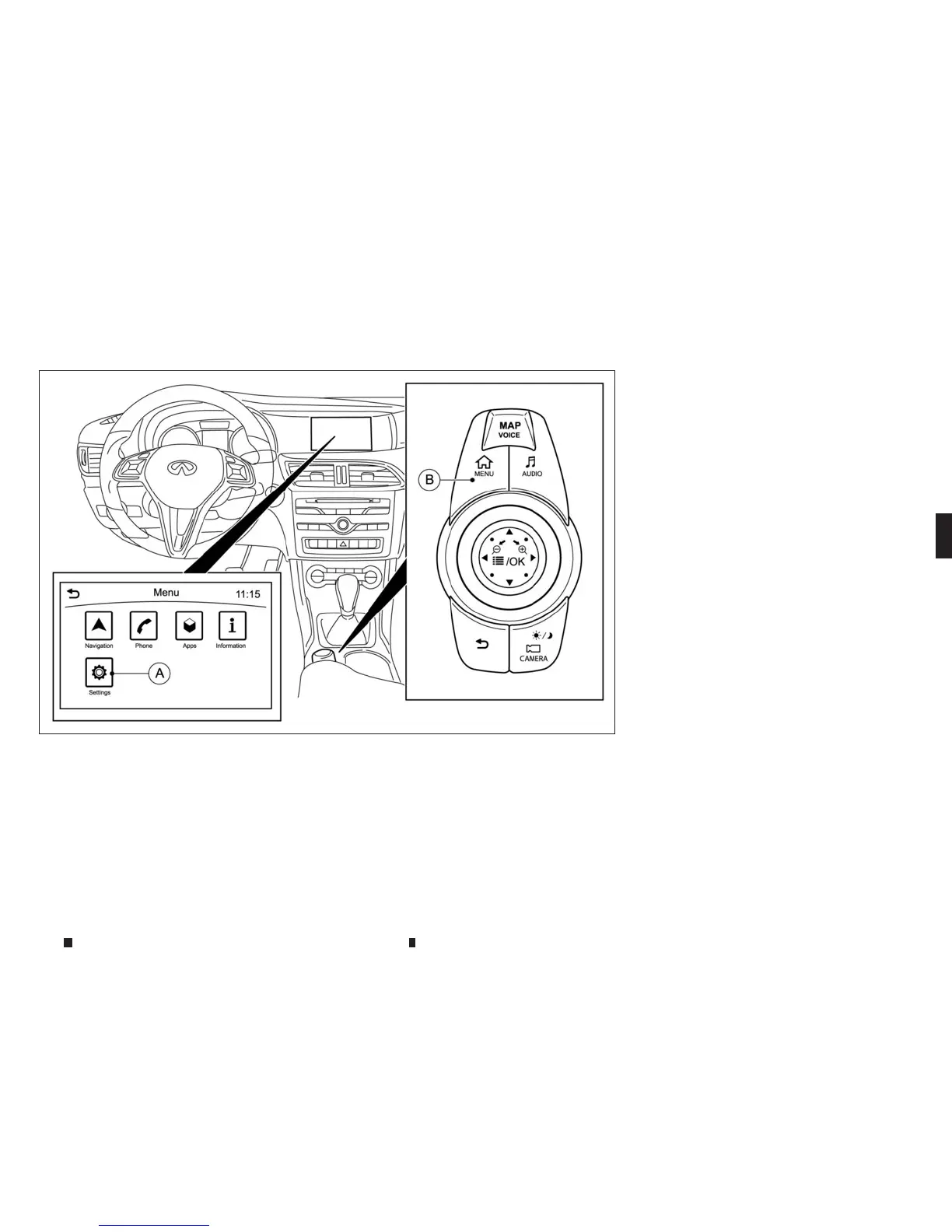
A
[Settings] key
j
B
<MENU> button
REARVIEW MONITORSETTINGS
TheRearView Monitor settings canbechanged
using the followingprocedure.
1. Push the <MENU> button
j
Bonthe INFINITI
Controller and touch[Settings]
j
Ainthe ve-
hicleinformation display.
2. Touch[Camera]/[Display]
NOTE
The [Display] setting is only available when thecam-
era screen is displayedonthe display.
Availablesettings
Designsand items displayed on the screen may
vary depending on the models.
[Camera]-[Predictive Course Lines]:
When thisitem is turned on, the predictive
course line is displayed on the rear view screen
when theshift lever is in the R(Reverse) posi-
tion.
[Display]- [Brightness]:
Adjustdisplay settings by touching [+]/[-].
[Display]- [Contrast]:
Adjust displaysettings by touching [+]/[-].
[Display]-[Blacklevel]:
Adjustdisplay settings by touching [+]/[-].
[Display]-[Tint]:
Adjustdisplay settings by touching [+]/[-].
[Display]-[Colour]:
Adjustdisplay settings by touching [+]/[-].
[Display]- [Default settings]:
Return allthe settings to default.
NSD628
Display screen, heater and air conditioner,and audio system 4-19



 To Next Page