j
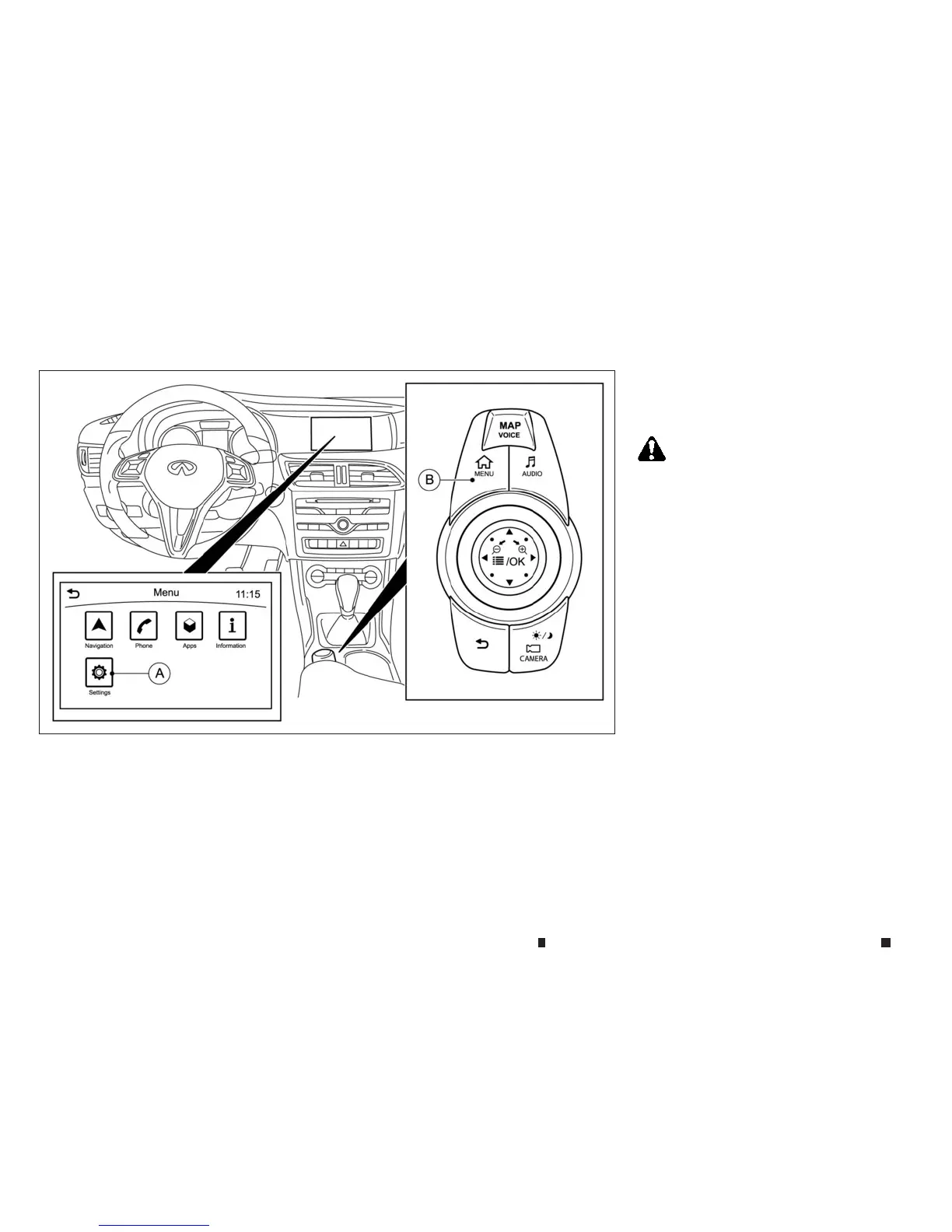
A[Settings] key
j
B
<MENU> button
MODSETTING
MOD system settings canbechanged using the
followingprocedure.
1. Push the <MENU> button
j
Bonthe INFINITI
Controller and touch[Settings]
j
Ainthe ve-
hicleinformation display.
2. Touch[Camera/Display]
3. Touch[Moving Object Detection].
4. Turn the MOD system on/off.
MOD SYSTEM LIMITATIONS
WARNING
Listed beloware the system limitationsfor MOD.Fail-
ure to operate the vehicle in accordancewith these
system limitationscould result in serious injuryor
death.
•
Do not usethe MOD system when towing atrailer
(if available). The system maynot function prop-
erly.
•
Excessive noise (for example, audio system vol-
ume or open vehicle window) will interfere with
thechime sound, and it maynot be heard.
•
TheMOD system performancewillbelimited ac-
cording to environmental conditionsand sur-
rounding objects suchas:
– When thereislow contrastbetweenback-
ground and the moving objects.
– When thereisblinking sourceoflight.
– When strong lightsuchasanother vehi-
cle’s headlight or sunlight is present.
– When cameraorientation is not in its
usual position, suchaswhen mirror is
folded.
NSD628
4-32 Displayscreen, heater and air conditioner,and audio system



 To Next Page