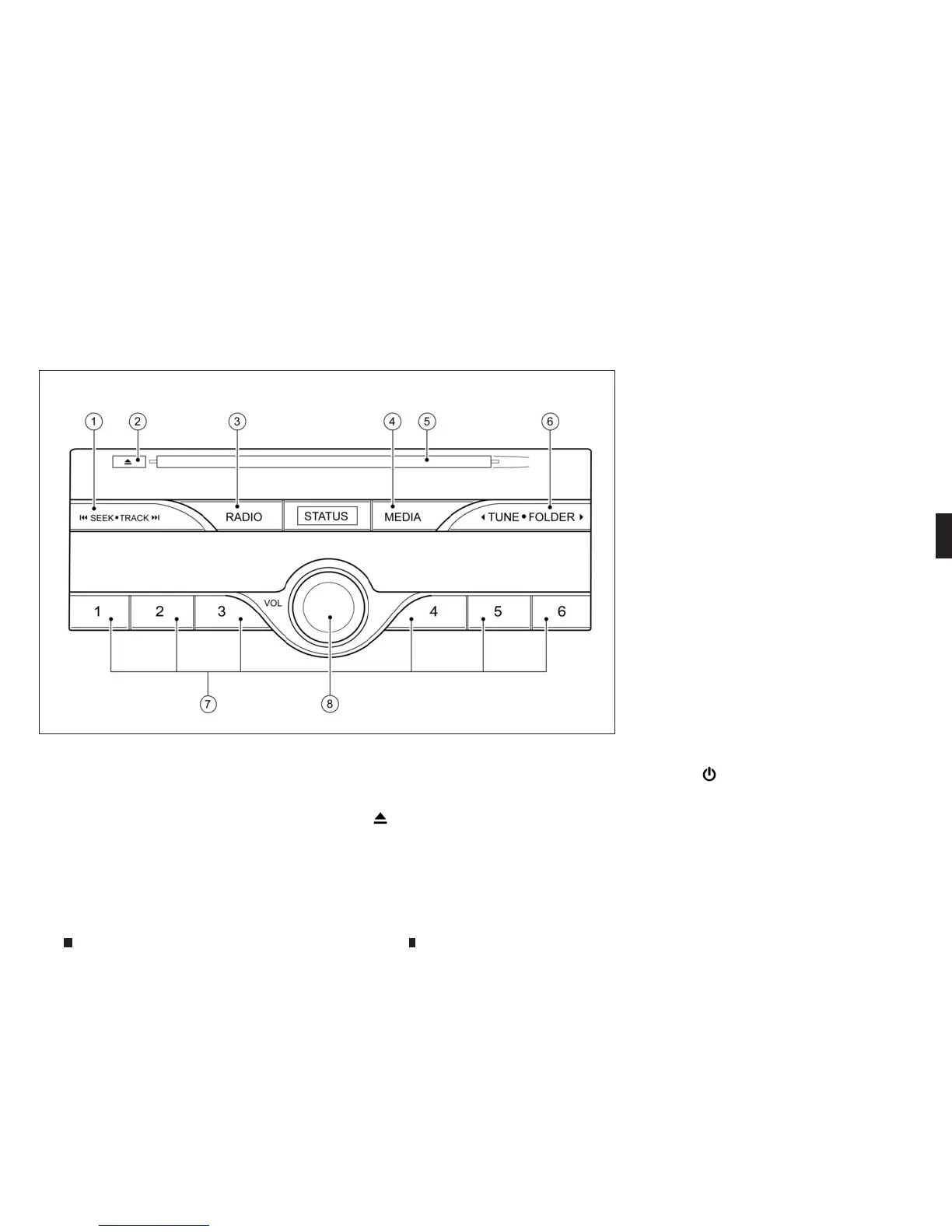
NAMESAND FUNCTIONS OF AUDIO
CONTROL BUTTONS
Mainaudio buttons
*The switch layout in the illustration shows that
of theLeft-HandDrive (LHD) model. Forthe
Right-Hand Drive (RHD) model, the switch lay-
out will be the opposite.
j
1 <SEEK•TRACK>:
Functionstoseek radio stationsortoskip
and fast-forward/rewind through tracks.
j
2
<
m
>:
Push to eject adisc.
j
3
<RADIO>:
Push to switch to the radio mode. The radio
band will switch between AM, FM, and DAB
(where fitted) each time the button is
pushed.
j
4
<MEDIA>:
Eachtime the button is pushed, adifferent
audiosource(CD,iPod, USB, AUXor
Bluetooth® Streaming Audio) will be
selected.
j
5
Disc slot:
Insertadisc with the label side facing up.
j
6
<TUNE•FOLDER>:
Functionstomanually tuneAM/FM and to
select MP3/WMA/AAC folders.
When DAB(where fitted) is playing, push-
ingthisbutton briefly will shift up/down
the stationwithin the ensemble. Pushing
and holdingthe button will shift up/down
the ensemblewhile tuning to DAB.
j
7
Radio memorybuttons: Up to six preferred
stations canberegistered in the preset list
foreachband.
j
8
<VOL/
m
>:
Push to turn the audio system on/off.
Turn to adjust the volume.
AudioAPPSinformation will be displayed when
musicisplayed viaINFINITI InTouchApps.
NAA1621
Display screen, heater and air conditioner,and audio system 4-57



 To Next Page