RADIO
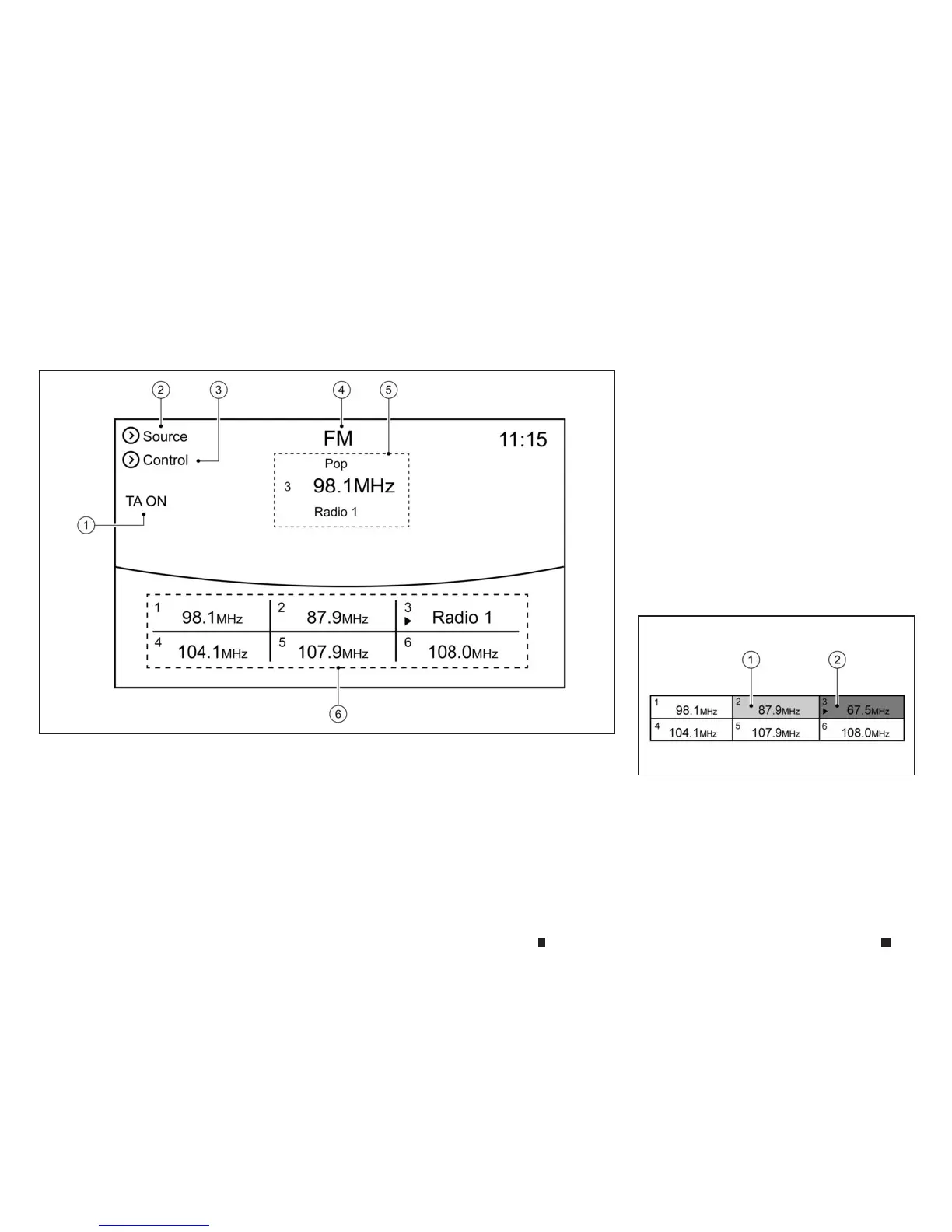
Howtoview radio operation screen
The radio screen canbeviewed and operated on
the display.
j
1
TA (Traffic Announcement) status indicator:
The current status is displayed.
j
2[Source]: Touchtoswitchtothe source
select screen.See
“Selecting audiosource”
later in thissection
j
3
[Control]: Touchtodisplay the control
screen. See
“Radio controls” later in this sec-
tion
j
4
Radioband indicator: The currently
selected radio band is displayed.
j
5
Selected stationand reception information
display: Selected station and reception
information available at thetime suchas
PTY name, etc. is displayed.
j
6
Preset list: Up to six preferred stationscan
be registered inthe preset list for each
band.
See
“Manual presetting” later in thissection
.
Namesofthe preset broadcasting stations
are displ ayed when available.
Radio sourcecontrol
Thereare 2elements used in the preset list area
that are associated with radio source:
j
1
Highlight for INFINITI controller operation.
j
2
(With triangle) Indicator of currentselected
preset station.
NAA1630
NAA1671
4-60 Display screen, heater and air conditioner,and audio system



 To Next Page