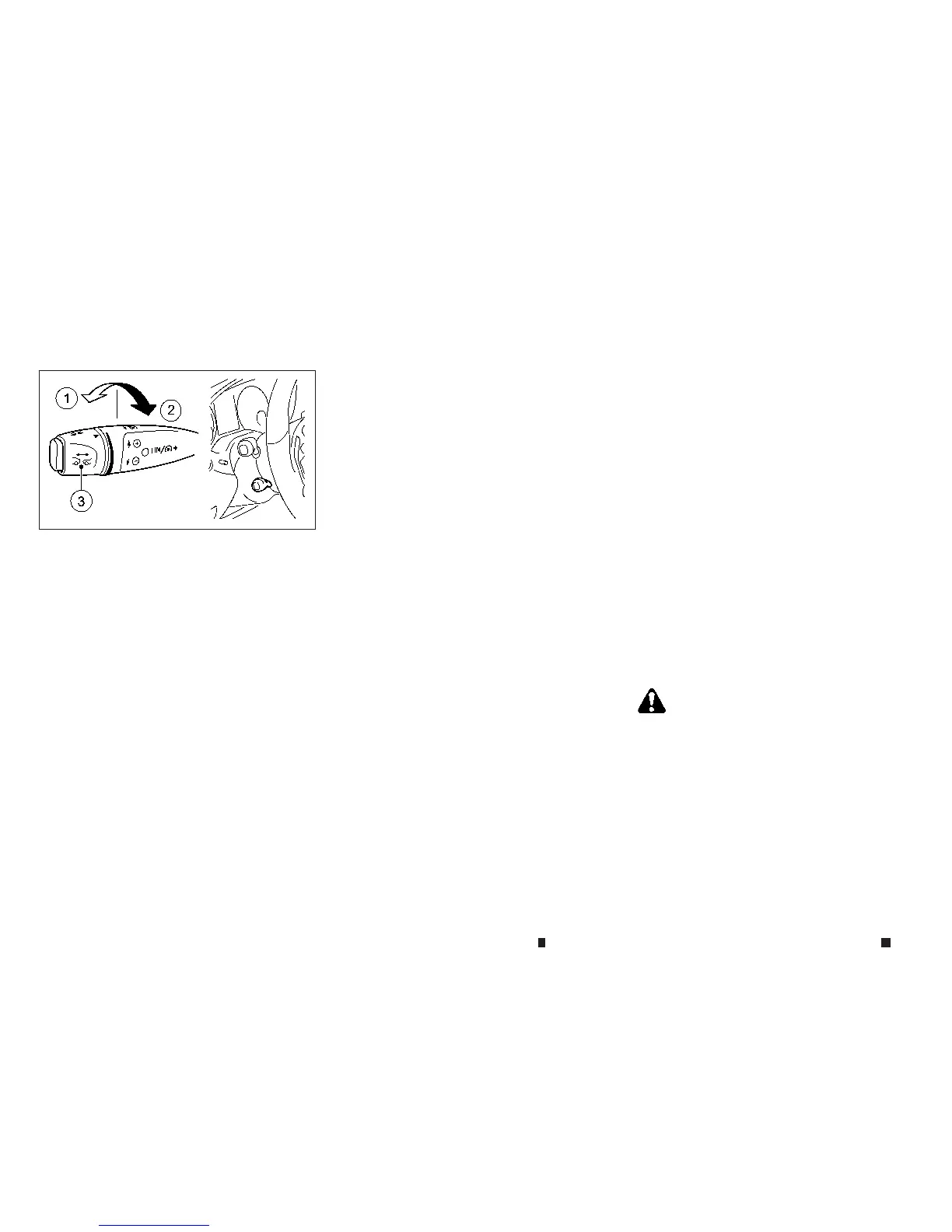
How to change the set distancetothe
vehicle ahead
The distanc etothe vehicle ahead canbese-
lected at anytime depending on the traffic con-
ditions.
To increasethe distancetothe vehicle ahead,
turn the knob
j
3toward the rear
j
2.To de-
creasethe distancetothe vehicle ahead, turn
theknob
j
3toward the front
j
1.
Youcan see thisdistanceinthe vehicle informa-
tiondisplay.
The distancetothe vehicle ahead will change
according to the vehicle speed. The higher the
vehiclespeed, the longerthe distance.
Approach warning
If your vehicle comes closer to the vehicle ahead
duetorapid deceleration of that vehicle or if
another vehicle cuts in, the system warnsthe
driver with the chime and distancewarning
light. Decelerate by depressing the brakepedal
to maintain asafe vehicle distanceif:
•
Thechime sounds.
•
The distancewarning light is illuminated.
Thewarning chime maynot sound and the dis-
tancewarning light maynot illuminate in some
cases when there is ashortdistancebetween
vehicles. Some examples are:
•
When thevehicles are travelling at the same speed
and the distancebetween vehiclesis not changing.
In this case, the distancewarning light will be on.
•
When thevehicle ahead is travelling faster and the
distance betweenvehicles is increasing.
•
When avehicle cuts in near your vehicle
•
Thewarning chime will not sound and the distance
warning light will not illuminate when:
– The vehicle approachesother vehicles
that areparked or moving slowly.
– The accelerator pedal is depressed, over-
riding the system.
Also, the sensor sensitivity canbeaffected by
vehicle operation (steeringmanoeuvre ordriv-
ing position in the lane) or traffic or vehicle con-
dition (for example, if
av
ehicle
is
being driven
with some damage).
Automatic cancellation
Achime soundsand the message [ICCoff] is dis-
played in the vehicle information display for 5
seconds under the following conditionsand the
control is automatically cancelled.
•
The electricparking brakeisapplied.
•
The ESP/VDC intervenes or the ESP/VDC is deacti-
vated.
•
TheP(Park), R(Reverse) or N(Neutral) position is
engaged.
•
The cruisecontrol lever is pulled in order to pull
away but the front passenger door or one of the
rear doors is open.
•
The vehicle is skidding.
•
ActivePark Assist is activated.
ICCLIMITATIONS
WARNING
Listed beloware the system limitationsfor the ICC
system.Failure to operate the vehicle in accordance
with these system limitationscould result in serious
injuryordeath.
•
This system is only an aid to assistthe driver and
is not acollision warning or avoidancedevice. It is
thedriver’sresponsibility to stayalert, drivesafely
and be in control of the vehicle at alltimes.
NSD583
5-48 Startingand driving


 To Next Page
 Loading...