j
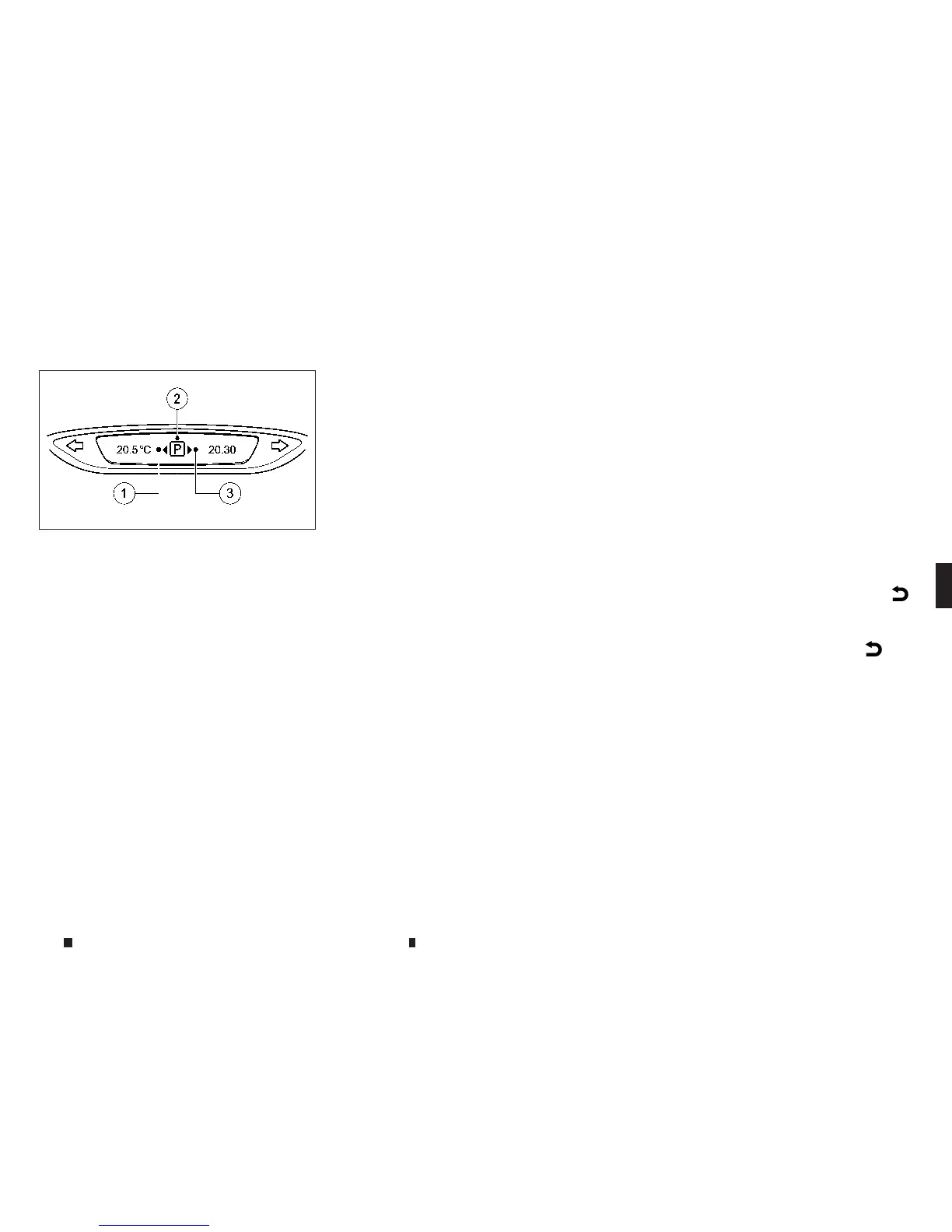
1
Detected parking spaceonthe left.
j
2
Parking symbol.
j
3
Detected parkingspaceonthe right.
NOTE
On vehicles with Manual Transmission, the parking
aid is displayed in the main areaofthe Vehicle Infor-
mation Display
IPAisactivated automatically when driving for-
wards. The system is operational at speeds of
up to approximately 35 km/h (22 MPH). While in
operation, the system independently locates
andmeasures parking spaces on both sides of
the vehicle
IP
Aw
il
lo
nl
yd
etect parking spac
es:
•
Parallel or at right angles to the direction of travel.
•
That are parallel to the direction of travel and are at
least1.5 mwide.
•
That are parallel to the direction of travel and at
least1.0 mlonger than your vehicle.
•
That are at rightangles to the direction of travel
and at least1.0 mwider than your vehicle.
NOTE
IPAcannot measure the length of aparking spaceifit
is at right angles to the direction of travel. Youwill
need to judgewhether your vehicle will fit in the park-
ing space
When driving atspeeds below 30 km/h (19MPH)
youwillsee parking symbol
j
2asastatus indi-
cator in the vehicle information display.When a
parking spacehas been detected, an arrow to-
wards the right
j
3orthe left
j
1also appears.
IPA only display sparking spaces on the front-
passenger side as standard. Parking spaces on
thedriver’s side are displayed as soon as the
turn signal on the driver’s side is activated.
When parking on the driver’s
si
de, thi
sm
us
tr
e-
main activated until youconfirm the useofIPA
by pressing the <OK> buttononthe steering
wheel. Thesystem automatically determines
whetherthe parking spaceisparalleloratright
angles to the direction of travel.
Aparking spaceisdisplayed while youare driv-
ingpastit, and until youare approximately 15 m
away from it.
PARKING
NOTE
When the parking sensor system detects obstacles,
youare responsiblefor braking in good time.
1. Stop the vehiclewhen the parking symbol
shows the desired parking spaceinthe com-
bination meter
2. Vehicles with manual transmission: shift to
reversegear.
Vehicles with automatic transmission: shift
into position R.
The [StartPark Assist? Yes: OK No:]
m
message appearsinthe vehicle information
display.
3. To cancel the procedure: pressthe
m
but-
ton on the steering wheel or pullaway
or
4. To park using IPApressthe <OK> buttonon
the steering wheel.The ParkAssist [Observe
surroundings] messageappears in the ve-
hicle information display.
5. Releasethe steering wheel.
6. Reverse the vehicle, being readytobrake at
a
ll
times. When reversing, drive ataspeed
below10km/h (5 MPH). Otherwise, IPAwill
be cancelled.
NSD612
Upper display
Starting and driving 5-65


 To Next Page
 Loading...