26
system guide
Navigation System
1
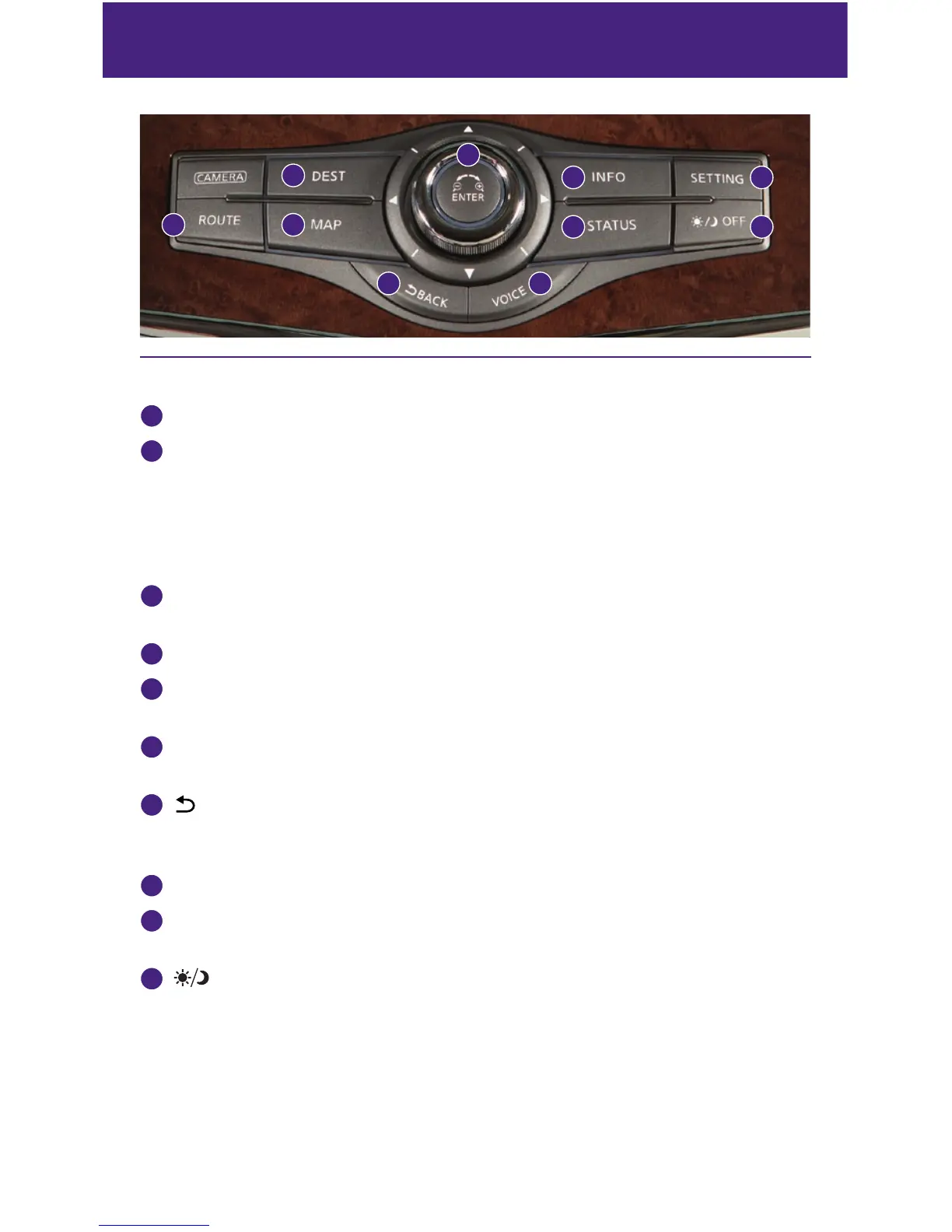
Destination (DEST) - Press to enter a destination.
2
INFINITI controller
• Slide or rotate to highlight an item on the screen and press ENTER to select the
highlighted item.
• On the map screen, turn to adjust the map scale.
• To scroll the map, slide the INFINITI controller in the direction you want to scroll.
3
Information (INFO) - Press to display the vehicle, traffic (if so equipped), weather
(if so equipped) or voice recognition information.
4
SETTING - Press to access the system settings.
5
ROUTE - Press to access the guidance control functions such as guidance cancellation,
route priority and waypoint settings on the route.
6
MAP - Press to display the map. While following a programed route, press multiple times
to change the type of route information.
7
BACK - Press to return to the previous screen. In a settings screen, this button can also
be used to apply the setting. In a character input screen, this button can also delete the
characters that have been entered.
8
VOICE - Press to hear the current voice guidance for a programed route.
9
STATUS - Press multiple times to display audio information, air conditioner status,
fuel economy or navigation directions.
10
OFF - Press to switch between the day screen (bright) and the night screen (dark).
Press and hold the button to turn the display off. Press again to turn the display on.
For more information, please refer to your Navigation System Owner’s Manual.
1
6
7 8
5
2
3
9
4
10


 To Next Page
 Loading...