Need help?
Do you have a question about the Infinix HOT 12 PLAY and is the answer not in the manual?
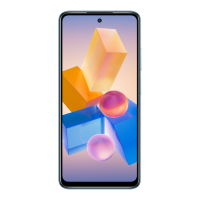
Location of the front-facing camera for photos and video calls.
Controls for adjusting audio volume up and down.
Button to turn the device on/off or lock/unlock the screen.
Device complies with FCC Rules part 15 concerning interference and operation conditions.
Unauthorized modifications void user's authority to operate the equipment.
Equipment tested for Class B limits, designed for protection against harmful interference.
Mobile phone meets government requirements for radio wave exposure, based on scientific standards.
Testing for typical body-worn operations, requires 1.0 cm separation from body.
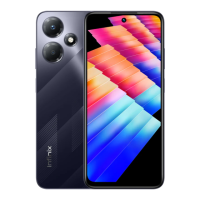
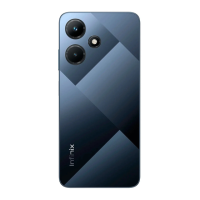
This document serves as the user manual for the Infinix HOT 12 PLAY, model X6816C, providing essential information for its operation and maintenance. The manual begins with an explosion diagram, offering a detailed visual breakdown of the phone's internal components, followed by a "Know your phone" section that identifies key external features. Subsequent sections cover SIM/SD card installation and charging instructions, concluding with important FCC compliance and safety information.
The explosion diagram, a critical part of the manual, lists 28 distinct components, illustrating the intricate assembly of the Infinix HOT 12 PLAY. This diagram is particularly useful for understanding the phone's construction and for potential repair or maintenance purposes. Key components identified include the LCM+CTP (Liquid Crystal Module + Capacitive Touch Panel) and its associated CTP Diffusion film, which together form the display assembly. The upper and lower housings (UPPER HOUSING, LOWER A HOUSING, LOWER B HOUSING) provide the structural framework for the device.
Camera components are extensively detailed, including the UPPER CAM DECO, BACK CAM, FRONT CAM, FRONT CAM RUBBER, and LOWERT SUB CAM. These elements highlight the phone's photographic capabilities and the design considerations for integrating multiple camera modules. The presence of a BIG LENS and SMALL LENS further suggests a multi-camera setup, potentially offering different focal lengths or specialized photographic functions.
The phone's internal electronics are represented by the MAIN PCB (Printed Circuit Board) and SUB PCB, which are the central hubs for processing and connectivity. Various FPCs (Flexible Printed Circuits) such as REC FPC (Receiver FPC), SIDEKEY FPC, and SPEAKER FPC indicate the flexible connections used for different modules, optimizing space and design. The BATTERY and BATTERY HOUSING are also clearly identified, emphasizing the power source and its protective enclosure.
User interaction elements are also present in the diagram, including the FINGERPRINT MODULE, which suggests biometric security features. Audio components like the MOTOR (likely for vibration feedback), RECEIVER (earpiece), SPEAKER, and EARPHONE RUBBER are shown, indicating the phone's capabilities for calls, media playback, and notifications. Connectivity is supported by the RF CABLE (Radio Frequency Cable) and USB RUBBER, which protects the USB port.
The "Know your phone" section simplifies the external features for the user. It identifies the Front camera, which is essential for selfies and video calls. The Volume + key and Volume - key are standard controls for adjusting audio levels, while the Power key serves multiple functions, including turning the device on/off, locking/unlocking the screen, and potentially triggering other features with long presses. These external controls are intuitive and fundamental to daily phone usage.
SIM/SD card installation is a straightforward process outlined in the manual. Users are instructed to power off the mobile before proceeding, a standard safety measure to prevent data corruption or damage to the SIM/SD card. The accompanying picture clearly shows the orientation for inserting SIM 1, SIM 2, and an SD card into the tray, with a "Face To Screen" indicator to ensure correct placement. This dual SIM and expandable storage capability are significant usage features, allowing users to manage multiple phone numbers and store a large amount of data.
Charging the phone is another essential aspect covered. The manual explicitly states that users can charge their device using either a charger or by connecting it to a computer via a USB cable. A crucial maintenance feature highlighted is the recommendation to "Use only INFINIX charger and cables." This warning is vital for device longevity and warranty validity, as using unauthorized accessories "may damage the device" and "invalidate your phone warranty." This emphasizes the importance of using compatible accessories for optimal performance and safety.
The FCC Caution section provides critical regulatory information, ensuring the device complies with part 15 of the FCC Rules. This section outlines the conditions for operation, stating that the device "may not cause harmful interference" and "must accept any interference received." This is a fundamental function description related to electromagnetic compatibility.
"Information to user" further elaborates on compliance, warning against unauthorized modifications that "could void the user's authority to operate the equipment." This reinforces the importance of using the device as intended and avoiding tampering.
The detailed "Information to the user" note addresses the equipment's compliance with Class B digital device limits, designed to provide "reasonable protection against harmful interference in a residential installation." This section explains that the equipment "generates uses and can radiate radio frequency energy" and provides troubleshooting steps if interference occurs. These steps include "Reorient or relocate the receiving antenna," "Increase the separation between the equipment and receiver," "Connect the equipment into an outlet on a circuit different from that to which the receiver is connected," and "Consult the dealer or an experienced radio/TV technician for help." These are practical maintenance features that users can employ to resolve common interference issues.
Finally, the "Specific Absorption Rate (SAR) information" provides details on the mobile phone's compliance with government requirements for exposure to radio waves. It states that the device meets standards developed by independent scientific organizations, ensuring a "substantial safety margin" for all users. The FCC RF Exposure Information and Statement specifies the SAR limit for USA (FCC) as 1.6W/kg and confirms that the X6816C (FCC ID: 2AIZN-X6816C) has been tested against this limit. The highest SAR values for use at the ear (1.21W/kg) and when properly worn on the body (1.18W/kg) are provided, offering transparency regarding RF exposure.
The "Body-worn Operation" section provides essential usage guidelines for maintaining compliance with RF exposure requirements. It specifies a "minimum separation distance of 1.0 cm" between the user's body and the handset, including the antenna. It also warns against using "third-party belt-clips, holsters, and similar accessories" that contain metallic components or do not meet the specified requirements, as they "may not comply with RF exposure requirements and should be avoided." The recommendation to "Use only the supplied or an approved antenna" is another crucial maintenance feature for ensuring safe and compliant operation.
The manual concludes with information about DTS patents and trademarks, indicating that the device incorporates DTS audio technology. It also identifies the operating system as Android™ and states that "Android is a trademark of Google LLC," providing essential software context for the device.
In summary, the Infinix HOT 12 PLAY user manual provides a comprehensive guide to the device, covering its physical components, basic setup, operational features, and critical safety and regulatory information. It emphasizes proper usage and maintenance practices to ensure the device's longevity and user safety.
 General
| Display Size | 6.82 inches |
|---|---|
| Resolution | 720 x 1612 pixels |
| Processor | Unisoc T610 |
| RAM | 4 GB |
| Storage | 64 GB |
| Rear Camera | 13 MP + AI Lens |
| Front Camera | 8 MP |
| Battery Capacity | 6000 mAh |
| Operating System | Android 11, XOS 10 |
| Network | 4G LTE |
| SIM | Dual SIM (Nano-SIM, dual stand-by) |
| Weight | 209 g |
| Colors | Racing Black |
| Dimensions | 171 x 78 x 8.9 mm (6.73 x 3.07 x 0.35 in) |

 To Next Page