User
manual
USE TROUGHT REMOTE CONTROLLER
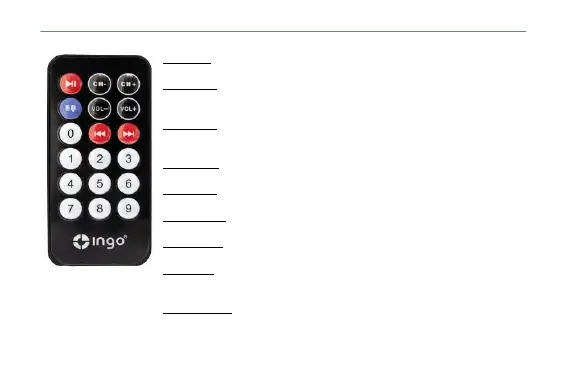
Button >|
Play button. Let’s start playing or pause the song displayed in the screen.
Button >>|
Forward button. In the frequency selection mode, allows tuning up. In
playback mode, it allows forward songs.
Button |<<
Backward button. In the frequency selection mode, allows tuning down.
In playback mode, it allows backward songs.
CH+ button
Up button frequency. Up 0.1MHZ the radio transmitter frequency.
CH- button
Down button frequency. Down 0.1MHZ the radio transmitter frequency.
VOL+ button
Volume up button. Let’s turn up the volume of MP3.
VOL- button
Volume down button. Let’s turn down the volume of MP3.
EQ button
EQ button. Allows you to select one of the EQ presets (Normal, Rock,
Ambient, Jazz, and SRS).
Numeric panel
Allows you to select the number song that you want to play.
4


 To Next Page