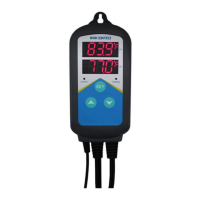
ITC-308 Plug-n-Play Temperature Controller
User Manual V1.0 2015-10-1
1. Overview 3. Keys instruction
●ITC-308 is an easy-to-use, safe and reliable dual relay output temperature
controller. It can be used as Over-temperature protection and automatic
temperature control system for various electric appliances such as equipment for
home-brew, aquarium, pet breeding, incubation, BBQ, seedling heat mats, oven
temperature control, terrestrial heat control, constant temperature cycle of heating
pump, culture fermentation, accelerating germination, electric radiator, electric
oven, etc.
●This product has Plug and Play design with dual relay, be able to connect with
refrigeration and heating equipment easily to realize ideal temperature control.
It’s equipped with dual LED display, and offers display options of Centigrade and
Fahrenheit, enabling more humanized temperature control. With large output
power 1,000W(110V) /2,000W(220V), it’s suitable for most applications.
● ITC-308 is designed with compressor delay protection for refrigeration, high and
① PV: Process Value. under running mode, display current temperature; under
low temperature alarm, and sensor fault alarm, which makes the temperature setting mode, display menu code.
controller more safe and reliable. Functions such as temperature calibration,
② SV: Setting Value. under running mode, display setting temperature; under
separately set differential for refrigeration and heating, enable more accurate
setting mode, display setting value.
temperature control. ③ Cooling indicator Lamp: when the light is on, start refrigeration; when the
light is flickering, the compressor is under delay protection.
Main features:
④ Heating Indicator Lamp: when the light is on, start heating.
● Plug and play design, easy to use;
⑤ SET key: press SET key for 3 seconds to enter menu for function setting.
●Dual relay output, be able to connect with refrigeration and heating equipment During the setting process, press SET key for 3 seconds to quit and
at the same time; save setting changes.
●Support reading with Centigrade or Fahrenheit unit;
⑥ DECRESE key: under running mode, press DECRESE key to inquiry CD
●Maximum output load: 1000W(110V)/2000W(220V); value; under setting mode, press DECRESE key to decrease value.
●Dual display window, be able to display measured temperature and set
⑦ INCREASE key: under running mode, press INCREASE key to inquiry HD
temperature at the same time; value; under setting mode, press INCREASE key to increase value.
●Temperature calibration; ⑧ Heating Device Socket: this socket is for heating output.
●Compressor delay protection for refrigeration control
⑨ Cooling Device Socket: the socket is for refrigeration output.
●High and low temperature alarms are available;
●Over-temperature and sensor fault alarm
4. Key operation instruction
●Heating/Cooling differential function could be set separately for refrigeration
and heating to protect temperature controller from violent change. 4.1 When the controller is working normally, short press “ ” key for one time,
then the heating differential (HD) will be displayed; short press “ ” for one time,
2. Specification
then the cooling differential (CD) will be displayed. The screen will return to
normal display mode after 2 seconds.
Temperature Control Range -50~99 °C / -58~210 ° F
Temperature Resolution 0.1 ° C / 0.1° F 4.2 How to set parameters
Temperature Accuracy ±1°C (-50 ~ 70°C) / ±1°F (-50 ~ 160° F) When the controller is working normally, press “SET” key for over 3 seconds to
Temperature Control Mode On/Off Control, Heating and Cooling enter parameters set up mode. “SET” indicator lamp will on. PV window displays
Input Power 100 ~240VAC, 50Hz/60Hz the first menu code “TS”, while SV window displays according setting value.
Temperature Control Output Max. 10A, 100V ~240V AC Press “SET” key to go to next menu and display according menu code, press
Buzzer Alarm High and Low Temperature Alarm “ ” key or “ ”key to set current parameter value. After setting done, press
Sensor Type NTC sensor (Including) “SET” key for 3 seconds at any time to save the parameters change and return
Sensor Length 2m / 6.56ft to normal temperature display mode. During setting, if there is no operation for
Relay Contact Capacity
Cooling (10A, 100-240VAC) 10 seconds, the system will quit setting mode and return to normal temperature
Heating (10A, 100-240VAC)
display mode without saving the parameters change.
Input Power Cable Length 1.5m ( 5ft )
Output Power Cable Length 30cm ( 1ft )
Dimension
Body: 140x68x33mm (5.5x2.7x1.3inch)
Socket: 85x42x24mm(3.3x1.7x1inch)
Ambient Temperature -30~ 75 ° C / -22~ 167 ° F
Storage
Temperature -20~ 60 ° C / -4~ 140 ° F
Humidity 20~85% (No Condensate )
Warranty 1 Year

 Need help?
 General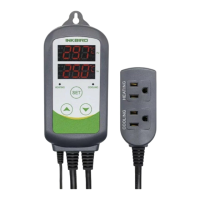

 To Next Page