Home
Inkbird
Gateway
IBS-M2
Page 8
Inkbird IBS-M2 - Page 8
20 pages
Manual
Save Page as PDF
To Next Page
To Next Page
To Previous Page
To Previous Page
Loading...
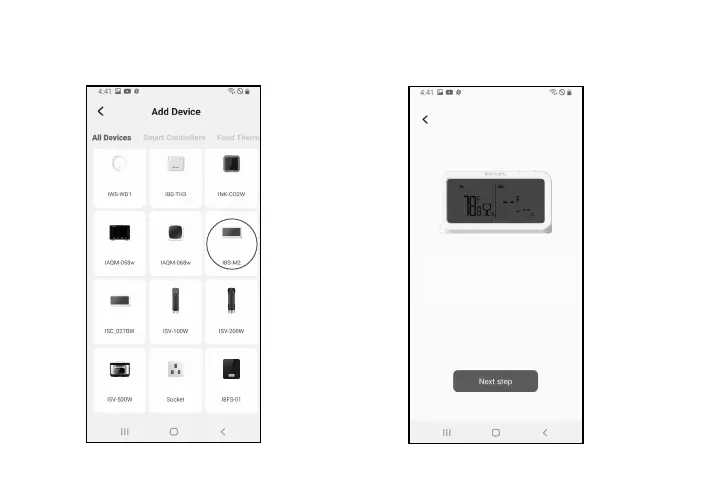
3.3.1 Open the app and click the “+” to
select IBS-M2 to start the connection.
3.3.2 Plug into a USB power supply
, power on
properly
, and click Next Step to continue.
-
0
5
-
Please connect the USB Power
supply and keep the device
powered on
7
9
Table of Contents
Main Page
Table of Contents
3
Product Introduction
4
Specification
5
APP Connection
6
Action Button Instructions
15
Safeguards
16
Product Warranty
16
FCC Requirement
17
Related product manuals
Inkbird IBS-M1
56 pages


 To Next Page
 Loading...