EasyManua.ls Logo

Innovative Technology ITIP-444 - User Manual

Innovative Technology ITIP-444
13 pages
Print Icon
To Next Page IconTo Next Page
Loading...
!
!
!
!
!
!
!
!
In#Car'Tablet'
Entertainment'System'
!
"#$%&'!()(*+,,,!
!
User'Manual'
!
!
!
!
!
!
QUICK'START'STEPS'
'
'
'
'
'
'
'
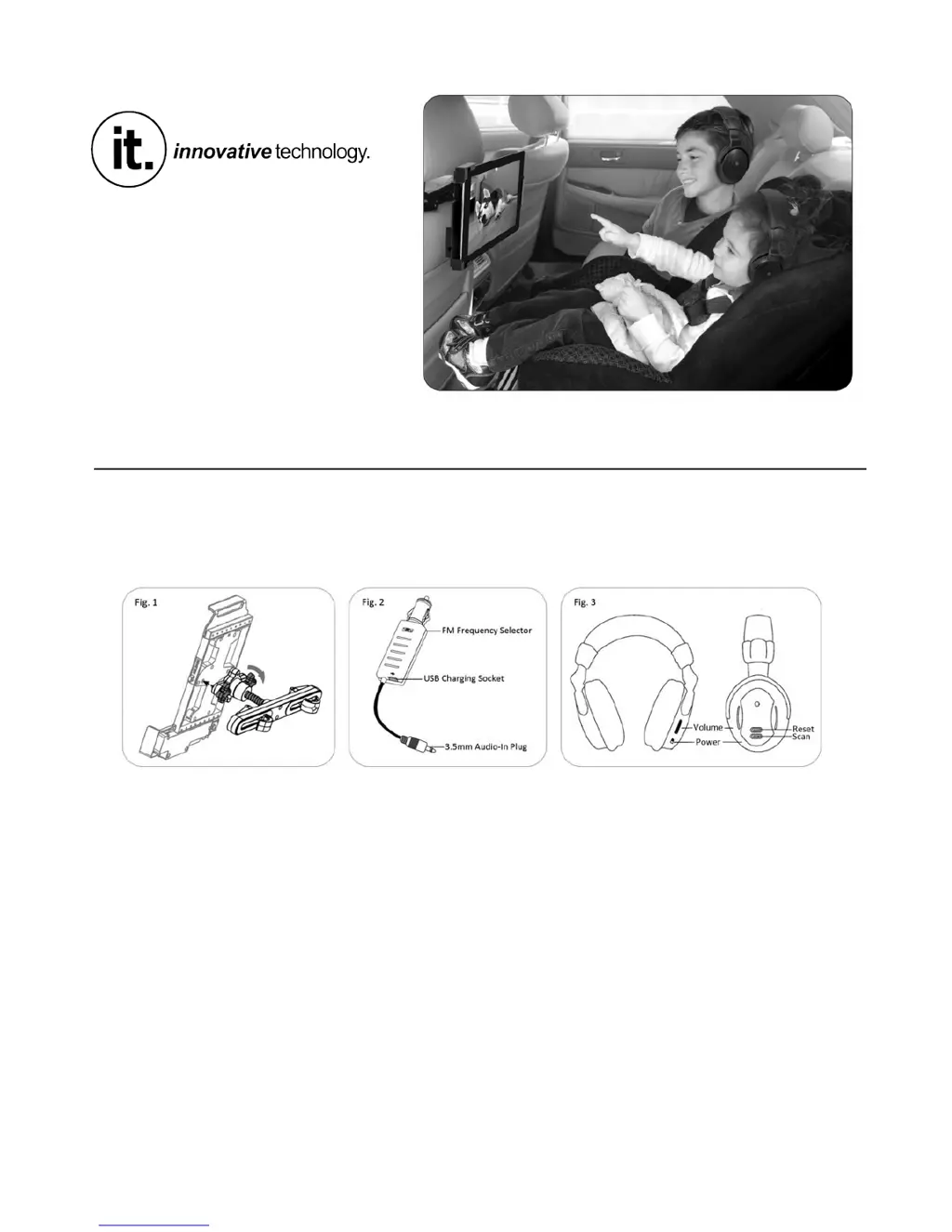
-. /012&3!451%6!78%!9%:$1%47!"#;<7!#<7#!78%!):=&%7!"#;<7!>/0?.!-@.! !
A. B&0C!78%!):=&%7!"#;<7!#<7#!78%!=:5D!#E!3#;1!8%:$1%47.!
F. G%&%:4%!78%!)#C!:<$!H#77#2!B&0C4!:<$!C&:5%!3#;1!7:=&%7!0<!78%!):=&%7!"#;<7.!
,. *&;?! 78%! /"! )1:<42077%1IB0?:1%77%! J$:C7%1! >/0?.! A@! 0<7#! 3#;1! 5:1K4! -ALI50?:1%77%! 4#5D%7! :<$!
0<4%17!78%!F.M22!J;$0#+(<!*&;?!0<7#!3#;1!7:=&%7.!
5. (<4%17!A!N!JJJ!=:77%10%4!><#7!0<5&;$%$@!0<!78%!9%:$C8#<%4!>/0?.!F@.#
6. O%7!78%!P#&;2%!7#!&#6!:<$!7;1<!78%!8%:$C8#<%4!#<.!
Note:#Excessive#sound#may#damage#your#hearing.#
Q. *1%44! :<$! 8#&$! 78%! 45:<! =;77#<! #<! 3#;1! 9%:$C8#<%4! 7#! 4%:158! E#1! 78%! /"! 58:<<%&! 78:7!
2:758%4!3#;1!/"!)1:<42077%1.!R4%!78%!58:<<%&!6078!78%!&%:47!47:705!:<$!5&%:1%47!4#;<$.!
Note:#If#you#hear#no#sound,#ensure#the#volume#is#set#to#an#audible#level#or#press#and#hold#the#
scan#button#again#to#search#for#the#correct#channel.!
S. T#;!:1%!<#6!1%:$3!7#!%<U#3!3#;1!(<+B:1!):=&%7!V<7%17:0<2%<7!O347%2W!
!

Questions and Answers

  • D
    Desiree WalkerJul 31, 2025
    Why are my Innovative Technology ITIP-444 Car Video System headphones not working?
    • R
      ryanmanningJul 31, 2025
      If your headphones aren't working, there could be several reasons: * The batteries may be dead. Try fitting new batteries into the headphones. * The headphones might be turned off. Ensure the headphones are switched on using the power switch. * The volume might be too low. Adjust the volume control to a higher level. * You may be too far from the transmitter. Move closer, keeping the distance within 16.4 feet.
  • D
    Danielle GriffithAug 11, 2025
    What to do if my Innovative Technology ITIP-444 Car Video System has no reception?
    • K
      Kenneth BergerAug 11, 2025
      If you're experiencing no reception, consider the following: * Check the connection between the transmitter and the tablet to ensure it's secure. * It's possible that the transmitter and receiver channels aren't matched. Try pressing and holding the Scan button on the headphones to search for the correct channel.
  • Z
    zacharyhughesAug 21, 2025
    How to fix unclear sound on Innovative Technology ITIP-444 Car Video System?
    • D
      David DixonAug 21, 2025
      If the sound isn't clear, it might be due to: * Interference from a nearby appliance. Try turning off any nearby appliances that could be causing interference. * Poor reception. Attempt to change to another channel.

Summary

Quick Start Steps

Safety and Precautions

Precautions

General warnings and cautions for safe operation of the device.

Important Safety Instructions

Detailed safety guidelines and user responsibilities for product use.

Mounting and Tablet Installation

Fitting Your iPad;Tablet into the Mount

Guide on how to place and secure your tablet within the mount.

Operation and Troubleshooting

Transmitting Signals

How the tablet's audio is transmitted via the FM transmitter to headphones.

Using the Wireless Headphones

Steps for powering on, adjusting, and using the wireless headphones.

Troubleshooting

Common problems and their solutions for the in-car entertainment system.

Innovative Technology ITIP-444 Specifications

General IconGeneral
Screen Size4.3 inches
Resolution480 x 272 pixels
TouchscreenNo
Power Supply12V DC
SD Card SlotYes