EasyManua.ls Logo

Inovalley SM121 - User Manual

Inovalley SM121
4 pages
Print Icon
To Next Page IconTo Next Page
Loading...
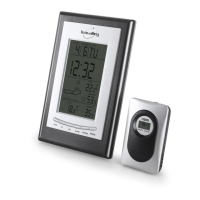
WIRELESS WEATHER STATION
Ref.: SM121 + SM121-B
- OPERATION INSTRUCTION -
1/ MAIN FUNCTIONS
1. Radio-controlled clock
2. Weather forecast for 4 states: sunny, semi-sunny, cloudy, rainy
3. Seven languages to show the day: English, Germany, French, Italian, Spanish, Dutch, Danish
4. Indoor temperature range: 0°C to 50°C, sampling cycle: 12 seconds
5. Indoor humidity range: 20% to 95%
6. Outdoor temperature/ humidity with RF : up to 3 channels
7. In/out trend indication of temperature/humidity
8. Alarm function for upper or lower limit of outdoor temperature
9. Indication of the comfort index
10. The function of Alarm/ Snooze
11. Summer time
12. Moon phase
2/ POWER-ON AND RESET
2.1 Setting up batteries
a) Open the battery compartment on the back of the station and remove plastic protections of 2 batteries.
b) Place the batteries based polarity, and properly close the door.
c) Then open the door to stack probe back and remove plastic protections of batteries.
d) Place the batteries based on polarity, and properly close the compartment.
e) Then wait for about 7 minutes time is automatically displayed.
Note: for manual tuning, see paragraph 3.3.
2.2 When Power-On and reset, LCD full display for 3 seconds enter the normal state after “Beep” check temperature
and humidity
1. The calendar defaults 0:00 January 1, 2004
2. Alarm defaults 0:00
3. The weather icon defaults semi-sunny
4. Temperature scales defaults Celsius degree °C.
5. Time system defaults 24Hr.
3/ INSTRUCTION OF OPERATING THE KEYS
3.1 Key functions
Six functional keys: DOWN, UP, SET, ALARM, CHANNEL, SNOOZE.
English
Question and Answer IconNeed help?

Do you have a question about the Inovalley SM121 and is the answer not in the manual?

Summary

Main Functions

Radio-controlled Clock

Overview of the radio-controlled clock functionality.

Weather Forecast States

Details weather forecast for four states: sunny, semi-sunny, cloudy, rainy.

Language Options

Lists seven available languages for day display.

Indoor Temperature and Humidity Range

Specifies indoor temperature range (0°C-50°C) and humidity range (20%-95%).

Outdoor Temperature and Humidity Reception

Covers outdoor temperature/humidity reception for up to 3 channels.

Trend Indication

Describes the trend indication for indoor/outdoor temperature and humidity.

Outdoor Temperature Alarm

Details alarm function for upper or lower outdoor temperature limits.

Comfort Index Display

Explains the indication of the comfort index.

Alarm and Snooze Functionality

Covers the functionality of the Alarm and Snooze features.

Summer Time Setting

Explains the summer time setting feature.

Moon Phase Display

Describes the moon phase display.

Power-On and Reset Procedures

Battery Setup Guide

Step-by-step guide for installing batteries in the main unit and probe.

Initial Display After Power-On;Reset

Describes the LCD display sequence and initial state after power-on or reset.

Operating the Keys

Key Function Overview

Lists and describes the six functional keys on the device.

Normal State Operations

Explains normal operation states and key functions like setting time and alarm.

Manual Time Setting

Detailed steps for manually setting the time, date, language, and time zone.

Alarm Setting Procedure

Instructions for setting the alarm time, including hour and minute adjustments.

Functions and Effects

RF Signal Receiving

Explains the RF signal receiving process, channel selection, and loss of signal indication.

Alarm Buzzer Behavior

Details the alarm buzzer behavior and snooze function when the alarm rings.

RCC Receiving Functionality

Describes how to enter RCC receiving status, its duration, and effects of DST.

Temperature and Humidity Measurement

Specifies measurement ranges, sampling period, and accuracy for temp/humidity.

Weather Forecast Icons

Lists the weather icons for four forecast states: sunny, semi-sunny, cloudy, rainy.

Battery Usage Precautions

Inovalley SM121 Specifications

General IconGeneral
Product colorBlack
Clock functionYes
Measuring functionsIndoor hygrometer, Indoor thermometer, Outdoor thermometer
Temperature measurement unitsF, °C
Weather station extremum dataThermometer
Measuring functions trend displayHygrometer, Thermometer
Display number of colorsMonochrome