The Insafe Matrix 100 is a digital keypad lock designed for safes, offering secure access control and user-friendly operation. It is part of the "Inspired Security" product line from Insafe.
Function Description:
The Matrix 100 operates as an electronic locking mechanism for safes, providing a secure alternative to traditional key locks. It utilizes a digital keypad for code entry, controlling the locking and unlocking of the safe door. The lock supports multiple user codes, including a primary user (1st User) and a secondary user (2nd User), allowing for flexible access management. A key feature is its "Wrong Try Penalty" system, which temporarily blocks access after multiple incorrect code entries, enhancing security against unauthorized attempts. The lock also incorporates a low battery warning system to ensure continuous operation and prevent unexpected lockouts.
Important Technical Specifications:
- Code Length: The lock uses six-digit codes for both opening and programming.
- Battery Type: Requires a 9-volt alkaline battery (PP3), such as Duracell.
- Wrong Try Penalty: After 4 consecutive incorrect code inputs, a 5-minute blocking time is activated. During this period, a red LED flashes every 10 seconds, and each input is accompanied by a long signal tone. Two additional incorrect inputs after the blocking time has passed will restart the blocking period.
- Code Retention: Programmed codes remain valid during battery changes, ensuring that access is not lost when the battery is replaced.
- Visual and Auditory Feedback: The lock provides signals (flashing LEDs and tones) for each digit entry, successful code acceptance, and warning conditions (e.g., low battery, wrong try penalty).
Usage Features:
- Opening the Safe:
- Enter the six-digit code slowly and distinctly. The lock signals at each entry.
- Turn the keypad clockwise immediately a quarter turn within 3 seconds of entering the code.
- Turn the safe handle (if present) and open the safe door.
- The factory-set opening code is 123456, which should be changed immediately after installation for security.
- Closing the Safe:
- Close the safe door.
- Turn the safe handle (if present).
- Turn the keypad anti-clockwise until it is upright.
- Verify that the keypad and door are locked.
- Changing a Code (1st User):
- Ensure the safe door is open throughout the entire process.
- Press and hold '0' until the red LED flashes permanently.
- Enter your old six-digit code (e.g., 654321).
- Input your new six-digit code (e.g., 567891).
- Repeat your new six-digit code to confirm.
- Test the new code by opening and closing the lock with the door in the open position.
- Adding a 2nd Code:
- Ensure the safe door is open throughout the entire process.
- Press and hold '1' until the red LED flashes permanently.
- Enter your 6-digit 1st code (e.g., 123456).
- Input the new 2nd 6-digit code (e.g., 111111).
- Repeat the new 2nd code to confirm.
- If the new code is denied, restart the programming process.
- Test the code by opening and closing the lock with the door in the open position.
- Deleting the 2nd Code:
- Only the 1st User can delete the 2nd User's code. The 2nd User cannot delete the 1st User's code.
- Ensure the safe door is open throughout the entire process.
- Press and hold '3' until the red LED flashes permanently.
- Input the 6-digit 1st Code (e.g., 123456).
- Test the lock by opening and closing it with the door in the open position to confirm the deletion.
Maintenance Features:
- Battery Changing:
- A warning tone beeps repeatedly, and the red LED flashes alternately to indicate low battery voltage.
- It is recommended to change the battery with the door locked open and the keypad in the locked position, if possible.
- Always use a good quality alkaline 9-volt battery (PP3), such as Duracell.
- Change the battery as quickly as possible; programmed codes remain valid during the change.
- Dispose of used batteries in an environmentally friendly way.
- Procedure:
- Gently pull the top of the keypad down.
- Ease the battery holder out of its compartment.
- Remove the old battery and replace it with a new one.
- Replace the battery holder in the compartment and close the keypad.
- Warning: Do not pull the battery holder cables.
- Test the code by opening and closing the lock with the door in the open position.

 Need help?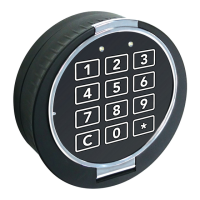

 To Next Page
 General