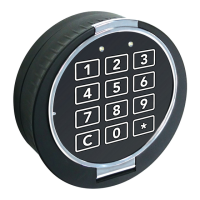
The Insafe Matrix 3 is a digital safe lock designed for secure access control. It features a robust keypad for entering codes and managing various settings.
Function Description
The Insafe Matrix 3 serves as a primary security mechanism for safes, allowing authorized users to lock and unlock the safe using digital codes. It supports multiple user types, including a Manager and regular Users, each with distinct access and management capabilities. The system incorporates a "Wrong Try Penalty" to deter unauthorized access attempts, temporarily disabling the keypad after a certain number of incorrect entries.
Important Technical Specifications
- Code Length: Manager and User codes are 8 digits long.
- ID Length: Manager and User IDs are 2 digits long.
- Power Source: The lock is powered by a 9 VDC ALKALINE battery.
- Keypad: Features a numerical keypad (0-9) with additional function keys (#, *, and an arrow key for confirmation/reset).
- Visual Feedback: The keypad provides visual feedback through green and red LED flashes to indicate successful operations, errors, or program modes.
- Audible Feedback: The keypad also provides audible beeps for various actions, such as successful code entry, errors, and program mode changes.
Usage Features
Opening the Lock for the First Time:
- Enter the Manager ID (01) and the factory-set Manager code (0123456).
- The keypad will beep, and a green LED will flash three times. Three red flashes indicate a "Wrong Try Penalty."
- Turn the keypad clockwise 1/4 turn within 3 seconds.
- Open the safe, turn the handle if any, and open the safe door.
- The system prompts to change the Manager and Manager code immediately after the first opening.
Changing the Master Code:
- Enter each digit slowly and distinctly. The lock signals each entry.
- Press #52 to put the lock in program mode. The green LED will stay on during this process. If the light goes out, restart the process.
- Enter the Manager ID (00) plus the existing 8-digit code (12345678).
- Enter the Manager ID (00) and the new 8-digit code.
- Enter the Manager ID (00) and the new 8-digit code again, then press the purple button to complete the process. The keypad will beep and flash green three times. Three low beeps and three red LED flashes indicate that the code was not changed.
Manager/User Code Change:
- Manager and User codes are 8 digits long (a fixed 2-digit ID followed by a changeable 6-digit PIN).
- Ensure the door is open throughout the entire process (including testing).
- Press #52 to put the lock in program mode. The green LED will stay on during this process. If the light goes out, restart the process.
- Enter the User ID and the current combination ("01-xxxxxx").
- Enter the User ID again, followed by the new combination ("01-xxxxxx").
- Enter the ID and the new combination again, then press the purple button to complete the process. The keypad will beep and flash green three times. Three low beeps and three red LED flashes indicate that the code was not changed.
- Test the code by opening and closing the lock with the door in the open position.
Adding 02 User Code:
- Press #50 to enter Add User Mode. The green LED will stay on during this process. If the light goes out, restart the process.
- Input the Manager code (01-xxxxxx).
- Input the new User ID and code (02-xxxxxx).
- Press 2 then 1, followed by the purple button to complete the process. The keypad will beep and flash green three times. Three low beeps and three red LED flashes indicate that the code was not added.
- Important: The code must be changed by the user before the lock can be opened.
Deleting 02 User Code:
- Press #56 to enter Delete User Mode.
- Input the Manager code (01-xxxxxx) followed by 02.
- Press the purple button. The keypad will beep and flash green three times. Three low beeps and three red LED flashes will indicate that the code was not deleted.
Wrong Try Penalty:
- The entry of four consecutive invalid combinations will trigger a 5-minute penalty period. During this period, the keypad will not operate.
Maintenance Features
Changing Batteries:
- Remove the battery box located at the bottom of the keypad by pressing the button. The spring-loaded mechanism will partially eject the battery pack out of the keypad.
- Remove the old batteries and install new 9 VDC ALKALINE batteries only, such as Energizer or Duracell batteries.
- Reinstall the battery pack.
For any difficulties, the Insafe Helpdesk can be contacted at 0800 526388.


 To Next Page

 General