EasyManua.ls Logo

Insignia NS-MTSA1 - User Manual

Insignia NS-MTSA1
2 pages
Print Icon
To Next Page IconTo Next Page
Loading...
PACKAGE CONTENTS
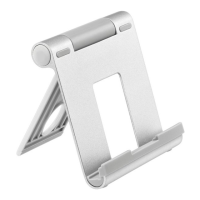
• Adjustable Tablet Stand
Quick Setup Guide
FEATURES
Fully adjustable up to 90° to give you an ideal
viewing angle
Aluminum body is durable and easy to clean
Locking stand securely holds your device
Compact, folding design for easy transport
COMPATIBILITY
For tablets and phones with up to 11" screens
Before using your new product, please read these instructions to prevent any damage.
QUICK SETUP GUIDE
Adjustable
Tablet Stand
NS-MTSA1 / NS-MTSA1-C
SETTING UP YOUR TABLET STAND
1 Press the button at the end of the roller and pull up
the back bracket to adjust the angle.
(With 0-135° adjustable angle)
Question and Answer IconNeed help?

Do you have a question about the Insignia NS-MTSA1 and is the answer not in the manual?

Summary

Setting Up Your Tablet Stand

Adjusting the Angle

Press the button at the end of the roller and pull up the back bracket to adjust the angle.

Placing Your Device

Place your tablet or phone on the stand.

Folding the Stand

Press the button and push down on the back bracket to fold it.

Important Safety Instructions

One-Year Limited Warranty

Contact Insignia

Specifications

Overview

This document describes the Insignia Adjustable Tablet Stand, models NS-MTSA1 and NS-MTSA1-C, a quick setup guide for a device designed to hold tablets and phones.

Function Description:

The Insignia Adjustable Tablet Stand is designed to provide a stable and customizable viewing platform for tablets and phones. Its primary function is to securely hold a device at various angles, enhancing user comfort and viewing experience. The stand is suitable for a wide range of devices, specifically those with screens up to 11 inches. Its adjustable nature allows users to find an ideal viewing angle, making it versatile for different activities such as watching videos, reading, or video calls. The locking mechanism ensures that the device remains securely in place once the desired angle is set.

Important Technical Specifications:

  • Dimensions (H×W×D): 4.3 × 4 × 1.4 inches (10.9 × 10.4 × 3.7 cm). These compact dimensions make the stand portable and easy to store.
  • Weight: 0.4 lb (190 g). The lightweight design further contributes to its portability.
  • Material: Constructed from aluminum, silicone, and plastic. The aluminum body provides durability, while silicone components likely offer anti-slip properties and protection for the device.
  • Maximum Device Thickness: Can accommodate devices up to 12 mm thick. This specification indicates that the stand can hold most tablets and phones, even those with protective cases.
  • Adjustable Angle Range: The stand offers an adjustable angle from 0 to 135 degrees. This wide range allows for significant flexibility in positioning the device for optimal viewing.

Usage Features:

  • Fully Adjustable: The stand can be adjusted up to 90 degrees, providing an ideal viewing angle for various scenarios. The full adjustable range is actually 0-135 degrees, offering extensive flexibility.
  • Easy Setup: Setting up the tablet stand involves a simple two-step process. First, to adjust the angle, the user presses a button at the end of the roller and pulls up the back bracket. This allows for precise angle adjustments. Second, to place a device, the user simply positions their tablet or phone on the stand.
  • Secure Holding: A locking stand mechanism is incorporated to securely hold the device in place, preventing accidental slips or falls.
  • Compact, Folding Design: The stand features a compact and folding design, which makes it easy to transport and store when not in use. To fold it, the user presses the button and pushes down on the back bracket.
  • Compatibility: Designed for use with tablets and phones with screens up to 11 inches, making it a versatile accessory for a broad range of mobile devices.

Maintenance Features:

  • Durable Aluminum Body: The aluminum construction ensures the stand is durable and resistant to wear and tear, contributing to a long product lifespan.
  • Easy to Clean: The aluminum body is also easy to clean, allowing users to maintain its appearance with minimal effort.
  • Anti-slip Silicone Pad: The stand includes an anti-slip silicone pad, which helps to keep the device stable and protected from scratches. Users are advised not to tear off this pad, as it is crucial for the stand's functionality and device protection.

Important Safety Instructions:

  • Do not attempt to disassemble this product: Users are cautioned against disassembling the stand, likely to prevent damage to the internal mechanisms or injury.
  • CAUTION: Don't pinch your fingers or your hand: Care should be taken during adjustment and folding to avoid pinching fingers or hands in the moving parts of the stand.
  • Don't tear off the anti-slip silicone pad: The silicone pad is an integral part of the stand's design, providing grip and protection for the device. Removing it would compromise these features.

The Insignia Adjustable Tablet Stand is a practical and user-friendly accessory, combining durability, adjustability, and portability to enhance the experience of using tablets and phones.

Insignia NS-MTSA1 Specifications

General IconGeneral
BrandInsignia
ModelNS-MTSA1
CategoryTablet Accessories
LanguageEnglish

Related product manuals