Need help?
Do you have a question about the insize 1113INS and is the answer not in the manual?
Alerts users to the caliper's waterproof limitations and proper cleaning agents.
Details resolution (0.01mm/0.0005") and accuracy (±0.03mm).
Identifies key parts of the digital caliper, including measuring jaws and buttons.
Explains the function of each button: in/mm, OFF/ON, ZERO, and data transfer.
Guides on cleaning, zeroing, applying consistent force, and auto power-off.
Instructions for battery installation, replacement, and precautions for long-term storage.
Specifies the recommended working temperature and humidity range.
Details FCC rules compliance, conditions, and interference mitigation.
States the device meets general RF exposure requirements for portable use.
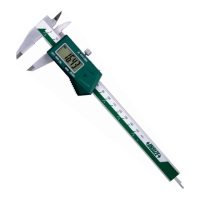
This document provides the operation instruction for the INSIZE Wireless Digital Caliper, a precision measuring tool designed for accurate length measurements. The caliper is equipped with a wireless data transfer function, allowing for convenient collection and transmission of measurement data.
The digital caliper is used for precise linear measurements, including external, internal, and depth measurements. It features a clear LCD display for easy reading of measurements in both millimeters and inches. The wireless capability enables seamless integration with data collection systems, enhancing efficiency in quality control and manufacturing processes.
To begin using the caliper, install a CR2032 battery. Remove the battery cover, insert the CR2032 battery with the positive side facing outwards, and then close the battery cover.
Before taking measurements, ensure the measuring faces are clean. Use a soft cloth to wipe them, then close the external jaws completely and press the 'ZERO' button to set the display to zero. Regular checks for proper zero setting are recommended to maintain accuracy.
For accurate measurements, it is crucial to apply constant and proper force on the caliper. The measuring jaws should "hold" the workpiece firmly while still allowing for slight sliding movement. This technique ensures consistent contact and reliable readings.
The caliper features an automatic power-off function that activates after approximately five minutes of inactivity to conserve battery life. To turn the display back on, simply press the 'OFF/ON' button or move the digital unit.
The caliper can be used with an optional receiver (code 7315-2, 7315-3, reference MN-7315R) for wireless data transmission. The receiver facilitates the collection of measurement data from the caliper, typically within a range of 6 meters. This setup allows for real-time data logging and analysis, which is beneficial in environments requiring continuous monitoring or automated data entry. The multichannel receiver (7315-2) can handle multiple data streams, making it suitable for setups with several calipers or other wireless measuring devices.
A single battery can last for approximately one year under normal use. When the battery is running low, the display may become weak, show abnormal readings, or exhibit other unusual phenomena when the digital unit is moved. In such cases, the battery should be removed and replaced.
If the caliper will not be used for more than three months, it is advisable to remove the battery. This prevents potential liquid leakage from the battery, which could damage the caliper's internal components and circuitry.
If the digits on the display do not change when buttons are pressed, it may indicate a temporary electronic glitch. To resolve this, take out the battery and reinsert it after one minute. This often resets the internal electronics and restores normal functionality.
The caliper is designed to operate within a temperature range of 0-40°C (32-104°F). It is important to use the device in an environment where the relative humidity does not exceed 80%. Operating outside these conditions may affect the caliper's performance and accuracy.
It is crucial to note that this caliper is not waterproof. Exposure to coolant or other reagents can cause incorrect or confused readings. If such substances come into contact with the sticker, they cannot be removed by ethanol. WD40 can be used to remove these substances, but prevention of contact is the best approach to maintain the caliper's integrity and accuracy.
The device complies with Part 15 of the FCC Rules, meaning its operation is subject to two conditions: it may not cause harmful interference, and it must accept any interference received, including interference that may cause undesired operation. Any changes or modifications not expressly approved by the party responsible for compliance could void the user's authority to operate the equipment.
The equipment has been tested and found to comply with the limits for a Class B digital device, providing reasonable protection against harmful interference in a residential installation. It generates, uses, and can radiate radio frequency energy. If it causes harmful interference to radio or television reception, users are encouraged to try measures such as reorienting the receiving antenna, increasing separation between equipment and receiver, connecting the equipment to a different circuit, or consulting a dealer/technician.
The device has been evaluated to meet general RF exposure requirements and can be used in portable exposure conditions without restriction.
 General
| Accuracy | ±0.03mm |
|---|---|
| Display | LCD |
| Material | Stainless Steel |
| Battery | Yes |
| Battery Life | Approx. 1 year |
| Measuring Range | 0-150mm |
| Resolution | 0.01mm |
| Operating Temperature | 0°C to 40°C |
| Display Type | Digital |


 To Next Page