
 Need help?
Do you have a question about the Inspur 3008 Series and is the answer not in the manual?
Explains core RAID functionalities and benefits.
Details various RAID levels (0, 1, 5, 6, 10, 1E, 50, 60) and characteristics.
Describes RAID 0 (striping), focusing on performance benefits.
Explains RAID 1 (mirroring), highlighting reliability and capacity.
Details RAID 5, using parity for data distribution and fault tolerance.
Describes RAID 6, featuring double parity for enhanced data reliability.
Explains RAID 10, a combination of RAID 1 and 0 for performance and protection.
Details RAID 1E, an enhanced RAID 1 with striping and mirroring.
Describes RAID 50, a combination of RAID 5 and 0 for improved security/performance.
Explains RAID 60, a combination of RAID 6 and 0 for data security/performance.
Lists technical and environmental parameters for SAS RAID controller cards.
Provides recommended RAID configurations for HDDs and SSDs.
Details optimal performance settings for HDDs with a super-capacitor.
Details optimal performance settings for HDDs without a super-capacitor.
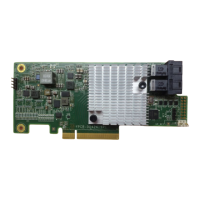
Describes appearance, features, and capabilities of the Inspur SAS3008IR/IT controller.
Outlines specific technical limitations for the SAS3008IR controller.
Details environmental specifications for SAS RAID controller cards.
Guides users through initial setup and configuration in Legacy mode.
Instructions to access and navigate the Configuration Utility (CU) screen.
Step-by-step guide on creating RAID arrays (RAID 0, 1, 10/1E).
Details on configuring RAID arrays, including global hot spare drives.
Provides instructions for configuring the controller in UEFI mode.
Steps to access the configuration interface in UEFI mode.
Guides on creating RAID arrays (0, 1, 1E, 10) within the UEFI environment.
Explains configuring RAID arrays, including hot spare drives, in UEFI mode.
Step-by-step guide to load RAID controller driver during Windows OS installation.
Instructions for loading RAID controller driver during Red Hat Linux installation.
Procedure for loading RAID controller driver during SUSE Linux installation.
Guidance on merging driver files with images for VMware installation.
Information and steps for preparing to contact Inspur support.
Guidance on using provided documentation for technical support.
Provides contact information and methods for reaching Inspur technical support.
Defines key terms and acronyms used in the manual.
 General
| Interface | PCIe 3.0 x8 |
|---|---|
| RAID Levels | 0, 1, 5, 6, 10, 50, 60 |
| Max Supported Devices | 256 |
| Category | Controller |
| Ports | 8 internal |
| Supported Devices | SAS, SATA HDD/SSD |
| Operating Temperature | 0°C to 55°C |
| Storage Temperature | -40°C to 70°C |

 To Next Page