EasyManua.ls Logo

Instapark PWT-7D - User Manual

Instapark PWT-7D
2 pages
Print Icon
To Next Page IconTo Next Page
Loading...
PWT-7D MANUAL
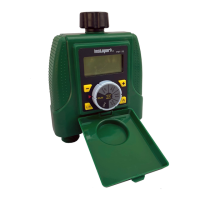
TWO OUTLET ELECTRONIC WATER TIMER
For watering use with outdoor home water faucet only. Do not use indoor or with appliance. Use only with pressures of 60
PSI (4 BAR) max. Do not use with water exceeding 100°F (38°C). Do not use on outlet with “Y” connectors or other hose
accessories. Detach and drain before freezing weather season.
INSTALLING THE BATTERIES
Remove the tray from the back of the timer by sliding it out
Insert 2 AA (1.5V) alkaline batteries (not included) onto the battery tray, then
reinsert the tray to the back of the timer.
• Replace battery every year, when low battery is indicated on the screen or when
long unattended use.
PROGRAMMING THE TIMER
• Rotate the dial to the positions indicated for setup
• Press L/R button to switch between the left and the right outlet for programming
To maintain water pressure both Left and Right outlets will not operate concurrently, it will only work one side at a time.
Note: The dial should be in the RUN position for the timer to operate (Programed Mode or Manual Mode)
SET CLOCK
Rotate the dial to SET CLOCK
Press the + or button to advance or reverse the clock time
(Hold the button to advance the timer quicker)
START TIME
Rotate the dial to START TIME
Press L/R to choose left or right valve
Press the + or button to set the start time (hold the button to advance the time quicker)
HOW LONG
Rotate the dial to HOW LONG
Press the + or button to set the length of the watering time (1 MIN up to 360 MINS)
HOW OFTEN
It allows you to set the program to repeat from 1HR, 2HRS, 4HRS, 12 HRS
and 1-7 days.
Rotate the dial to HOW OFTEN
Press the + or button to set the frequency
Question and Answer IconNeed help?

Do you have a question about the Instapark PWT-7D and is the answer not in the manual?

Summary

Installing the Batteries

Programming the Timer

Set Clock

Rotate dial to SET CLOCK and use +/- buttons to adjust time.

Start Time

Rotate dial to START TIME, select valve, and use +/- buttons to set time.

How Long

Rotate dial to HOW LONG and use +/- buttons to set watering duration.

How Often

Rotate dial to HOW OFTEN and use +/- buttons to set watering frequency.

Timer Operation Modes

Run Mode

Rotate dial to RUN; timer waters per programmed settings. Dial must stay in RUN.

Manual Watering

Set dial to RUN, press buttons for instant watering duration.

Off Mode

Turning dial to OFF immediately stops any watering.

Advanced Features and Setup

Rain Delay

Press '+' in RUN mode for 24-hour delay. Can be set for 0, 24, 48, 72 hours.

Installation

Attach timer to faucet after programming and turn faucet on.

Troubleshooting

No Display

Check battery installation and charge level if the display is blank.

Watering Issues

Verify dial position, faucet, clock, battery, programming, and rain delay settings.

Water Wont Turn Off

Ensure duration is set correctly, manual mode is off, and batteries are not drained.

Instapark PWT-7D Specifications

General IconGeneral
ModelPWT-7D
TypeDigital Timer
Outlets1
Timer Modes7-day programmable
Battery BackupYes
DisplayLCD
Maximum Load15A, 1800W