16
> Before Start > Part Names >Install > Initial Setup > Playback
Advanced Setup | Firmware Update | Others
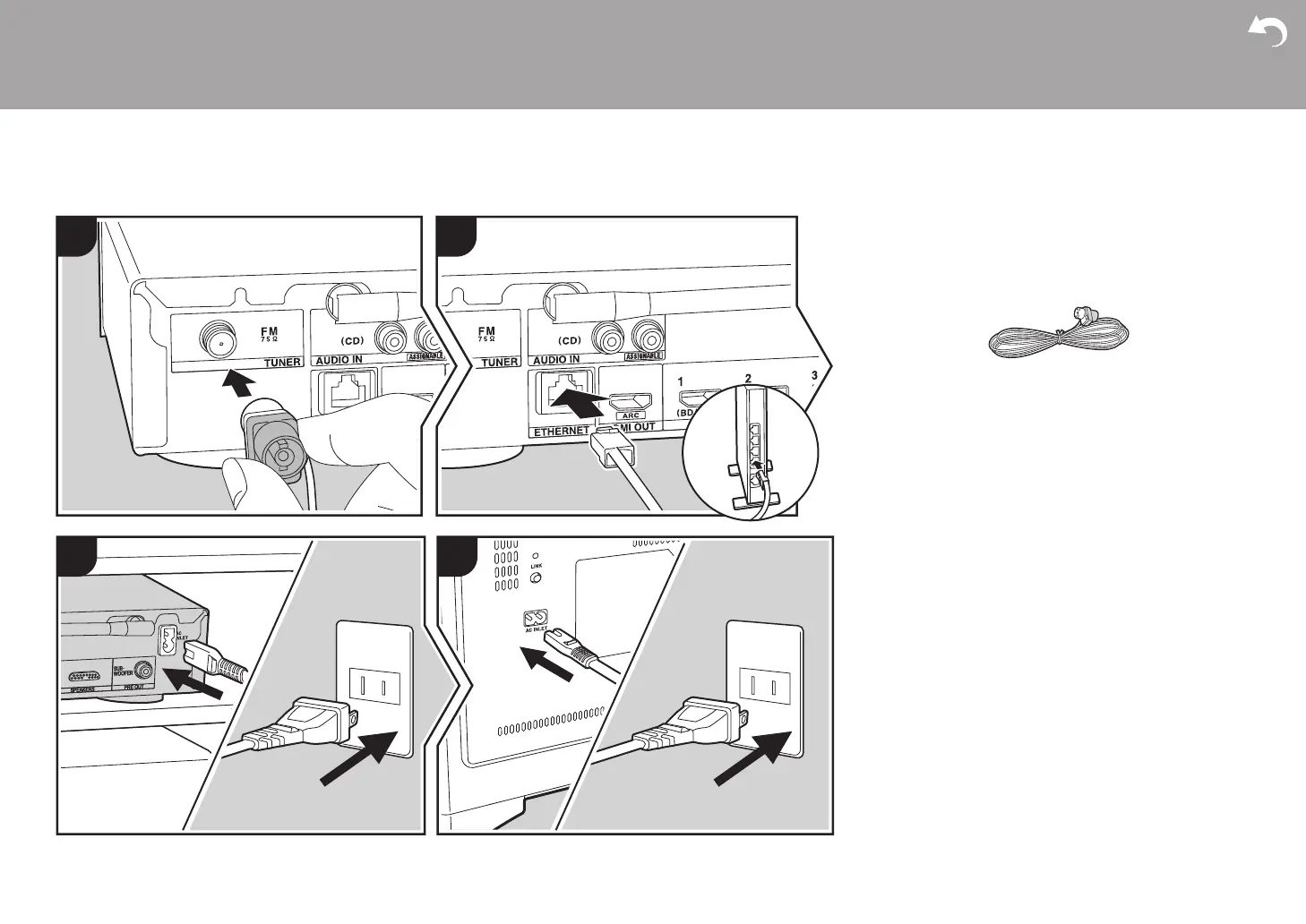
5. Connect Other Cables
a FM indoor antenna, b Ethernet cable、c Power cord (for main unit), d Power cord (for subwoofer)
Antenna Hookup
Connect the supplied FM indoor antenna to the TUNER FM
75Ω terminal. Move the FM indoor antenna around while
playing the radio to find the position with the best reception.
Network Hookup
Connect this unit to the network using wired LAN or Wi-Fi
(wireless LAN). You can enjoy network features such as
internet radio by connecting the unit to the network. If you
connect by wired LAN, connect with an Ethernet cable to the
ETHERNET port as shown in the illustration. To connect by
Wi-Fi, then after selecting "Wireless" in "3. Network
Connection" (ÄP18) in Initial Setup, select the desired
setting method and follow the onscreen instructions to
configure the connection.
Power Cord Hookup
This unit includes removable power cords. Connect the
power cords to the power outlet after completing all other
connections. Connect the power cords to AC INLET of the
unit and then connect to the outlet. Always disconnect the
outlet side first when disconnecting the power cord.


 To Next Page