English
Controls and Indicators
- 8 -
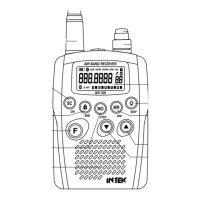
7. MR (Memory Read) / MW (Memory Write) Key
This receiver contains a total of 99 memory locations for each Air band, VHF FM band and
WFM band where desired frequencies can be programmed by the user. Programming of the
desired frequencies can be carried our in the following ways for each band. Please refer to
MEMORY OPERATION at page 12.
8. Charge Jack
Connect the supplied 230VAC battery travel charger to this jack.
9. UP Key
The UP key (9) is used to change frequency, memory channel and toggle setting for the other
selected functions.
10. DOWN Key
The DOWN key (10) is used to change frequency, memory channel and toggle setting for the
other selected functions.
11. Built-in Speaker
Built-in front speaker.
12. MO / STEP Key
MONITOR FUNCTION
Quickly press the MO/STEP key (12) to activate the Monitor function. This function opens
Squelch in order to listen to the background noise and weak signals. When the Squelch is open,
the B Icon (O) is lighted on the LCD display.
FREQUENCY STEP SELECTION
You could preset the channel steps value for each band listed below :
Air Band channel steps: 12.5 KHz, 25 KHz and 8.3 KHz
VHF Band channel steps: 5 KHz, 10 KHz, 12.5 KHz, 15 KHz, 20 KHz, 25 KHz and 50 KHz.
WFM Band: No channel step. It is fixed at 100 KHz.
To select the desired frequency step, please proceed as follows :
Press the F (13) and MO/STEP key (12); the LCD display will show the CS indication and the
selected frequency step. Press the UP (9) or DOWN (10) keys to select the desired frequency
step then press MO key (12) to confirm. After preset, when you press the UP (9) or DOWN (10)
keys, the frequency will move up or down in the selected channel step value.


 To Next Page