The IntelliClear 800 is an 800 GPD (Gallons Per Day) under-sink tankless reverse osmosis water purifier equipped with a digital dual faucet. It is designed to filter and improve the quality of tap water from the mains water supply, providing clean and safe drinking water for domestic use. The system is tested and certified by NSF against NSF/ANSI Standard 58 for TDS (Total Dissolved Solids) reduction.
Function Description:
The IntelliClear 800 utilizes advanced multistage dual cell filtration to remove contaminants from water. The filtration process includes:
- Sediment Filter: Traps large sediment particles such as sand, dirt, silt, and rust.
- Active Carbon Filter: Separates volatile organic carbon compounds, pesticides, and chemicals.
- High Precision PP Filter: Removes fine particles from tap water.
- Reverse Osmosis Filter: Eliminates up to 99% of common drinking water contaminants by forcing water molecules through a membrane, filtering out contaminants and flushing them away.
- Carbon Block Filter: Improves drinking water taste and gets rid of odors.
The system is designed to fit under most kitchen and wet-bar sinks and can also feed multiple dispensers and ice machines. It operates with a digital smart faucet that provides real-time information about the system's status.
Important Technical Specifications:
- Rated Voltage: 100-240V AC
- Rated Frequency: 50/60Hz
- Rated Current: 1.5 A
- Power Consumption: 80 W
- Protection Class: Class II
- Inlet Water Source: Municipal tap water
- Inlet Water Pressure: 14-100 psi
- Operating and Storage Temperature: 40-100 °F (4-38 °C)
- RO Filter Life Cycle: 24 months or 1710 gallons (6500 liters)
- PCB Filter Life Cycle: 12 months or 950 gallons (3600 liters)
- Inlet Water Temperature: 40-100 °F (4-38 °C)
- Product Dimensions (H x W x D): 18.1 x 5.2 x 16.5" (460 x 132 x 420 mm)
- Gross Weight: 29.3 lbs (13.3 kg)
- Net Weight: 26 lbs (11.8 kg)
- Recommended Water Quality:
- Total Dissolved Solids (TDS): up to 750 ppm
- Turbidity: up to 1 NTU
- Inlet water pressure: 14-100 psi
- Inlet water temperature: 40-100 °F (4-38 °C)
The system requires a 110-240V, 50/60 Hz, AC only, 15 A or 20 A fused, grounded electrical supply. A separate circuit is recommended, and the outlet should not be controlled by a switch. An extension cord should not be used.
Usage Features:
The IntelliClear 800 is designed for ease of use with its digital smart faucet and quick-connect fittings.
- Digital Smart Faucet Display: The faucet features a display that shows the filter's status, TDS IN/OUT readings, and system messages.
- Upon power-on, all indicators flash 5 times.
- When the faucet is off and the system is powered on, the screen displays the filter's status. After 1 minute of no operation, it switches to standby mode.
- Filter Life Reminder: The display shows the remaining life of the filter. As the filter is used, segments of a ring light turn off, indicating approximate remaining life. When the filter expires, the ring light turns off, the filter replacement indicator turns red, and "Filter" flashes on the screen.
- Malfunction Display: Error codes like "E9" (faucet not receiving data), "E6" (system continuously working for over 40 minutes, indicating timeout protection), and "EA" (abnormal TDS display) are shown on the screen to alert the user to potential issues.
- Buttons:
- Power Button: To switch the product on/off.
- Reset Button: Used after replacing filters to reset the filter life indicator.
- Flush Button: Initiates a flush cycle for newly installed filters.
- Signals:
- Filter Indicator Lights: Blink when it's time to change RO or PCB filters.
- Power Indicator Light: Illuminates when the filtration system is on and functioning.
- Modes:
- Stand-by Mode: Automatically activated after 3 hours of non-use. The system resumes operation when the faucet is used.
- Safety Mode: Automatically switches off if water runs continuously for 30 minutes. To reset, close the faucet, turn off power, switch the product on.
- Auto-cleaning Mode: The product enters this mode for 25 seconds during startup to clean the filters.
- Quick-Connect Fittings: All PE-tubes connect using quick-connect fittings, simplifying installation and replacement. A locking clip secures the connection.
- Startup Procedure: After connecting the adapter and faucet, press the power button. The system will blink indicators and beep, then enter a 25-second auto-cleaning mode. It is recommended to flush the filters by running water through the faucet for at least 20 minutes before first use.
Maintenance Features:
Regular maintenance, primarily filter replacement, is crucial for optimal performance and water quality.
- Filter Replacement Intervals: General filter replacement is recommended every 12 months, though this may vary based on water usage and source water quality. The RO filter life cycle is 24 months or 1710 gallons, and the PCB filter life cycle is 12 months or 950 gallons.
- Filter Life Indicators: The corresponding indicator lights for the RO or PCB filters will blink when replacement is needed. Changes in water taste, odor, color, or flow rate also indicate a need for filter replacement.
- Replacement Process:
- Close the 3-way valve and disconnect the power plug.
- Open the faucet to release pressure.
- Remove the main unit cover.
- Grasp the handle of the expired filter and rotate counterclockwise to unlock and remove it.
- Insert the new filter, rotating clockwise to lock it in place, then snap the cover back on.
- Close the faucet, open the 3-way valve, and reconnect the power.
- Press the power button to switch on the product. The system will undergo a 25-second auto-cleaning cycle.
- Prompted Filter Replacement: After startup, press and hold the Reset button for 3 seconds until a beep is heard.
- Manual Filter Replacement: If replacing a specific filter manually, press the Reset button to select the blinking indicator for the filter to be replaced. Hold the Reset button for 3 seconds until a beep is heard, and the indicator remains on.
- Flush the new filter by running water through the faucet for at least 20 minutes.
- Cleaning: Do not use abrasive or harsh cleaners, window sprays, scouring cleansers, flammable fluids, cleaning waxes, concentrated detergents, bleaches, or petroleum-based cleansers on plastic parts. Avoid paper towels, scouring pads, or other harsh cleaning tools to prevent scratches.
- Troubleshooting: The manual provides solutions for common issues such as decreased flow, changes in water taste, high TDS levels, leaks, and no purified water output. This includes checking valve positions, filter status, and connections, as well as resetting the leakage detector.
- Warranty: The product comes with a 1-year limited warranty covering defects in material and workmanship from the date of original purchase. The warranty is void if the product is used for purposes other than single-family household use or subjected to incorrect voltage/waveform.
The IntelliClear 800 is designed for indoor use only and should be installed and maintained by an experienced adult following plumbing and electrical codes. It is not intended for use with microbiologically unsafe water or water from unknown sources.

 Need help?
 General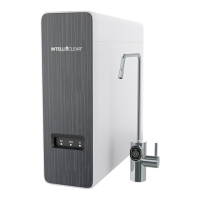

 To Next Page