Quad Inverter Manual
Most modules will come with the cable already connected but it’s a good idea to double check
the orientation before proceeding. Be aware that some modules may have headers that serve
other purposes so ensure the cable is connected to the right one.
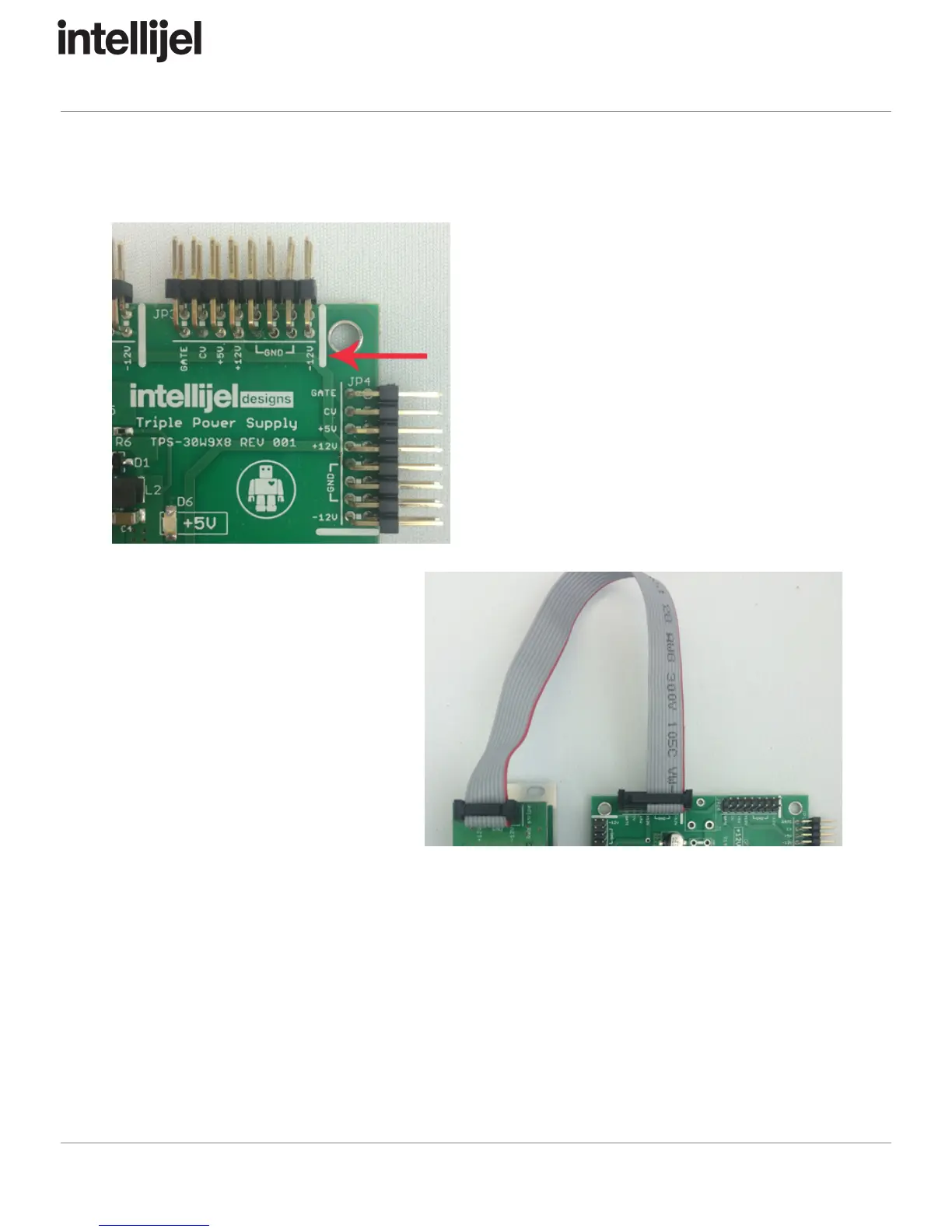
The other end of the cable, with a 16-pin
connector, connects to the power bus board of
your Eurorack case. Ensure the red stripe on the
cable lines up with the -12V pins on the bus
board. On Intellijel power supplies the pins are
labelled with the words “-12V” and a thick white
stripe.
If you are using another manufacturer’s power
supply, check their documentation for
instructions.
Once connected, the cabling between
a module and power supply should
resemble the photo shown to the right.
Before reconnecting power and turning
on your modular system, double check
that the ribbon cable is fully seated on
both ends and that all the pins are
correctly aligned. If the pins are
misaligned in any direction or the
ribbon is backwards you can cause
damage to your module, power supply,
or other modules.
After you have confirmed all the connections, you can reconnect the power cable and turn on
your modular system. You should immediately check that all your modules have powered on
and are functioning correctly. If you notice any anomalies, turn your system off right away and
check your cabling again for mistakes.
Page 2


 To Next Page
 Loading...