Quad Inverter Manual
Installation
Intellijel Eurorack modules are designed to be used with a Eurorack-compatible case and power
supply.
Before Your Start
Before installing a new module in your case you must ensure your case’s power supply has
sufficient available capacity to power the module:
● Sum up the specified +12V current draw for all modules, including the new one. Do the
same for the -12 V and +5V current draw. The current draw will be specified in the
manufacturer's technical specifications for each module.
● Compare each of the sums to specifications for your case’s power supply.
● Only proceed with installation if none of the values exceeds the power supply’s
specifications. Otherwise you must remove modules to free up capacity or upgrade your
power supply.
You will also need to ensure you have enough free space (hp) as well as free power headers in
your case to fit the new module.
You can use a tool like ModularGrid to assist in your planning. Failure to adequately power your
modules may result in damage to your modules or power supply. If you are unsure, please
contact us before proceeding.
Installing Your Module
When installing or removing a module from your
case always turn off the power to the case and
disconnect the power cable. Failure to do so
may result in serious injury or equipment
damage.
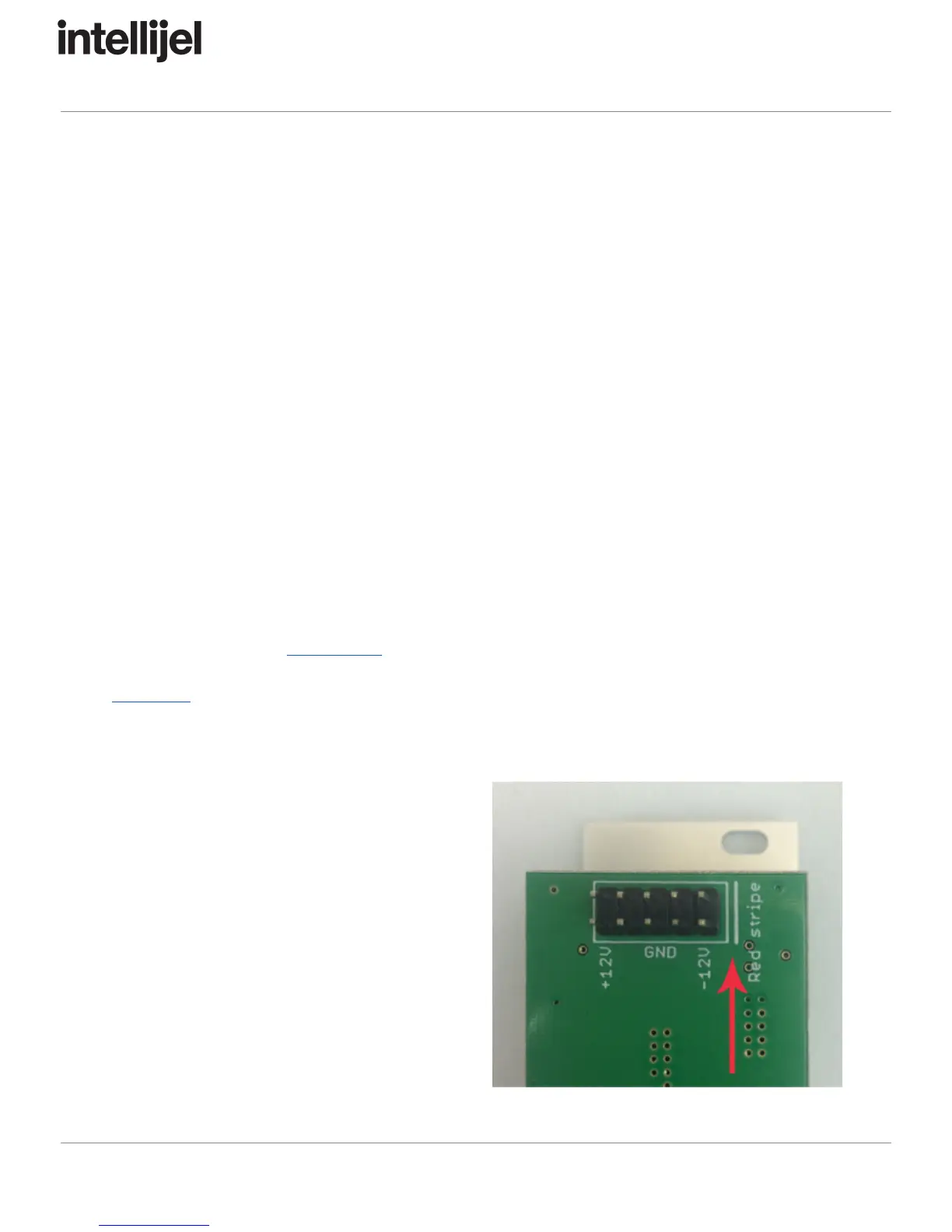
Ensure the 10-pin connector on the power cable
is connected correctly to the module before
proceeding. The red stripe on the cable must
line up with the -12V pins on the module’s
power connector. The pins are indicated with
the label -12V, a white stripe next to the
connector, the words “red stripe”, or some
combination of those indicators.
Page 1



 To Next Page
 Loading...