
 Need help?
Do you have a question about the Intellitec LPL822 and is the answer not in the manual?
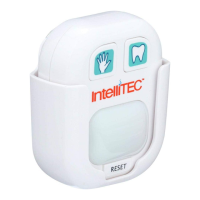
Identifies the Wash Button, Brush Button, LED Light, Reset Button, Mounting Bracket, and Battery Compartment.
Instructions for the 20-second handwashing cycle, including visual cues and completion signal.
Instructions for the 2-minute teeth brushing cycle, including progress indication and completion signal.
Steps for attaching the timer to a surface using the included hook and loop tape.
Instructions on how to secure the timer mounting bracket using a screw.
Guide for using the suction cup to attach the mounting bracket to smooth surfaces.
Guide for inserting and replacing the 3 AAA batteries in the timer.
Safety guidelines and important precautions for battery usage and handling.
Details the device's compliance with FCC rules and potential interference guidelines.
Information on where to find answers to common questions and support.
Details regarding the product's 2-year limited warranty and return/repair process.
The IntelliTEC™ LED "WASH & BRUSH" TIMER, model LPL822, is a personal hygiene timer designed to encourage proper hand washing and teeth brushing durations. This device features a compact design with clearly labeled controls and multiple mounting options for user convenience.
The primary function of the LPL822 is to provide timed guidance for two common hygiene tasks: hand washing and teeth brushing. It utilizes an LED light to indicate progress and completion of the timed cycles.
For Washing (20 Seconds):
For Brushing (2 Minutes):
A "Reset Button" is provided to correct accidental button presses, allowing the user to restart the unit.
The LPL822 offers versatile mounting options to suit various bathroom environments:
Hook and Loop Tape (Included):
Screw (Included):
Suction Cup (Included):
The device complies with Part 15 of the FCC Rules, ensuring it does not cause harmful interference and accepts any received interference. Users are advised that modifications not approved by the responsible party could void their authority to operate the product. Troubleshooting steps for interference include reorienting the antenna, increasing separation between equipment and receiver, connecting to a different circuit, or consulting a radio/TV technician.
For warranty details and directions on repair or replacement, users should visit www.lancerandloader.com. For recently purchased items, returning to the retailer is the quickest option, as return policies vary by retailer.
The IntelliTEC™ LED "WASH & BRUSH" TIMER is a user-friendly device designed to promote better hygiene habits through simple, visual timing cues and flexible installation options.
 General
| Brand | Intellitec |
|---|---|
| Model | LPL822 |
| Category | Timer |
| Language | English |

 To Next Page