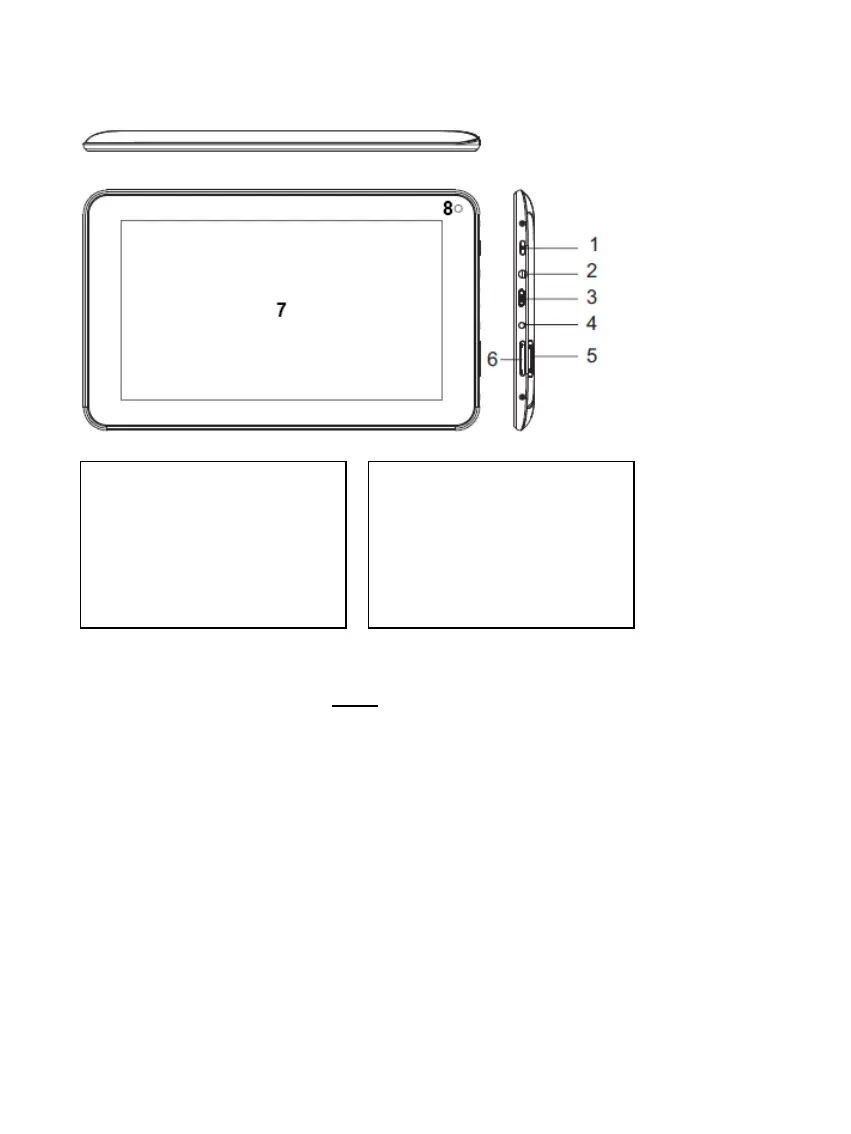
4.) Device overview
5.) Charging the battery
Please charge the battery completely before first use of the device. Connect the included
power adapter to the device and a power outlet. The full charge takes approximately 5 hours.
The charge condition will be displayed you during operation. In case of an active display lock, the
actual charge condition will be displayed you in percentage.
If the equipment is switched off, if you press shortly a key in any order a battery symbol will be shown
on the display. During the charge process by an animation the filling of the battery will be displayed in
many levels. If the battery is fully loaded, the animation will stop and the battery will be displayed
completely.
6.) Using a Micro SD/SDHC Card
This device is able to read data directly from a Micro SD/SDHC memory card.
In order to use a Micro SD/SDHC memory card, slide the card into the opening provided at the
bottom of the device (I). Use the pre-installed Explorer (more information is to be found in the
extensive operating instructions), to be able to access the data provided on the memory card. For
this, please select the “SD Card“ in the index of the Explorer.
1.) On / Off button: Press and
hold to turn the unit off, press
briefly to switch between
standby and active mode
2.) 3.5mm headphone jack
3.) Micro USB Socket
4.) DC 5V 2A input
5.) Micro SD Card slot
6.) Volume +/-
7.) Touchscreen
8.) Front Camera



 To Next Page
 Loading...