Need help?
Do you have a question about the Intenso Video Scooter and is the answer not in the manual?
Step-by-step instructions for connecting the player to a PC using a USB cable for file transfer.
Safe procedures for disconnecting the player from a computer to prevent data loss.
Details how to charge the device's internal battery via USB connection to a PC.
Explains how to view the current battery charge level on the device screen.
Describes using the player while it is charging and viewing charge status during operation.
Covers basic functions like powering the device on/off and using the key lock feature.
Instructions for playing music, navigating music files and folders, and using the A-B loop.
Guide to playing video files, including format requirements and playback controls.
How to view photos, including slideshow options and navigating photo folders.
Steps for using the device's recording feature, saving, and playing back audio recordings.
How to browse, manage, and delete files and folders on the memory card.
Accessing device settings for music, recording, display, language, system, and other configurations.
 General
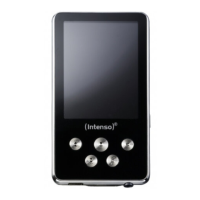
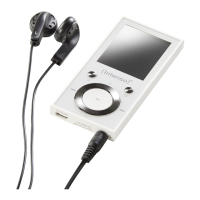
| Type | MP3 player |
|---|---|
| Product color | Pink |
| LED indicators | Yes |
| Player media type | Flash memory |
| Video memory capacity | - h |
| Total storage capacity | 8 GB |
| Compatible memory cards | MicroSD (TransFlash) |
| Music memory capacity (songs) | - |
| Display diagonal | 1.8 \ |
| Audio formats supported | MP3, WMA |
| Image formats supported | JPG |
| Video formats supported | AVI |
| Headphone frequency | 20 - 20000 Hz |
| Headphone connectivity | 3.5 mm |
| MP3 bit rates | 32 - 320 Kbit/s |
| Equalizer bands quantity | 9 |
| Interface | USB 2.0 |
| Battery capacity | 150 mAh |
| Continuous audio playback time | 8 h |
| Cables included | USB |
| Operating temperature (T-T) | 0 - 40 °C |
| Resolution | 160 x 120 pixels |
 Weight and Dimensions
| Depth | 9 mm |
|---|---|
| Width | 42 mm |
| Height | 91 mm |
| Weight | 28 g |


 To Next Page