Item No. 8105095 – 12/2013 Page 5 of 5
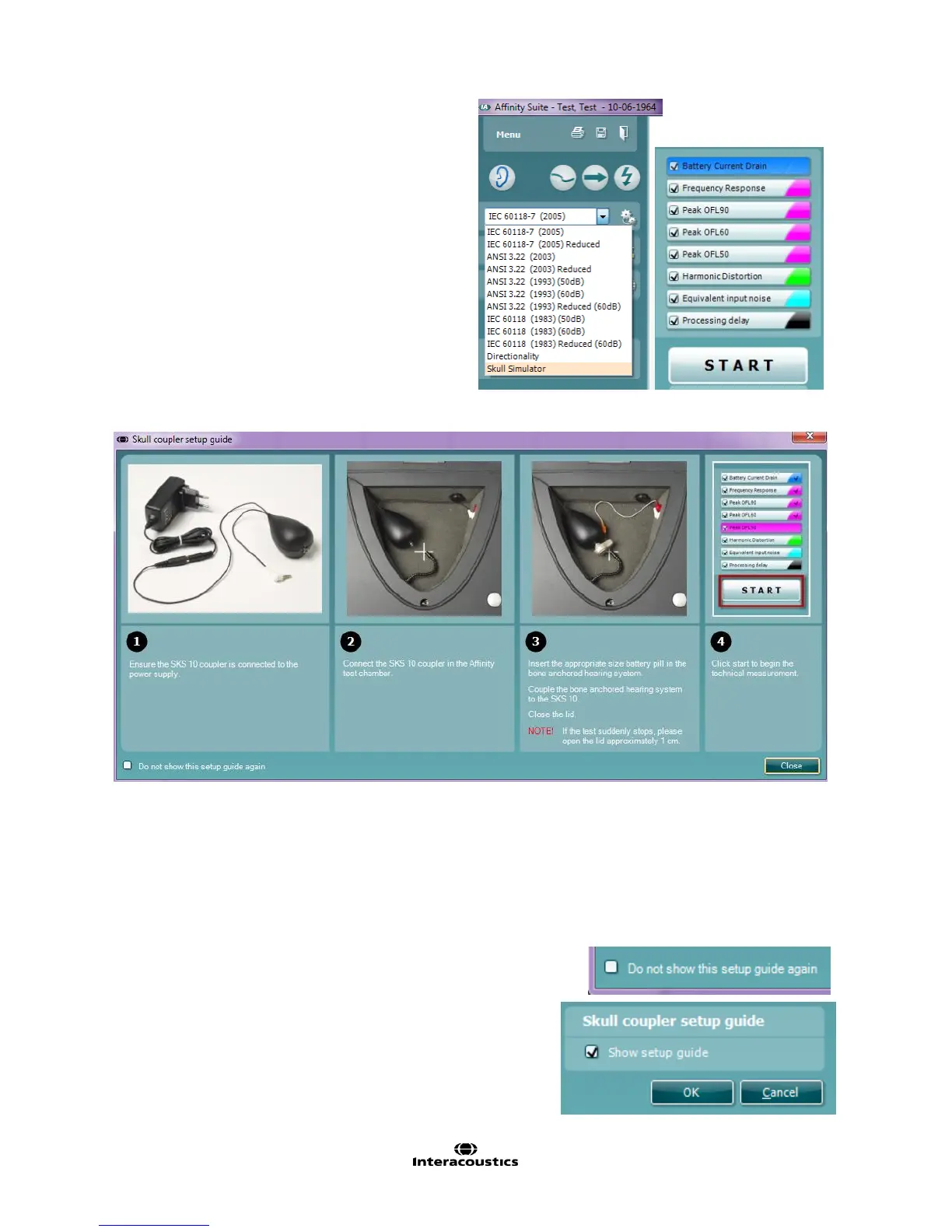
10. Choose a test protocol from the drop down menu.
11. Click START to begin the test.
NOTE: The Affinity
2
has a default Skull Simulator protocol,
which takes element from the ANSI standard for Hearing
Instruments. This protocol can easily be edited or modified
in the setup menu of the HIT module. It is also possible to
create your own protocol.
Skull Simulator Setup Guide in the Affinity
2
1. The setup guide window will appear as soon as the skull simulator protocol is chosen. To deactivate it,
insert checkmark in the “Do not show this setup guide again” box.
2. To re-initiate the Skull Coupler Setup Guide startup window, go to Menu/Setup/General Setup and insert
checkmark in the “Show setup guide” box.
For further information on the SKS10 and creating or customising protocols, please refer to the Interacoustics Additional
Information document.
For further information on how to setup the bone anchored device, please refer
to the respective bone anchored hearing device manufacturers’ product
information documents.



 To Next Page