EasyManua.ls Logo

Intermatic DT200LT - User Manual

Intermatic DT200LT
4 pages
Print Icon
To Next Page IconTo Next Page
Loading...
7777 Winn Road
Spring Grove, Illinois 60081
www.intermatic.com
Digital Landscape Timer
MODEL DT200LT
for use in Low Voltage Transformers up to 1200 W
SAFETY SECTION
WARNING
Risk of Fire or Electrical Shock
Do Not use the timer to control devices that could have dangerous consequences due to inaccurate timing, such as sun lamps, saunas, heaters, crock pots, etc.
Unplug the timer before replacing batteries.
Do Not use to control receptacles.
Installation should be in accordance with national and local electrical code requirements.
NOTICE
Dispose of product per local regulations for disposal of used batteries.
PRODUCT DESCRIPTION
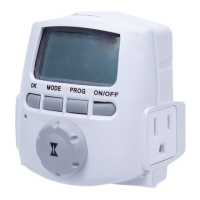
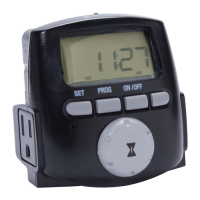
The Intermatic DT200LT Digital Landscape Timer is a simple-to-use landscape timer to be used with low voltage transformers
up to 1200 W in order to control landscape lighting. This timer supports pre-programmed dawn/dusk times or one set of
custom ON/OFF times.
Specications
Output
15 A Resistive, 120 VAC
12 A Inductive, 120 VAC
1000 W, 120 VAC
1/2 HP, 120 VAC
Input
120 VAC, 60 Hz, 2.5W max
Operating Temperature
-40°F to 122°F (-40°C to 50°C), for 1200 W, 120 VAC
Batteries
Two LR44 batteries that keep time and settings for up
to three months without power
TIMER OVERVIEW
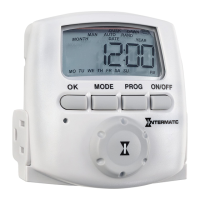
Item Description Item Description
A Battery Holder H Selector Knob
B Low Battery Indicator I Reset Button
C Time of Day Display J Day of the Week Display
D SET Button K Mode Display
E PROG Button L ON/OFF Indicator Light
F ON/OFF Button M Battery Pull Tab
G Grounded Outlet (2)

Questions and Answers

  • C
    Curtis SmithJul 28, 2025
    Why does my Intermatic Timer show ON, but the light is off?
    • J
      jeffreyvillegasJul 28, 2025
      The light or controlled device itself may be switched off, or the light bulb may be burned out. Ensure the light or controlled device is switched on and plugged in. If not, replace the light bulb.
  • E
    Erika MurphyAug 4, 2025
    What to do if Intermatic DT200LT switches at the incorrect times?
    • C
      Carolyn PriceAug 4, 2025
      If your Intermatic Timer switches at the incorrect times or skips programmed times, the programmed schedule(s) may be incorrect. Review the settings by pressing PROG and revise them as necessary.
  • T
    Tammy PerezAug 12, 2025
    What to do if my Intermatic DT200LT Timer doesn't match the programmed ON/OFF status?
    • D
      Darlene SharpAug 12, 2025
      The timer does not “catch up” automatically to the programmed load state. The status of the timer will remain as is until it comes to the next programmed ON/OFF time. After programming your events or the time, push the ON/OFF button to change the load state, if necessary.
  • L
    Lawrence SantiagoAug 20, 2025
    How to fix a Intermatic Timer with a battery symbol always showing?
    • J
      Jessica DennisAug 20, 2025
      The batteries are either low, not installed, not installed correctly, still have the pull tab, or have poor contact in the battery holder. Here's what to check: * Remove the pull tab, if present. * Verify the battery polarity per the outline on the inside or “+/-” on the outside of the battery holder. * Bend the contacts of the battery holder to touch the batteries firmly. * Replace both batteries. Use two type LR44 or A76.

Summary

Safety Section

Risk of Fire or Electrical Shock

Important warnings regarding electrical hazards and proper disposal of batteries when using the timer.

Product Description

Timer Overview

Initial Setup

Overview

Initial steps required before setting up the timer: enabling the battery and setting time, date, and location.

Enabling the Battery

Instructions for removing the battery pull tab and ensuring the timer display is ready for initial setup.

Setting the Time, Date, and Location

Step-by-step guide to program the timer's time, year, month, date, daylight saving, state, time zone, and offsets.

Programming

Changing the Pre-Programmed Dusk (ON) Time

Procedure to adjust the pre-programmed dusk ON time to a custom ON time for landscape lighting.

Changing the Pre-Programmed Dawn (OFF) Time

Procedure to adjust the pre-programmed dawn OFF time to a custom OFF time for landscape lighting.

Performing a Factory Reset

Operation

Optional - Overriding the Programmed ON;OFF Times

How to manually override programmed ON/OFF times by pressing the ON/OFF button.

Operating the Timer

Instructions for plugging in the timer and connecting landscape lighting or transformers to the outlets.

Battery Maintenance

Guidance on replacing LR44 batteries, low battery indicators, and preserving settings during battery changes.

Limited One-Year Warranty

Troubleshooting Guide

Intermatic DT200LT Specifications

General IconGeneral
BrandIntermatic
ModelDT200LT
CategoryTimer
LanguageEnglish

Related product manuals