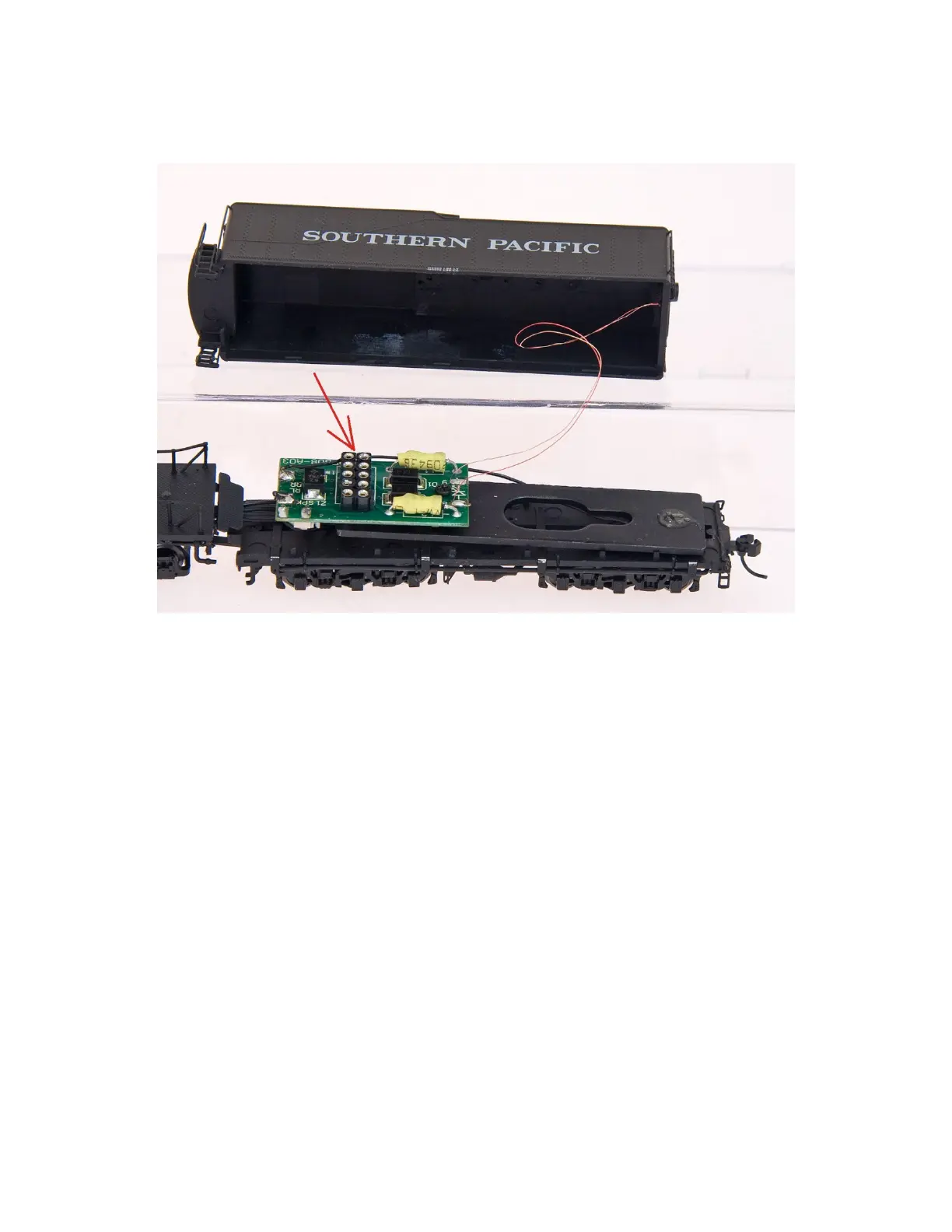
4.Remove the NMRA dummy plug and plug in your decoder. Align Pin-1 from the decoder (orange wire) to
Pin-1 on the plug (marked with a *1). Backwards installation of the decoder is harmless and will only result
in the locomotive operating opposite to the direction indicator on your DCC system.
5.Replace the tender body.
Operating the DCC Equipped Locomotive with a qualified NMRA Command Station:
•Select the factory default locomotive address. (Address 3 with most brands of decoders)
•Set the controller to the preferred speed-step range.
•To Accelerate: Advance the throttle control slowly until the locomotive moves forward. Adjust the throttle as
required to achieve the desired speed.
•To Decelerate: Reduce the throttle control slowly. Adjust the throttle to achieve the desired speed.
•To Stop: Reduce the throttle control slowly to the Zero/Stop position.
•To Reverse or Change Direction: With the throttle in the Zero/Stop position, change the direction control to
reverse or opposite position. Then accelerate, decelerate, and stop as described above.
Important Notes:
•NEVER Reverse or Change direction while the locomotive is moving to avoid damaging driveline
components.
•Avoid rapid throttle changes and abrupt stops to reduce excessive strain on driveline components.
AC-12 LokSound Documentation Insert - V2.3.odt
5


 To Next Page
 Loading...