55
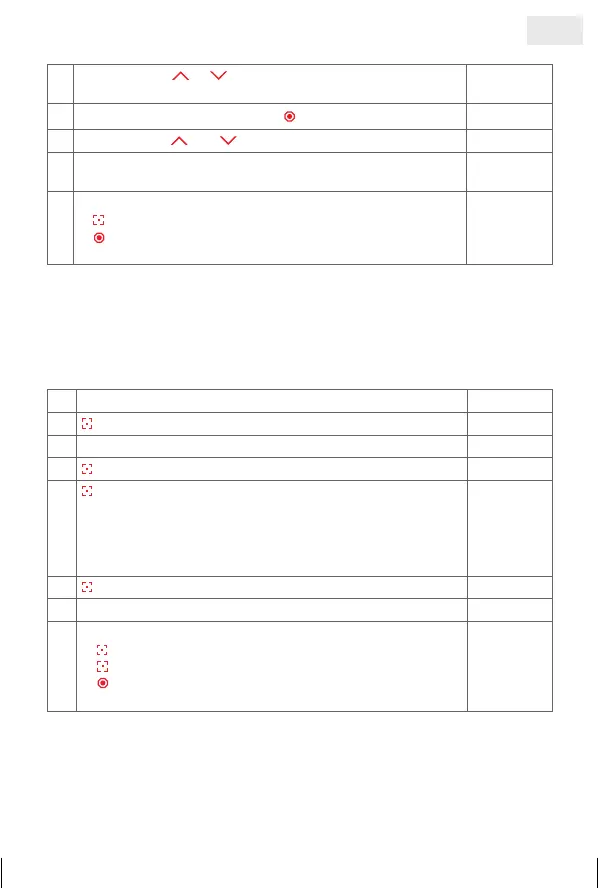
1. Individual fixed position of blind
1.
Move with key
or to required end position and move
to required slat position
2.
Open cover of base element –
press and hold
©©££
3. Press buttons and at the same time
ªªªª
4. Saving of fixed position is completed, when LED`s stopped
scanning
©©££
5.
Further possibilities:
1)
press briefly = to select an option from the ‘Menu’
2)
press and hold or no operation for 25 sec. =
finish installation mode
2. a) Program sunrise automatic mode
If this function is selected, the I-tec shading after a learning period (max. 36
hours) recognises sunrise automatically and goes up.
1. Select function selection menu
©©££
2.
Press and hold = confirm selection
ªªªª
3. Select function selection menu
©£££
4.
Press and hold = confirm selection
¢¢¢¢
5.
Press briefly = select channel which should be
programmed by all shadings
¢ £££
= Channel 1
££¢£
= Channel 3
£ ¢ ££
= Channel 2
£££¢
= Channel 4
¢¢¢¢
= All channels
¢ £££
6.
Press and hold = function programmed
ªªªª
7. Programming process completed
©£££
8.
Further options:
1)
Press and hold = repeat process
2)
Press briefly = to the next function selection menu
3)
2x press and hold or no operation for 25 sec. =
completion of installation mode
GB
14_107_BHB_West.indd 55 02.06.14 13:00


 To Next Page
 Loading...