61
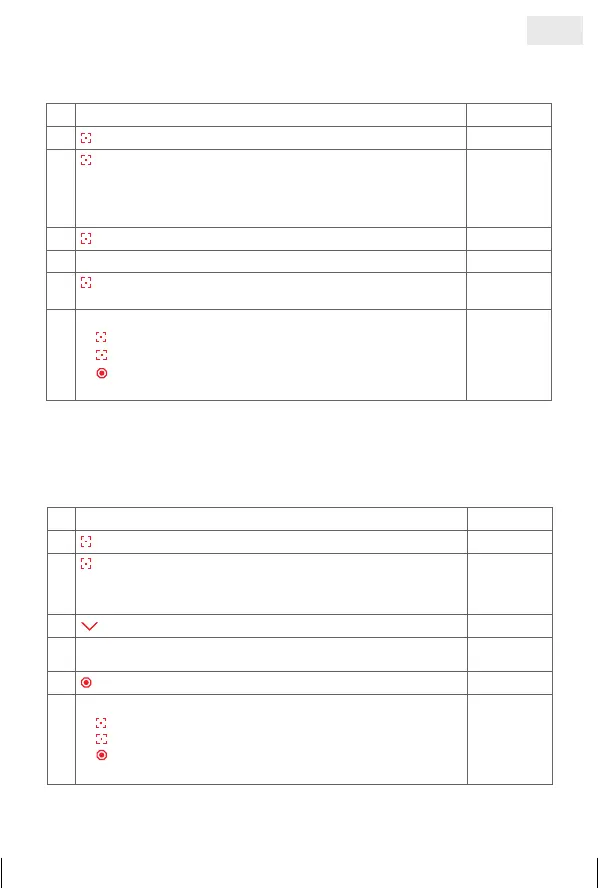
5. a) Delete programmed radio transmittor
1. Select the ‘Menu’ function
©©£©
2.
press and hold = confirm selection
3.
press briefly = select channel in which to delete all
programmed blinds
©£££
= channel 1
££©£
= channel 3
£©££
= channel 2
£££©
= channel 4
©£££
4.
press and hold = deleting process is started
ªªªª
5. Deleting process is completed
©©©©
6.
press briefly = confirm feed back.
This brings you back to 1. Function Selection menu
©©£©
7.
Further possibilities:
1) press and hold = repeat process
2)
press briefly = to select an option from the ‘Menu’
3)
press and hold or no operation for 25 sec. =
finish installation mode
5. b) Lock blind
With this function unauthorized persons cannot change the settings of the
control. This function is also useful at commercial building sites with more
shadings; it avoids not finding pre-programmed shadings or re-programming
them again.
1. Select the ‘Menu’ function
©©£©
2.
press and hold = confirm selection
3.
press briefly = select channel which will be locked
©£££
= channel 1
££©£
= channel 3
£©££
= channel 2
£££©
= channel 4
©£££
4. press and hold = locking process is started
ªªªª
5.
Locking process is completed, if previously selected LED
flashes
©£££
6.
press briefly = function completed
7.
Further possibilities:
1)
press and hold = repeat process
2)
press briefly = to select an option from the ‘Menu’
3)
press and hold or no operation for 25 sec. =
finish installation mode
GB
14_107_BHB_West.indd 61 02.06.14 13:00


 To Next Page
 Loading...