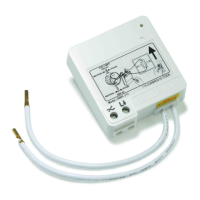
Need help?
Do you have a question about the INTERTECHNO ITL-2300 and is the answer not in the manual?
Diagram showing the wiring connections for the ON-OFF function of the wireless-mini insert module.
Diagram illustrating the wiring for the Delay-OFF Timer function of the wireless-mini insert module.
Guidance for qualified electricians on installing the wireless-mini insert module, including turning off the fuse and configuring connections.
Step-by-step guide on how to pair transmitters with the wireless-mini insert module using the learn button and LED indicator.
Instructions to remove a single transmitter code from the wireless-mini insert module by pressing the OFF button during pairing.
Procedure to clear all learned transmitter codes from the module by holding the learn button until the LED confirms deletion.
 General
| Interface | RF Wireless |
|---|---|
| Product color | White |
| Channels quantity | 32 channels |
| Operating frequency | 433.92 MHz |
| Wireless technology | - |
| Connectivity technology | Wireless |
| Power source | AC |
| AC input voltage | 230 V |
| AC input frequency | 50 Hz |
| Quantity per pack | 1 pc(s) |
 Weight and Dimensions
| Depth | 40 mm |
|---|---|
| Width | 43 mm |
| Height | 16 mm |

 To Next Page